12
GB
MHC-ECL7D/ECL6D.GB.4-467-787-11(1)
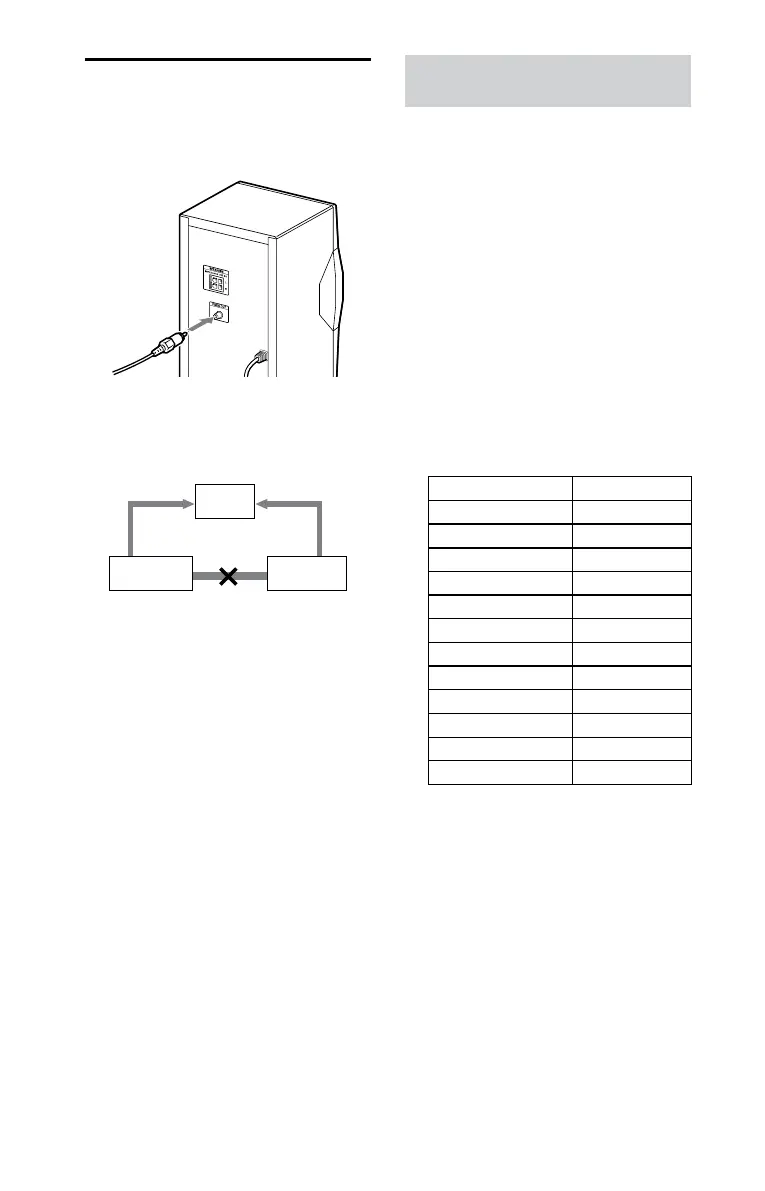
Connecting your TV
Connect the video input jack of your
TV to the VIDEO OUT jack on the unit,
using the supplied video cord.
When connecting a video deck
Connect the TV and the video deck using
video and audio cords (not supplied) as
shown below.
TV
Video deck Unit
Do not connect directly.
If you connect a video deck between this
system and the TV, you may experience
video leakage when watching the video
signal from this system. Do not connect a
video deck between this system and TV.
Manufacturer’s code numbers for
non-Sony TVs
This system supports the following TV
manufacturers. Make sure to set the
corresponding manufacturer’s code
number.
1
Press / to turn on the
system.
2
Press and hold SHIFT, then
press the number buttons to
enter a manufacturer’s code
number while holding down
TV /.
If more than one code number is
listed, try entering them one at a
time until you nd the one that
works with your TV.
Manufacturer Code number
SONY 01 (default)
HITACHI 02, 24
LG/GOLDSTAR 04, 76
NEC 04
PHILIPS 06, 08, 21, 72
TOSHIBA 07, 38
RCA 10
PIONEER 16
PANASONIC 17, 19, 49
SHARP 18, 29
SAMSUNG 20, 71
JVC 33










 To Next Page