26
GB
MHC-ECL7D/ECL6D.GB.4-467-787-11(1)
Using the setup menu
You can make various adjustments to
menu items.
Displayable items may vary depending
on the country or region.
The default setting is underlined.
1
Press FUNCTION repeatedly
to select the DVD/CD or USB
function.
2
Press SETUP in stop mode.
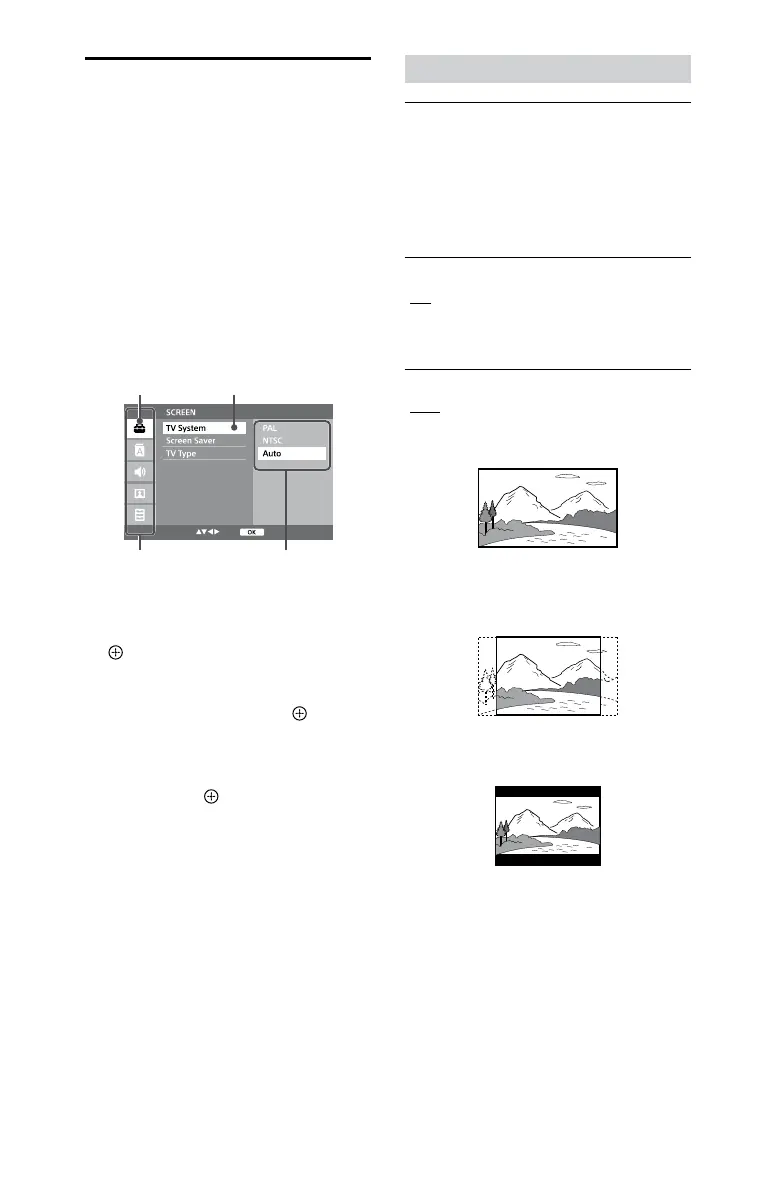
The setup menu appears.
OptionsSetup categories
Selected setup
item
Selected
category
3
Press / to select one of the
setup categories, then press
.
4
Press / to select a setup
item, then press or
.
5
Press / to select the option
you want to change, and
then press
to conrm your
selection.
6
Press SETUP to turn o the
setup menu.
[SCREEN] settings
Ą [TV System]*
[PAL]: For a PAL-system TV.
[NTSC]: For an NTSC-system TV.
[Auto]: For a TV that is compatible with
both PAL and NTSC.
* The default setting varies depending on
the country or region.
Ą [Screen Saver]
[On]: Turns on the screen saver when
in stop, no disc, or eject mode for
more than 15 minutes.
[O]: Turns o the screen saver.
Ą [TV Type]
[16:9]: Select this when connecting a
wide-screen TV or a TV with a wide
mode function.
[4:3PS]: Displays a full-height picture
on the entire screen, with trimmed
sides.
[4:3LB]: Displays a wide picture with
black bands on the top and bottom.










 To Next Page