10
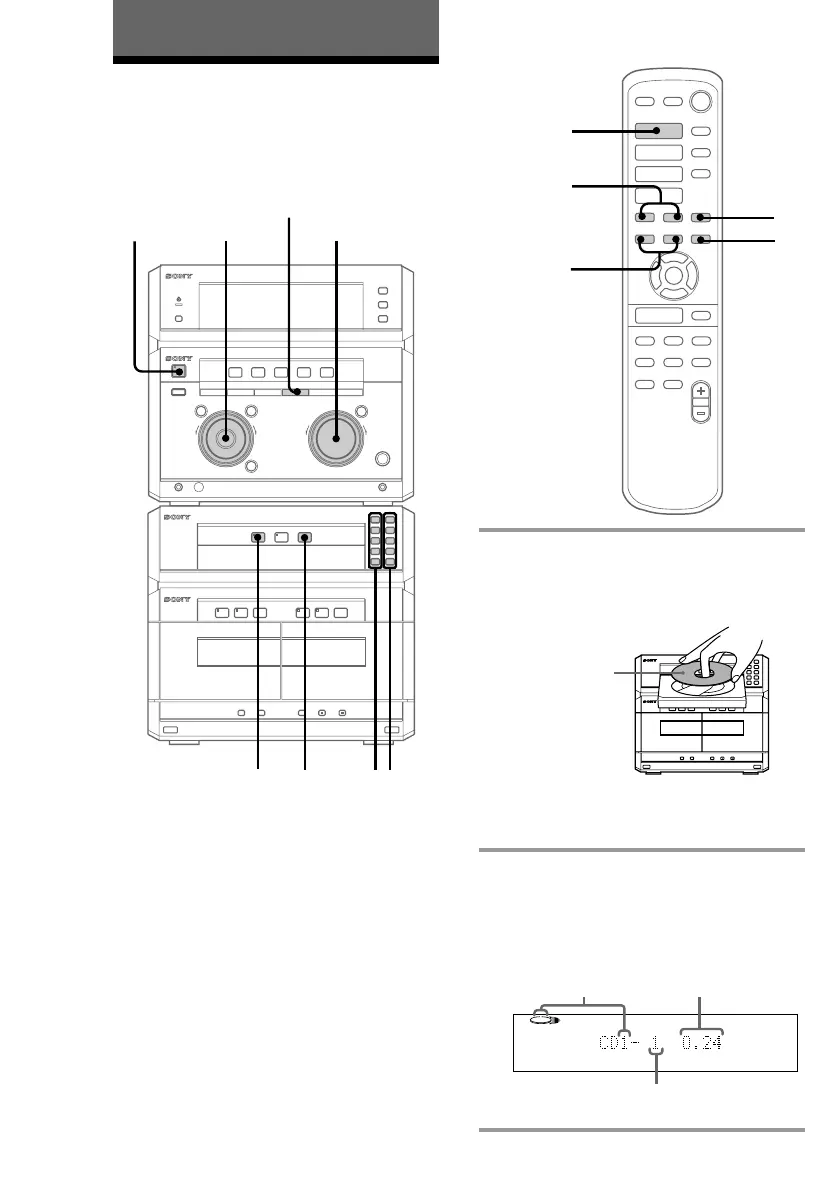
1 Press one of the CD 1~5 § buttons
and place a CD on the disc tray.
If a disc is not placed properly it will not
be recognized.
Press the same button to close the disc
tray. To insert other CDs, press § of
other numbers to open the disc tray.
2 Press one of the DISC 1~5 buttons.
The disc tray closes and play starts.
If you press · (or CD · on the
remote), play starts from the CD loaded
on the tray whose button is lit green.
1
1
2
3
4
5
§
§ §
·
ª · π ª · π
∏
π
)0P
+=p
·
·ª
·ª
·
p
CD·
p
P
=/+
0/)
V
v
bB
–
+
0
g
)
≠ +
–
+
1
2
3
4
5
§
§ §
·
ª · π ª · π
∏
π
·
PLAY MODE
VOLUME
π
Playing a CD
— Normal play
Basic Operations
Track number
Disc tray number Playing time
With the label
side up. When
you play a CD
single, place it
on the inner
circle of the tray.
You can play up to five CDs in a row.
12
1/u
(Power)
jog dial


 To Next Page
 Loading...