4
GB
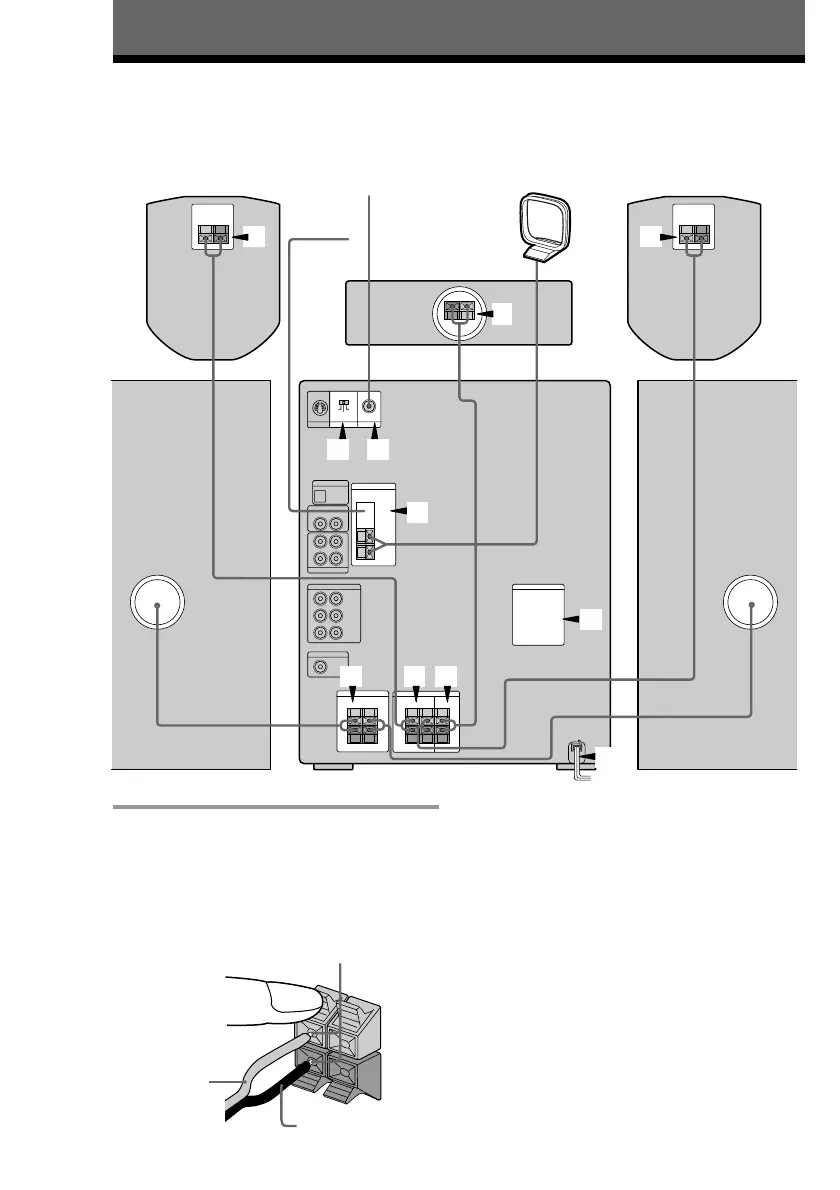
1 Connect the front speakers.
Connect the speaker cords to the FRONT
SPEAKER jacks as below.
For the front speakers with jacks,
connect the speaker cords to the speaker
in the same way.
4
8
7
2 2
3
1 23
56
Getting Started
Step 1: Hooking up the system
Do the following procedure 1 to 8 to hook up your system using the supplied cords and
accessories.
Notes
• Keep the speaker cords away from the
antennas to prevent noise.
• The type of speakers supplied vary
according to the model you purchased
(see “Specifications” on page 62).
Front speaker (Left)Front speaker (Right)
Insert only the stripped portion.
Black/
Stripe (’)
Red/
Solid (‘)
Center
surround speaker
Rear surround speaker
(Left)
Rear surround speaker
(Right) To the video input
FM
antenna
AM loop
antenna
+
–
R
L
+



 To Next Page