Additional Operations 19
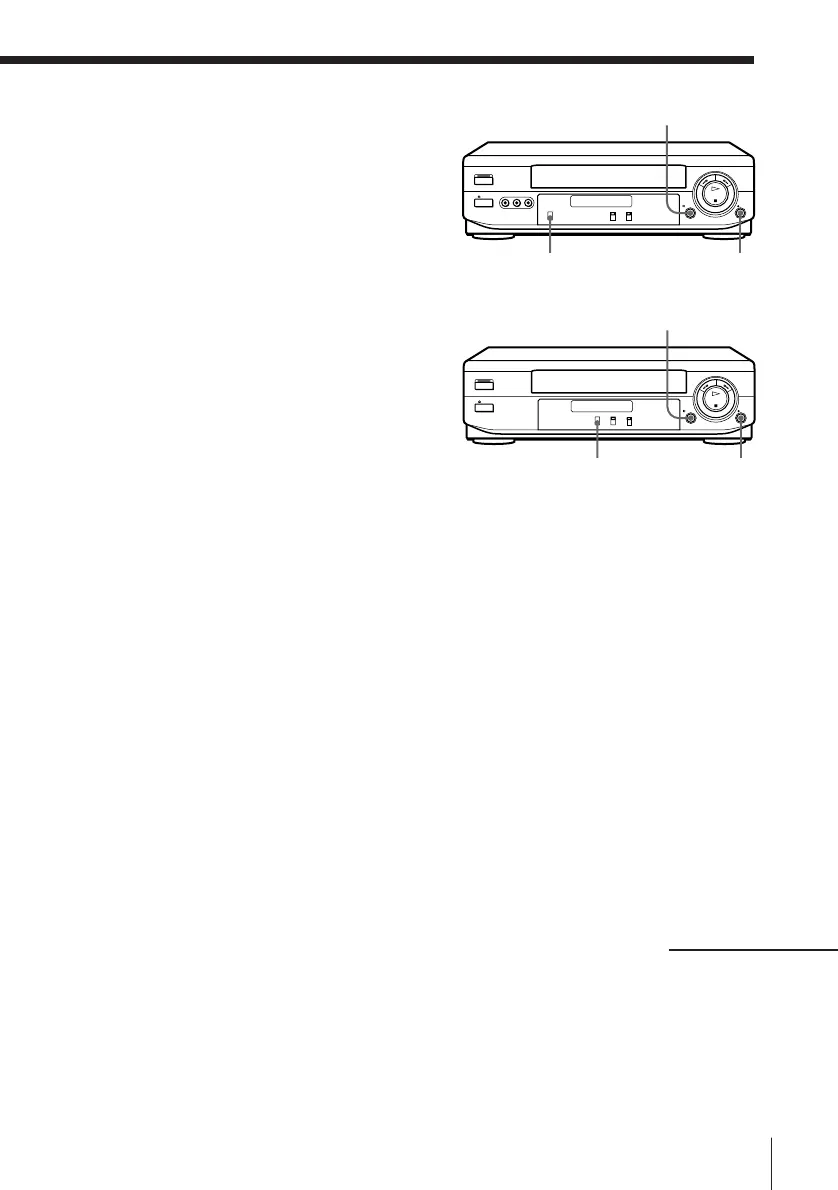
r REC
P PAUSE
SLV-XF247ME/PS
r REC
P PAUSE
SLV-XA147JE/MJ
INPUT SELECT
TAPE SPEED
REC
REC
Operation (when
recording on this unit)
You can make a copy of a tape using
this unit for recording or playback.
The unit cannot record TV
programmes directly since it does not
have a TV tuner.
Before you start editing
• Turn on your TV and set it to the
video channel.
1 (SLV-XF247ME/PS only)
Set INPUT SELECT to LINE 1
(or LINE 2).
2 (SLV-XA147JE/MJ only)
Set TAPE SPEED to select the
tape speed (SP or LP for the PAL
colour system, and SP or EP for
the NTSC colour system).
LP provides a recording time twice as long as SP. EP provides a
recording time three times as long as SP. However, SP produces better
picture quality.
3 Insert a source tape with its safety tab removed into the other
(playback) VCR. Search for the point to start playback and set it to
playback pause.
4 Insert a tape with its safety tab in place into this (recording) unit.
Search for the point to start recording and press P PAUSE.
5 Press r REC on this unit to set it to recording pause.
6 To start editing, press the P PAUSE buttons on both units at the same
time.
To stop editing
Press the p STOP buttons on both units.
continued





 To Next Page