Display/Optional Components
17
GB
To enhance your system, you can connect optional components. Refer to the operating instructions
provided with each component.
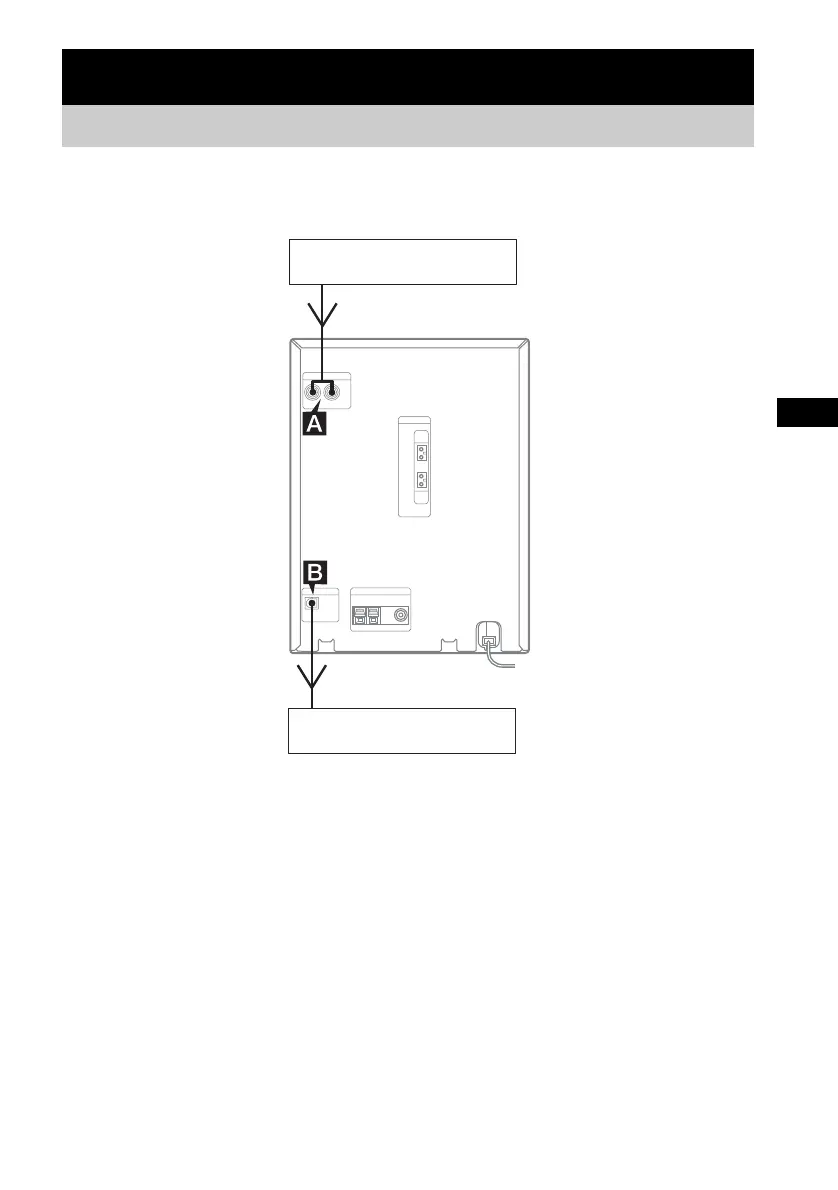
A MD (VIDEO) IN jacks
Use audio cords (not supplied) to connect an
optional analog component (MD deck or VCR,
etc.) to these jacks. You can then listen to the
sound from the component.
B CD DIGITAL OUT jack
Use a digital optical cord (square, not supplied)
to connect an amplifier, MD deck, or DAT deck
with a digital optical input jack. Sound is then
output when the system function is set to CD. If
the jack is covered with a cap, remove it before
use.
Optional Components
Hooking up optional components
Optional analog component
From the audio output jacks of an
optional analog component
To the digital input jack of an
optional digital component
Optional digital component



 To Next Page