EasyManua.ls Logo

Sony MX-P21 - Page 10

Sony MX-P21
54 pages
Print Icon
To Next Page IconTo Next Page
To Previous Page IconTo Previous Page
Loading...
astening
BA
P4x
10
scan
ttom.
326x8
(LED
2
(two)
located
k
and
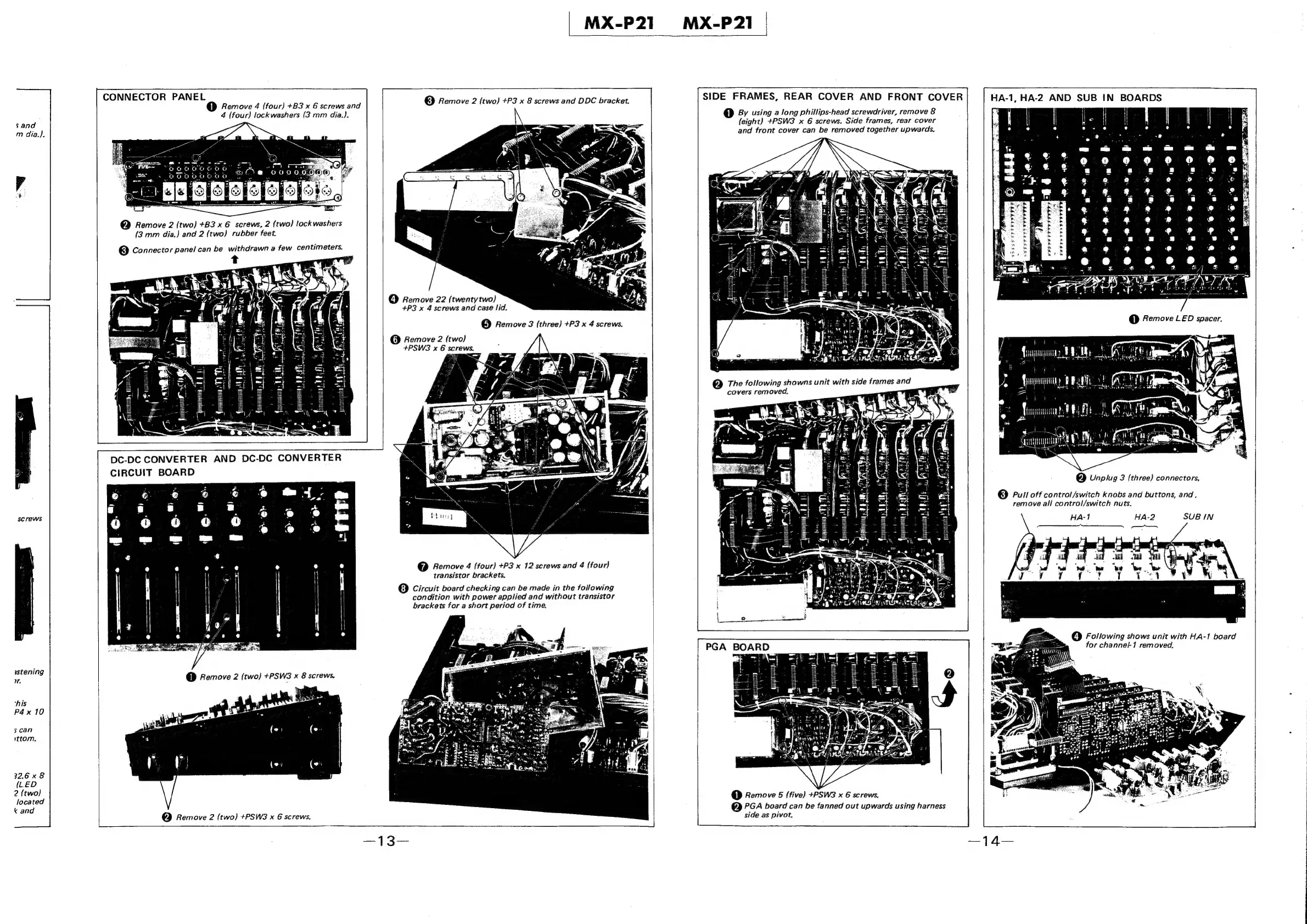
CONNECTOR
PANEL
C1)
Remove
4
(four)
+B3
x
6
screws
and
4
(four)
lock
washers
{3
mm
dia.).
@
Remove
2
(two)
+B3
x
6
screws,
2
(two)
lockwashers
(3
mm
dia.)
and
2
(two)
rubber
feet.
©
Connector
panel
can
be
withdrawn
a
few
centimeters.
t
CIRCUIT
BOARD
@
Remove
2
(two)
+PSW3
x
6
screws,
[
=n
RR
ARANEDSED
ANIA
ROA
CONVERTER.
DC-DC
CONVERTER
AND
DC-DC
CONVERTER
MX-P21
©
Remove
2
(two)
+P3
x
8
screws
and
DDC
bracket.
(4)
Remove
22
(twentytwo)
+P3
x
4
screws
and
case
lid.
©
Remove
3
(three)
+P3
x
4
screws.
@
Remove
2
(two)
+PSWS3
x
6
screws,
@
Remove
4
(four)
+P3
x
12
screws
and
4
(four)
transistor
brackets.
(8)
Circuit
board
checking
can
be
made
in
the
following
condition
with
power
applied
and
without
transistor
brackets
for
a
short
period
of
time,
SIDE
FRAMES,
REAR
COVER
AND
FRONT
COVER
C1)
By
using
a
long
phillips-head
screwdriver,
remove
&
(eight)
+PSW3
x
6
screws.
Side
frames,
rear
cover
and
front
cover
can
be
removed
together
upwards.
The
following
showns
unit
with
side
frames
and
covers
removed.
@
Remove
5
(five)
+PSW3
x
6
screws,
PGA
board
can
be
fanned
out
upwards
using
harness
side
as
pivot,
[
HaA-1,
HA-2
AND
SUB
IN
BOARDS
e"
a
Br
de
le
Tedd
ed
b
et:
FEF
TE
PERE
=
e
s
8
.
a
ba
y
9
«
a
e
Y
t
a
ind
ae
|
iy
PRG
jointly
PRT
SE
tem,
|
sunning
ERATE,
@
Unplug
3
(three)
connectors,
©
Pull
off
contro!/switch
knobs
and
buttons,
and,
remove
all
control/switch
nuts.
HA-1
HA-2
SUB
IN
4
)
Following
shows
unit
with
HA-1
board
for
channel-1
removed.

Other manuals for Sony MX-P21

Related product manuals