EasyManua.ls Logo

Sony MXP-290 - 1-3. Control with External Equipment

Sony MXP-290
Print Icon
To Next Page IconTo Next Page
To Previous Page IconTo Previous Page
Loading...
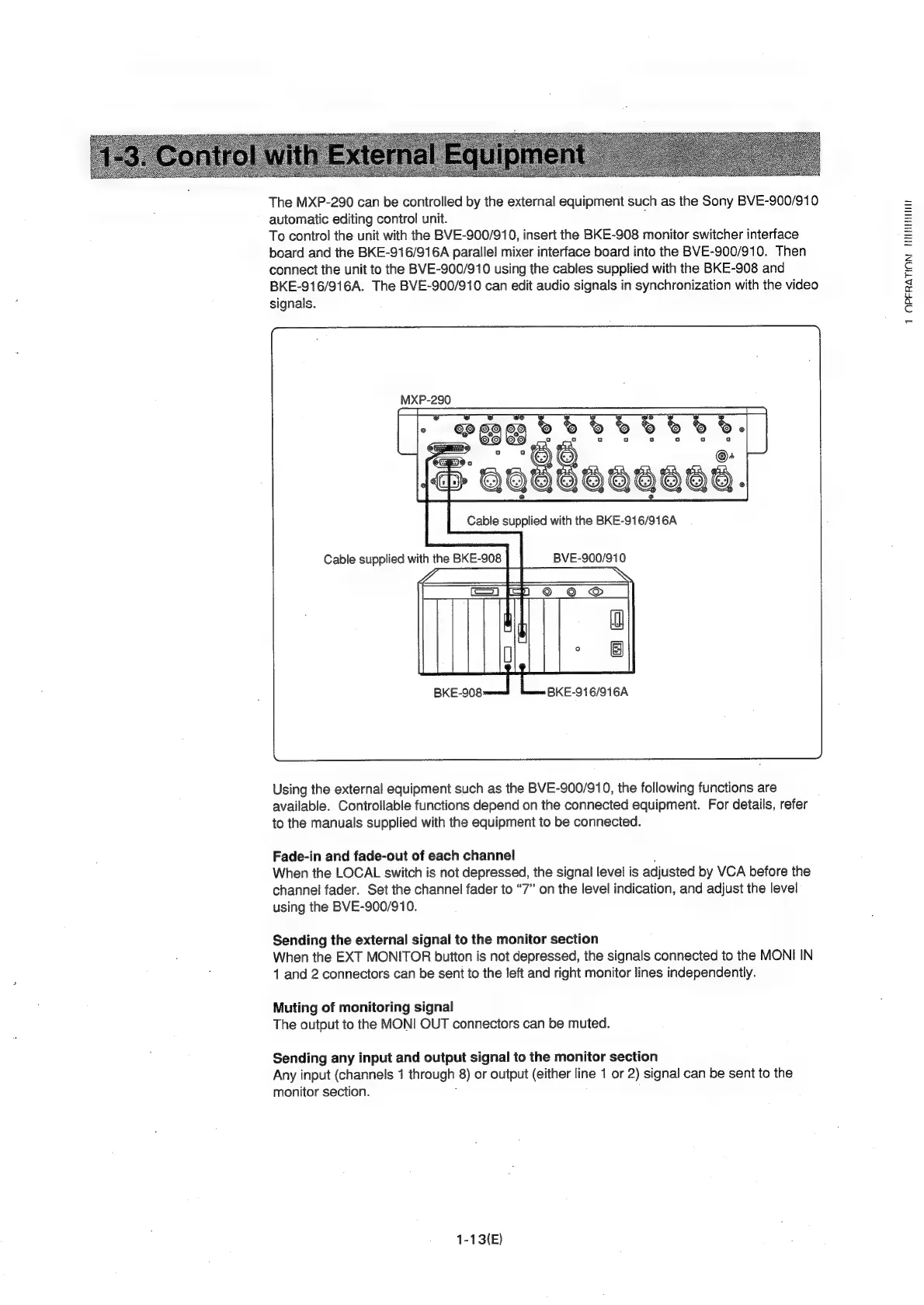
The
MXP-290
can
be
controlled
by
the
external
equipment
such
as
the
Sony
BVE-900/910
automatic
editing
control
unit.
To
control
the
unit
with
the
BVE-900/910,
insert
the
BKE-908
monitor
switcher
interface
board
and
the
BKE-916/916A
parallel
mixer
interface
board
into
the
BVE-900/910.
Then
connect
the
unit
to
the
BVE-900/910
using
the
cables
supplied
with
the
BKE-908
and
BKE-916/916A.
The
BVE-900/910
can
edit
audio
signals
in
synchronization
with
the
video
signals.
MXP-290
12
OO
Using
the
external
equipment
such
as
the
BVE-900/910,
the
following
functions
are
available.
Controllable
functions
depend
on
the
connected
equipment.
For
details,
refer
to
the
manuals
supplied
with
the
equipment
to
be
connected.
Fade-in
and
fade-out
of
each
channel
:
When
the
LOCAL
switch
is
not
depressed,
the
signal
level
is
adjusted
by
VCA
before
the
channel
fader.
Set
the
channel
fader
to
ā€œ7ā€
on
the
level
indication,
and
adjust
the
level
using
the
BVE-900/910.
Sending
the
external
signal
to
the
monitor
section
When
the
EXT
MONITOR
button
is
not
depressed,
the
signals
connected
to
the
MONI
IN
1
and
2
connectors
can
be
sent
to
the
left
and
right
monitor
lines
independently.
Muting
of
monitoring
signal
The
output
to
the
MONI
OUT
connectors
can
be
muied.
Sending
any
input
and
output
signal
to
the
monitor
section
Any
input
(channels
1
through
8)
or
output
(either
line
1
or
2)
signal
can
be
sent
to
the
monitor
section.
;
1-13(E)
1
OPFRATION
THITNITIIT

Related product manuals