5
MZ-NH600
SECTION 2
GENERAL
This section is extracted from
instruction manual.
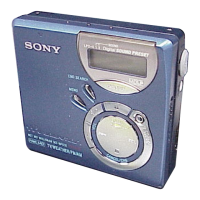
Looking at controls
The recorder
A x (stop) CANCEL button
B OPEN switch
C Display window
D T MARK/REC (+N) button
E
NAVI/ MENU button
Press lightly to go to the NAVI
(navigation) setting mode
Press for 2 seconds or more to go to
the MENU setting mode.
F GROUP button
G DC IN 3V jack
When you use the optional AC power
adaptor, connect it to this jack.
H X (pause) button
I Jog dial
J 5-way control key
Operation Function
Press NENT
1)
1)
There are tactile dots beside the
N
ENT
and
VOL +
buttons.
play, enter
Press towards
.
find the beginning
of the previous
track, rewind
Press towards
>
find the beginning
of the next track,
fast forward
Press towards
VOL +
1)
or
VOL −.
volume
K USB cable connecting jack
L LINE IN (OPT) jack
M Battery compartment (at the bottom)
N HOLD switch
Slide the switch in the direction of the
arrow to disable the buttons on the
recorder. To prevent the buttons from
being accidentally operated when you
carry the recorder, use this function.
O i (headphones/earphones) jack
The display window of the recorder
A Character information display
Displays the disc and track names,
date, error messages, track numbers,
etc.
B SYNC (synchro-recording) indication
C Hi-MD/MD indication
“Hi-MD” lights up when the
operation mode of the recorder is in
Hi-MD mode and “MD” lights up
when the operation mode is in MD
mode.
D REC indication
Lights up during recording or file
transfers from the computer. When
flashing, the recorder is in record
standby mode.
E Battery indication
Shows the approximate remaining
battery power. If the battery is weak,
the indication becomes empty and
starts flashing.
F Disc indication
Shows that the disc is rotating for
recording or playing.
G Track mode (PCM, Hi-SP, Hi-LP, SP,
LP2, LP4, MONO) indication
H Sub play mode/Repeat play
indications
Shows the selected Sub play mode
(single-track play, shuffle play, etc.) or
Repeat play.
I Main play mode indications
Shows the selected main play mode
(group play, bookmark play, etc.).
78 9



 To Next Page
 Loading...