
 Need help?
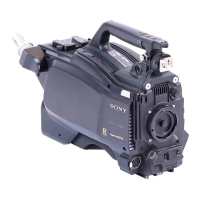
Do you have a question about the Sony POWER HD FX PDW-700 and is the answer not in the manual?
Details the wavelength, emission duration, and maximum laser output power.
Essential steps and notes to follow before operating the camcorder for the first time.
Detailed description of the camcorder's advanced features and technologies for high-quality imaging.
Identifies and explains the purpose of all external buttons, switches, and connectors on the camcorder.
Details the function of front panel controls, selectors, and connectors for efficient operation.
Explains the meaning and function of various indicators and status displays on the camcorder.
Covers attaching battery packs and using AC adaptors for continuous operation.
Step-by-step guide on how to securely attach and adjust the optional viewfinder.
Procedure for setting the camcorder's region to ensure proper functionality.
Instructions for setting the internal clock, which affects timecode accuracy.
Detailed steps for correctly mounting and securing lenses to the camcorder.
Procedure for adjusting the lens flange focal length for precise focus.
Guide to connecting microphones and audio equipment to the camcorder's input connectors.
Instructions for securely mounting the camcorder onto a tripod using an adaptor.
Details on connecting and using an external video light with the camcorder.
Guide on how to properly attach and use the camcorder's shoulder strap.
Explains how to connect and use a remote control unit for camcorder operation.
Details supported video and audio recording formats and system frequencies.
Guides for adjusting black and white balance to ensure optimal image quality.
Explanation of shutter modes and how to select shutter speeds for various shooting conditions.
Procedure to adjust the automatic iris reference value for better exposure control.
Covers automatic and manual adjustment of audio input levels for channels 1-4.
Instructions for setting timecode, user bits, and synchronizing timecode.
Guidelines for handling, storing, and caring for professional discs.
Step-by-step instructions for inserting and removing discs from the camcorder.
Explains the salvage function for recovering data after recording interruptions.
Covers the fundamental steps from power-on to recording and stopping.
Details on how to review recorded clips, including normal playback and search functions.
Instructions on how to delete recorded clips and manage playback conditions.
Covers advanced shooting techniques like essence marks and clip flags.
Guide to capturing time-lapse videos using Auto and Manual Interval Rec modes.
Explains how to continue recording during disc exchanges using the cache function.
Instructions on how to erase and re-record the last recorded clip using the retake function.
Details on automatically assigning titles to clips for better management.
Steps for recording video signals from external sources via SDI or analog inputs.
How to navigate between different Graphical User Interface screens for disc operations.
Displays thumbnails of clips for easy selection, organization, and playback.
Shows thumbnails of sub clips within a clip list for editing and playback.
Covers selecting, searching, and manipulating thumbnails for efficient clip management.
Functionality for creating and editing clip lists for cut editing and scene selection.
Management tasks for discs, including checking properties, formatting, and using planning metadata.
Provides a quick reference for accessing functions using keyboard shortcuts.
Overview of the camcorder's menu structure and hierarchy for navigation.
Comprehensive list of all available menu items, settings, and their descriptions.
Detailed explanation of how to navigate and operate the camcorder's menu system.
Covers fine-tuning various camera settings like gain, output signals, and ASSIGN switches.
Instructions for inserting, removing, and protecting data on Memory Sticks.
Steps for saving and loading user settings and presets to/from a Memory Stick.
Procedures for saving and loading custom scene files for specific shooting conditions.
Configuration to automatically display relevant menu pages upon Memory Stick insertion.
Introduction to connecting to a remote computer for file operations via FAM or FTP.
Detailed steps for performing file operations using FAM connection on Windows.
Instructions for file operations using FAM connection on Macintosh systems.
Guide to performing file operations using FTP connection for remote computer access.
Procedures to verify the camcorder's functionality and settings before shooting.
Tests for recording and playback functions, including audio and timecode checks.
Instructions for safely cleaning the camcorder's viewfinder components.
Information on warning indications, messages, and actions to take for troubleshooting.
Crucial guidelines for safe usage, storage, and handling of the camcorder.
Technical details including power, dimensions, imager, and audio specifications.
Visual guide to compatible optional accessories and components for the camcorder.
Guide to using PDZ-1 software for transferring and managing proxy AV data.
Details on character input support for various USB keyboard languages.
Information on patents, licenses, trademarks, and software credits.
Explanation of Memory Stick technology, types, usage, and precautions.
 General
| Type | Professional camcorder |
|---|---|
| Recording Format | XDCAM HD 422 |
| Effective Pixels | 1920 x 1080 |
| Maximum Resolution | 1920 x 1080 |
| Audio Channels | 4 |
| Power Requirements | DC 12 V |
| Lens Mount | Sony 1/2-inch bayonet mount |
| Optical Filter System | ND filter |
| Recording Media | Professional Disc |
| Audio Recording | PCM 16-bit, 48 kHz |
| LCD Screen | 3.5-inch color LCD |
| Input/Output | HDMI, SDI, Genlock, Timecode, USB |









 To Next Page