EasyManua.ls Logo

Sony PS-LX33 - Page 5

Sony PS-LX33
42 pages
Print Icon
To Next Page IconTo Next Page
To Previous Page IconTo Previous Page
Loading...
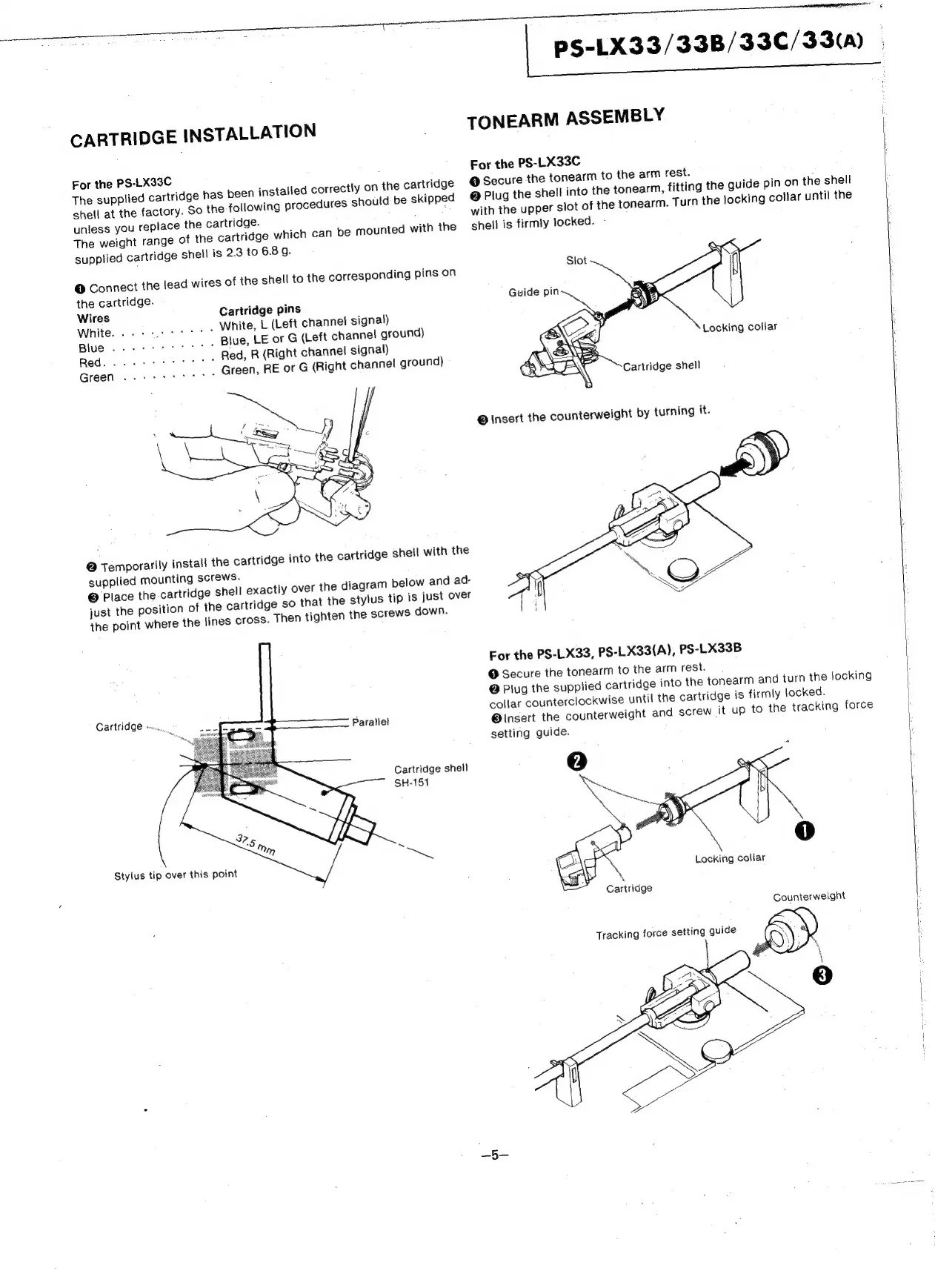
CARTRIDGE
INSTALLATION
For
the
PS-LX33C
The
supplied
cartridge
has
been
installed
correctly
on
the
cartridge
So
the
following
procedures
should
be
skipped
shell
at
the
factory.
unless
you
replace
the
cartridge.
The
weight
range
of
the
cartridge
which
can
be
mounted
with
the
supptied
cartridge
shell
is
2.3
to
6.8
g.
@
Connect
the
lead
wires
of
the
the
cartridge.
Wires
Cartridge
pins
White...
este
White,
L
(Left
channet
signal)
Blue...
eet
Blue,
LE
or
G
(Left
channel
ground)
Red...
eee
rrrrtt
Red,
R
(Right
channel
signal)
Green...
eect
Green,
RE
or
G
(Right
channel
ground)
@
Temporarily
install
the
cartridge
into
the
cartridge
shell
with
the
supplied
mounting
screws.
©
Place
the
cartridge
shell
exactly
over
the
the
point
where
the
lines
cross.
Then
tighten
the
screws
down.
CAM
NAGE
sine
Parallel
SH-151
Stylus
tip
over
this
point
shell
to
the
corresponding
pins
on
diagram
below
and
ad-
just
the
position
of
the
cartridge
so
that
the
stylus
tip
is
just
over
Cartridge
shell
PS-LX33/33B/33C/33(A)
TONEARM
ASSEMBLY
For
the
PS-LX33C
@
Secure
the
tonearm
to
the
arm
rest.
@
Plug
the
shell
into
the
tonearm,
fitting
the
guide
pin
on
the
shell
with
the
upper
slot
of
the
tonearm.
Turn
the
locking
collar
until
the
shell
is
firmly
locked.
-
Siot
Guide
pin
For
the
PS-LX33,
PS-LX33(A),
PS-LX33B
@
Secure
the
tonearm
to
the
arm
rest.
@
Plug
the
supplied
cartridge
into
the
tonearm
and
turn
the
locking
collar
counterclockwise
until
the
cartridge
is
firmly
locked.
@lnsert
the
counterweight
and
screw
it
up
to
the
tracking
force
setting
guide.
Locking
collar
Counterweight

Related product manuals