Need help?
Do you have a question about the Sony PS-LX300USB and is the answer not in the manual?
Details drive system, motor type, platter size, speeds, wow/flutter, and signal-to-noise ratio.
Describes the type, balance, and effective length of the tone arm.
Details power supply and output jack specifications for USB connectivity.
Covers power requirements, consumption, dimensions, mass, and supplied accessories.
Procedures for checking AC leakage on exposed metal parts and measurement methods.
Instructions on how to remove and install a new stylus tip for optimal performance.
A brief note about securing the cartridge with a bond when changing it.
Guides on detaching and reattaching the turntable's protective cover.
Identifies and describes the components located on the front of the turntable.
Identifies and describes the connection ports and switches on the rear of the turntable.
Outlines the sequence of steps for disassembling the unit.
Details the procedure for removing and reassembling the bottom panel of the turntable.
Provides instructions for disassembling and accessing the USB board component.
Presents an exploded view and detailed parts list for the entire turntable unit.
Shows an exploded view and parts list specific to the turntable's USB board.
Details the exploded view and parts list for the knob and control section of the unit.
Lists included accessories and available instruction manuals in various languages.
 General
| Type | Belt-drive audio turntable |
|---|---|
| Interface | USB2.0, RCA |
| Operation | Automatic |
| Stylus type | mm |
| Belt material | Rubber |
| Plug and Play | Yes |
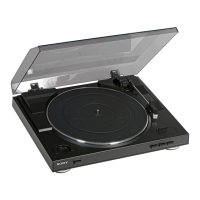
| Product color | Black, Silver |
| Wow & flutter | 0.25 % |
| Nominal speeds | 33 1/3, 45 RPM |
| Turntable size | 295 mm |
| Stylus pressure | 3.5 g |
| Pick-up arm type | S-Shape |
| Platter material | Aluminum |
| Pick-up arm length | 195 mm |
| Signal-to-Noise Ratio (SNR) | 50 dB |
| Cables included | USB |
| USB version | 2.0 |
| USB ports quantity | 1 |
| Playback formats | MP3 |
| Power supply type | AC |
| AC adapter frequency | 50 / 60 Hz |
| AC adapter input voltage | 230 V |
| Power consumption (typical) | 2 W |
| Package weight | 4000 g |
| Compatible operating systems | - Windows XP Home Edition Service Pack 2 / XP Professional Service Pack 2\\r - Windows Vista Home Basic / Vista Home Premium / Vista Business / Vista Ultimate\\r - Windows 7 Home Premium / 7 Professional / 7 Ultimate |
 Weight and Dimensions
| Depth | 360 mm |
|---|---|
| Width | 420 mm |
| Height | 95 mm |
| Weight | 3300 g |
| Product dimensions (WxHxD) | 420 x 360 x 95 mm |

 To Next Page