EasyManua.ls Logo

Sony PS-X600 - Turntable Assembly; Cartridge Installation

Sony PS-X600
12 pages
Print Icon
To Next Page IconTo Next Page
To Previous Page IconTo Previous Page
Loading...
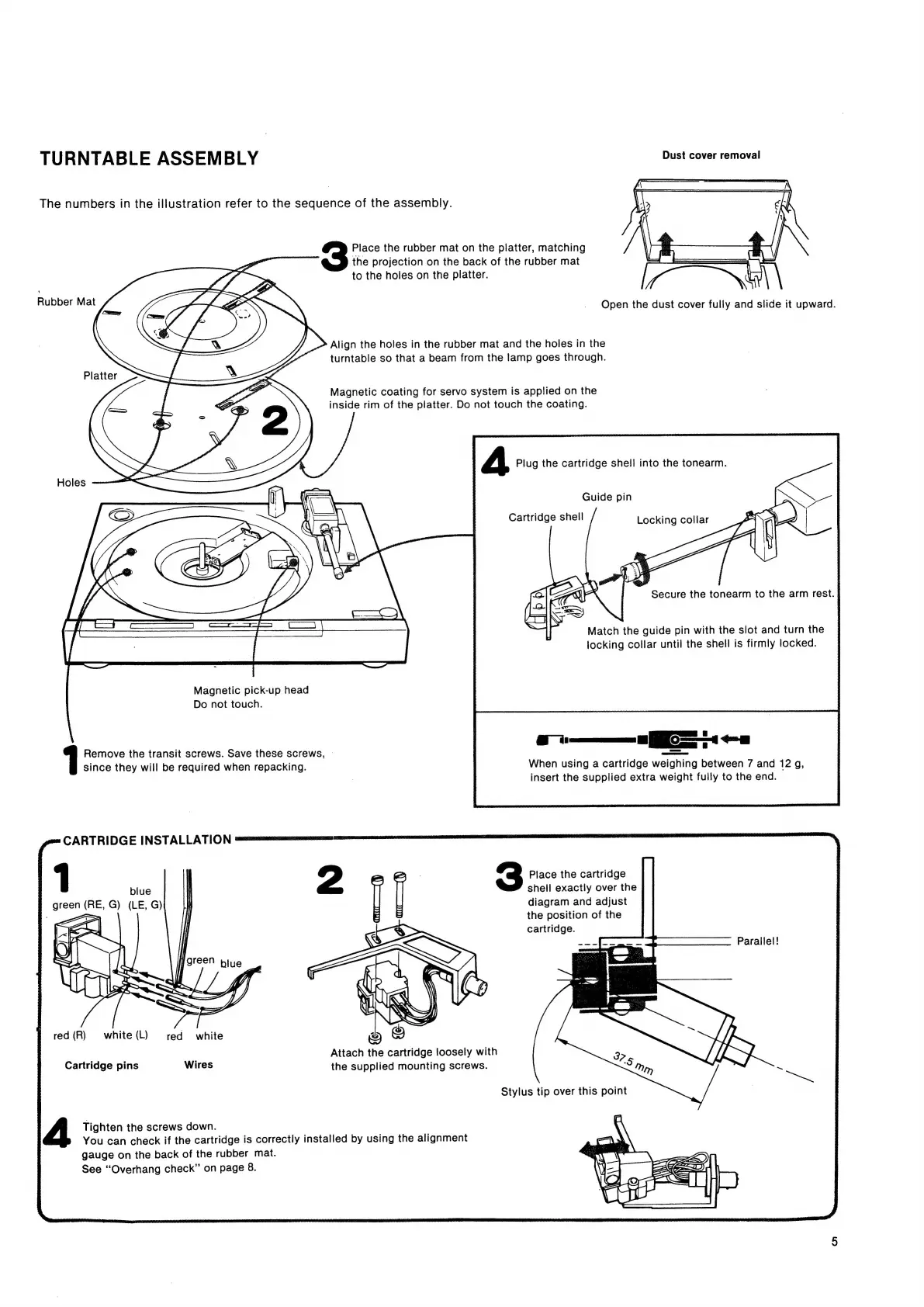
TURNTABLE
ASSEMBLY
Dust
cover
removal
The
numbers
in
the
illustration
refer
to
the
sequence
of
the
assembly.
Place
the
rubber
mat
on
the
platter,
matching
>
ae
the
projection
on
the
back
of
the
rubber
mat
|
to
the
holes
on
the
platter.
Rubber
Mat
Open
the
dust
cover
fully
and
slide
it
upward.
Align
the
holes
in
the
rubber
mat
and
the
holes
in
the
turntable
so
that
a
beam
from
the
lamp
goes
through.
Platter
Magnetic
coating
for
servo
system
is
applied
on
the
inside
rim
of
the
platter.
Do
not
touch
the
coating.
A
Plug
the
cartridge
shell
into
the
tonearm.
Holes
Guide
pin
Cartridge
shell
Secure
the
tonearm
to
the
arm
rest.
§
Match
the
guide
pin
with
the
slot
and
turn
the
locking
collar
until
the
shell
is
firmly
locked.
Magnetic
pick-up
head
Do
not
touch.
os
es
When
using
a
cartridge
weighing
between
7
and
12
g,
insert
the
supplied
extra
weight
fully
to
the
end.
Remove
the
transit
screws.
Save
these
screws,
|
since
they
will
be
required
when
repacking.
gm=
CARTRIDGE
INSTALLATION
ssessnennsnsccannceecns
sme
1
blue
I
green
(RE,
G)
(LE,
G)
3
Place
the
cartridge
shell
exactly
over
the
diagram
and
adjust
the
position
of
the
cartridge.
Parallel!
green
biue
red(R)
white(L)
red
white
;
Attach
the
cartridge
loosely
with
Cartridge
pins
Wires
the
supplied
mounting
screws.
4
Tighten
the
screws
down.
You
can
check
if
the
cartridge
is
correctly
installed
by
using
the
alignment
gauge
on
the
back
of
the
rubber
mat.
See
“‘Overhang
check”
on
page
8.

Related product manuals