EasyManua.ls Logo

Sony PS-X600 - Location and Function of Controls

Sony PS-X600
12 pages
Print Icon
To Next Page IconTo Next Page
To Previous Page IconTo Previous Page
Loading...
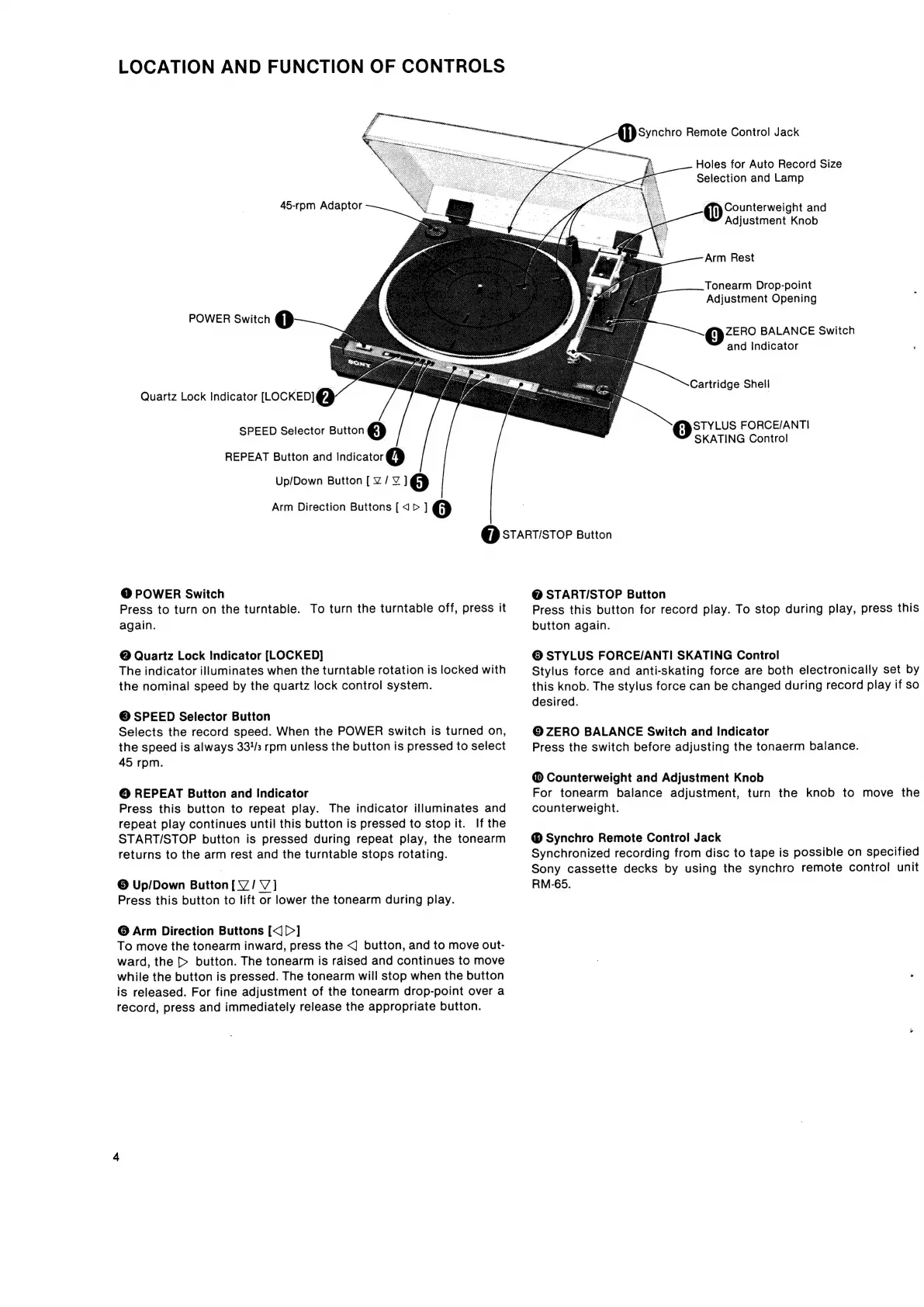
LOCATION
AND
FUNCTION
OF
CONTROLS
45-rpm
Adaptor
POWER
Switch
Oo
Quartz
Lock
Indicator
[LOCKED]
@
SPEED
Selector
Button
@
REPEAT
Button
and
Indicator
@
Up/Down
Button
[Z/
7
]
5]
Arm
Direction
Buttons
[<p>
]
@
@
synchro
Remote
Control
Jack
Holes
for
Auto
Record
Size
Selection
and
Lamp
{iy
counterweight
and
Adjustment
Knob
Arm
Rest
Tonearm
Drop-point
Adjustment
Opening
ZERO
BALANCE
Switch
and
Indicator
;
Cartridge
Shell
STYLUS
FORCE/ANTI
SKATING
Control
(7)
START/STOP
Button
@
POWER
Switch
Press
to
turn
on
the
turntable.
To
turn
the
turntable
off,
press
it
again.
@
Quartz
Lock
Indicator
[LOCKED]
The
indicator
illuminates
when
the
turntable
rotation
is
locked
with
the
nominal
speed
by
the
quartz
lock
control
system.
©
SPEED
Selector
Button
Selects
the
record
speed.
When
the
POWER
switch
is
turned
on,
the
speed
is
always
33/3
rpm
unless
the
button
is
pressed
to
select
45
rpm.
©
REPEAT
Button
and
Indicator
Press
this
button
to
repeat
play.
The
indicator
illuminates
and
repeat
play
continues
until
this
button
is
pressed
to
stop
it.
If
the
START/STOP
button
is
pressed
during
repeat
play,
the
tonearm
returns
to
the
arm
rest
and
the
turntable
stops
rotating.
©
Up/Down
Button
[V/V]
Press
this
button
to
lift
or
lower
the
tonearm
during
play.
©
Arm
Direction
Buttons
[<]
[>]
To
move
the
tonearm
inward,
press
the
<]
button,
and
to
move
out-
ward,
the
>
button.
The
tonearm
is
raised
and
continues
to
move
while
the
button
is
pressed.
The
tonearm
will
stop
when
the
button
is
released.
For
fine
adjustment
of
the
tonearm
drop-point
over
a
record,
press
and
immediately
release
the
appropriate
button.
@
STARTI/STOP
Button
Press
this
button
for
record
play.
To
stop
during
play,
press
this
button
again.
©
STYLUS
FORCE/ANTI
SKATING
Control
Stylus
force
and
anti-skating
force
are
both
electronically
set
by
this
knob.
The
stylus
force
can
be
changed
during
record
play
if
so
desired.
©
ZERO
BALANCE
Switch
and
Indicator
Press
the
switch
before
adjusting
the
tonaerm
balance.
Counterweight
and
Adjustment
Knob
For
tonearm
balance
adjustment,
turn
the
knob
to
move
the
counterweight.
®
Synchro
Remote
Control
Jack
Synchronized
recording
from
disc
to
tape
is
possible
on
specified
Sony
cassette
decks
by
using
the
synchro
remote
control
unit
RM-65.

Related product manuals