EasyManua.ls Logo

Sony PS-X600 - How the Auto Record Size Selection Works; Instantaneous Start of Play (Cueing)

Sony PS-X600
12 pages
Print Icon
To Next Page IconTo Next Page
To Previous Page IconTo Previous Page
Loading...
HOW
THE
AUTO
RECORD
SIZE
SELECTION
WORKS
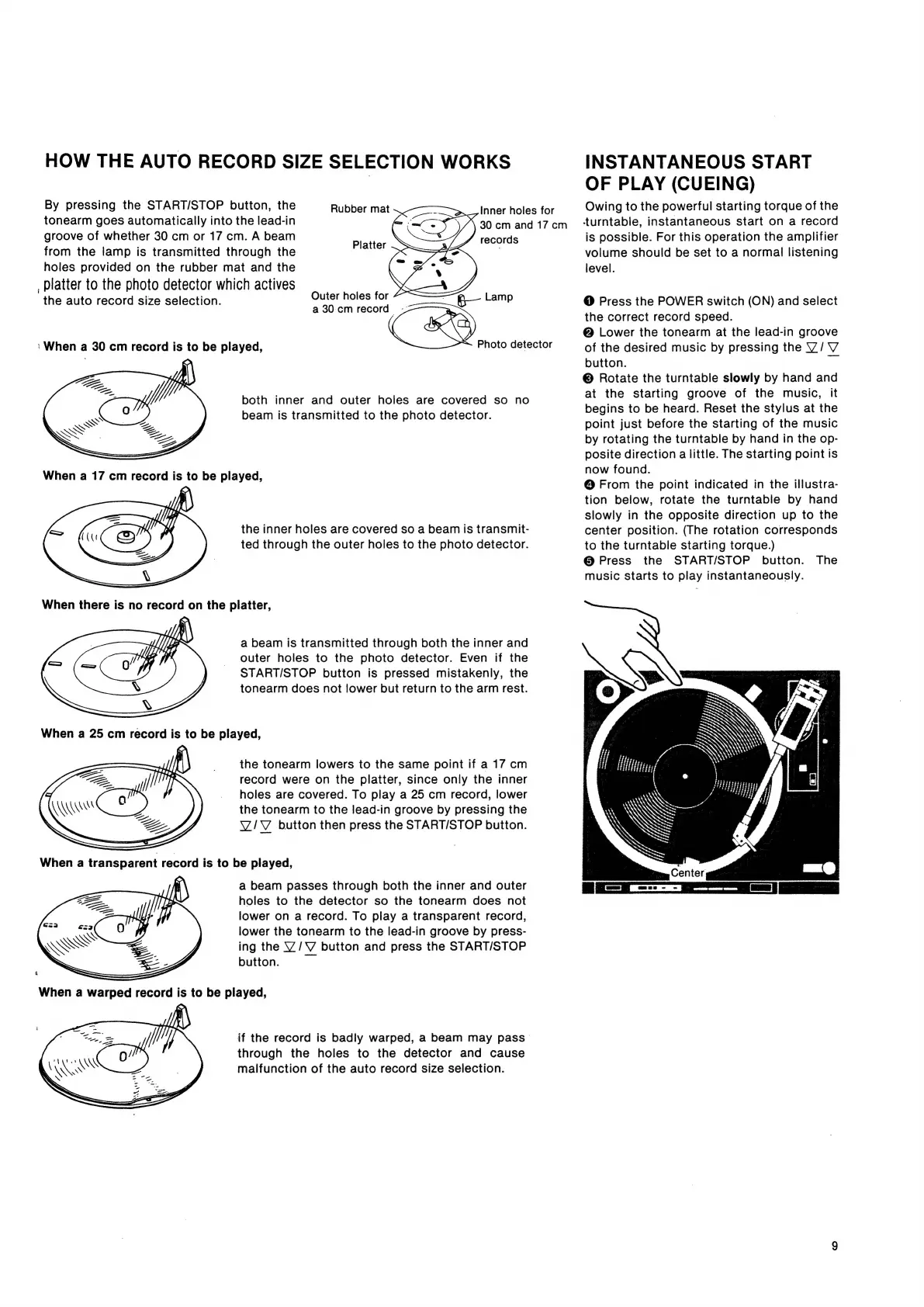
By
pressing
the
START/STOP
button,
the
Rubber
mat
tonearm
goes
automatically
into
the
lead-in
groove
of
whether
30
cm
or
17
cm.
A
beam
from
the
lamp
is
transmitted
through
the
holes
provided
on
the
rubber
mat
and
the
_
platter
to
the
photo
detector
which
actives
the
auto
record
size
selection.
Outer
holes
for
R—
Lamp
a
30cm
record
Cae
‘When
a
30
cm
record
is
to
be
played,
Photo
detector
,
Oo
both
inner
and
outer
holes
are
covered
so no
beam
is
transmitted
to
the
photo
detector.
Inner
holes
for
30
cm
and
17
cm
records
Platter
the
inner
holes
are
covered
so
a
beam
is
transmit-
ted
through
the
outer
holes
to
the
photo
detector.
a
beam
is
transmitted
through
both
the
inner
and
outer
holes
to
the
photo
detector.
Even
if
the
START/STOP
button
is
pressed
mistakenly,
the
tonearm
does
not
lower
but
return
to
the
arm
rest.
the
tonearm
lowers
to
the
same
point
if
a
17
cm
record
were
on
the
platter,
since
only
the
inner
holes
are
covered.
To
play
a
25
cm
record,
lower
the
tonearm
to
the
lead-in
groove
by
pressing
the
Y/V
button
then
press
the
START/STOP
button.
a
beam
passes
through
both
the
inner
and
outer
holes
to
the
detector
so
the
tonearm
does
not
lower
on
a
record.
To
play
a
transparent
record,
lower
the
tonearm
to
the
lead-in
groove
by
press-
ing
the
Y/V
button
and
press
the
START/STOP
button.
if
the
record
is
badly
warped,
a
beam
may
pass
through
the
holes
to
the
detector
and
cause
malfunction
of
the
auto
record
size
selection.
INSTANTANEOUS
START
OF
PLAY
(CUEING)
Owing
to
the
powerful
starting
torque
of
the
turntable,
instantaneous
start
on
a
record
is
possible.
For
this
operation
the
amplifier
volume
should
be
set
to
a
normal
listening
level.
@
Press
the
POWER
switch
(ON)
and
select
the
correct
record
speed.
@
Lower
the
tonearm
at
the
lead-in
groove
of
the
desired
music
by
pressing
the
V/V
button.
_
©
Rotate
the
turntable
slowly
by
hand
and
at
the
starting
groove
of
the
music,
it
begins
to
be
heard.
Reset
the
stylus
at
the
point
just
before
the
starting
of
the
music
by
rotating
the
turntable
by
hand
in
the
op-
posite
direction
a
little.
The
starting
point
is
now
found.
@
From
the
point
indicated
in
the
illustra-
tion
below,
rotate
the
turntable
by
hand
slowly
in
the
opposite
direction
up
to
the
center
position.
(The
rotation
corresponds
to
the
turntable
starting
torque.)
@
Press
the
START/STOP
button.
The
music
starts
to
play
instantaneously.

Related product manuals