EasyManua.ls Logo

Sony PS-X600 - To Begin Record Play at a Particular Point; To Move to a Different Part of a Record While Playing; To Stop During Play; To Lift Up the Stylus During Play

Sony PS-X600
12 pages
Print Icon
To Next Page IconTo Next Page
To Previous Page IconTo Previous Page
Loading...
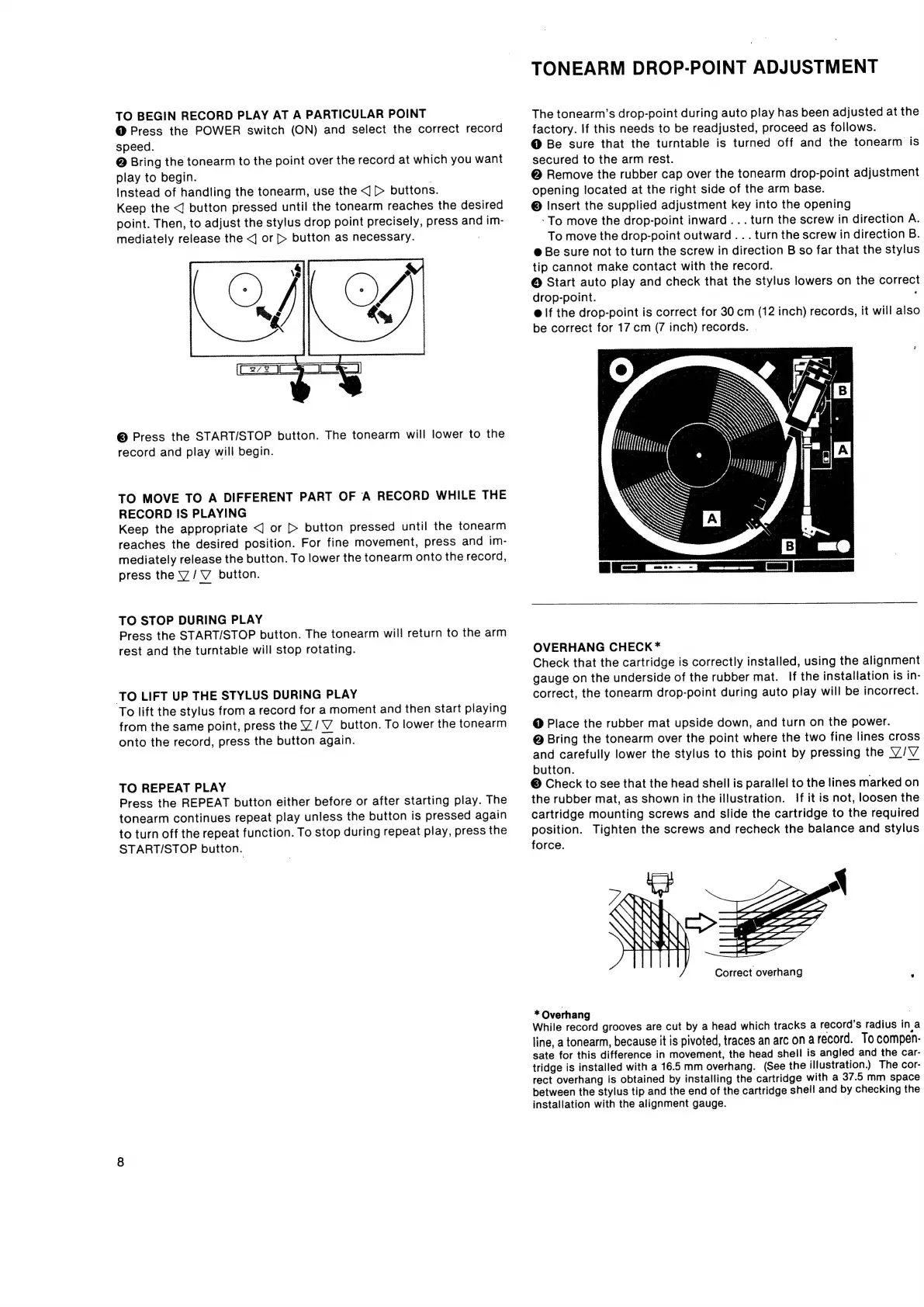
TO
BEGIN
RECORD
PLAY
AT
A
PARTICULAR
POINT
@
Press
the
POWER
switch
(ON)
and
select
the
correct
record
speed.
@
Bring
the
tonearm
to
the
point
over
the
record
at
which
you
want
play
to
begin.
|
Instead
of
handling
the
tonearm,
use
the
<J
>
buttons.
Keep
the
<J
button
pressed
until
the
tonearm
reaches
the
desired
point.
Then,
to
adjust
the
stylus
drop
point
precisely,
press
and
im-
mediately
release
the
<j
or
[>
button
as
necessary.
©
Press
the
START/STOP
button.
The
tonearm
will
lower
to
the
record
and
play
will
begin.
TO
MOVE
TO
A
DIFFERENT
PART
OF
A
RECORD
WHILE
THE
RECORD
IS
PLAYING
Keep
the
appropriate
<]
or
[>
button
pressed
until
the
tonearm
reaches
the
desired
position.
For
fine
movement,
press
and
im-
mediately
release
the
button.
To
lower
the
tonearm
onto
the
record,
press
the
VY
/
V
button.
TO
STOP
DURING
PLAY
Press
the
START/STOP
button.
The
tonearm
will
return
to
the
arm
rest
and
the
turntable
will
stop
rotating.
TO
LIFT
UP
THE
STYLUS
DURING
PLAY
To
lift
the
stylus
from
a
record
for
a
moment
and
then
start
playing
from
the
same
point,
press
the
Y/V_
button.
To
lower
the
tonearm
onto
the
record,
press
the
button
again.
TO
REPEAT
PLAY
Press
the
REPEAT
button
either
before
or
after
starting
play.
The
tonearm
continues
repeat
play
unless
the
button
is
pressed
again
to
turn
off
the
repeat
function.
To
stop
during
repeat
play,
press
the
START/STOP
button.
TONEARM
DROP-POINT
ADJUSTMENT
The
tonearm’s
drop-point
during
auto
play
has
been
adjusted
at
the
factory.
If
this
needs
to
be
readjusted,
proceed
as
follows.
@
Be
sure
that
the
turntable
is
turned
off
and
the
tonearm
is
secured
to
the
arm
rest.
@
Remove
the
rubber
cap
over
the
tonearm
drop-point
adjustment
opening
located
at
the
right
side
of
the
arm
base.
©
Insert
the
supplied
adjustment
key
into
the
opening
-To
move
the
drop-point
inward...
turn
the
screw
in
direction
A.
To
move
the
drop-point
outward
...
turn
the
screw
in
direction
B.
@
Be
sure
not
to
turn
the
screw
in
direction
B
so
far
that
the
stylus
tip
cannot
make
contact
with
the
record.
@
Start
auto
play
and
check
that
the
stylus
lowers
on
the
correct
drop-point.
:
@
If
the
drop-point
is
correct
for
30
cm
(12
inch)
records,
it
will
also
be
correct
for
17
cm
(7
inch)
records.
|
OVERHANG
CHECK*
Check
that
the
cartridge
is
correctly
installed,
using
the
alignment
gauge
on
the
underside
of
the
rubber
mat.
If
the
installation
is
in-
correct,
the
tonearm
drop-point
during
auto
play
will
be
incorrect.
@
Place
the
rubber
mat
upside
down,
and
turn
on
the
power.
@
Bring
the
tonearm
over
the
point
where
the
two
fine
lines
cross
and
carefully
lower
the
stylus
to
this
point
by
pressing
the
V/V
button.
|
=
©
Check
to
see
that
the
head
shell
is
parallel
to
the
lines
marked
on
the
rubber
mat,
as
shown
in
the
illustration.
If
it
is
not,
loosen
the
cartridge
mounting
screws
and
slide
the
cartridge
to
the
required
position.
Tighten
the
screws
and
recheck
the
balance
and
stylus
force.
Correct
overhang
;
*
Overhang
While
record
grooves
are
cut
by
a
head
which
tracks
a
record's
radius
in
a
line,
a
tonearm,
because
it
is
pivoted,
traces
an
arc
on
a
record.
To
compen-
sate
for
this
difference
in
movement,
the
head
shell
is
angled
and
the
car-
tridge
is
installed
with
a
16.5
mm
overhang.
(See
the
illustration.)
The
cor-
rect
overhang
is
obtained
by
installing
the
cartridge
with
a
37.5
mm
space
between
the
stylus
tip
and
the
end
of
the
cartridge
shell
and
by
checking
the
installation
with
the
alignment
gauge.

Related product manuals