EasyManua.ls Logo

Sony PVM-2030 - Connecting a Microcomputer; Attaching the Ferrite Core; Connecting the Microcomputer

Sony PVM-2030
18 pages
Print Icon
To Next Page IconTo Next Page
To Previous Page IconTo Previous Page
Loading...
[
CONNECTING A
!ljlCRpqQ.MP.irriR
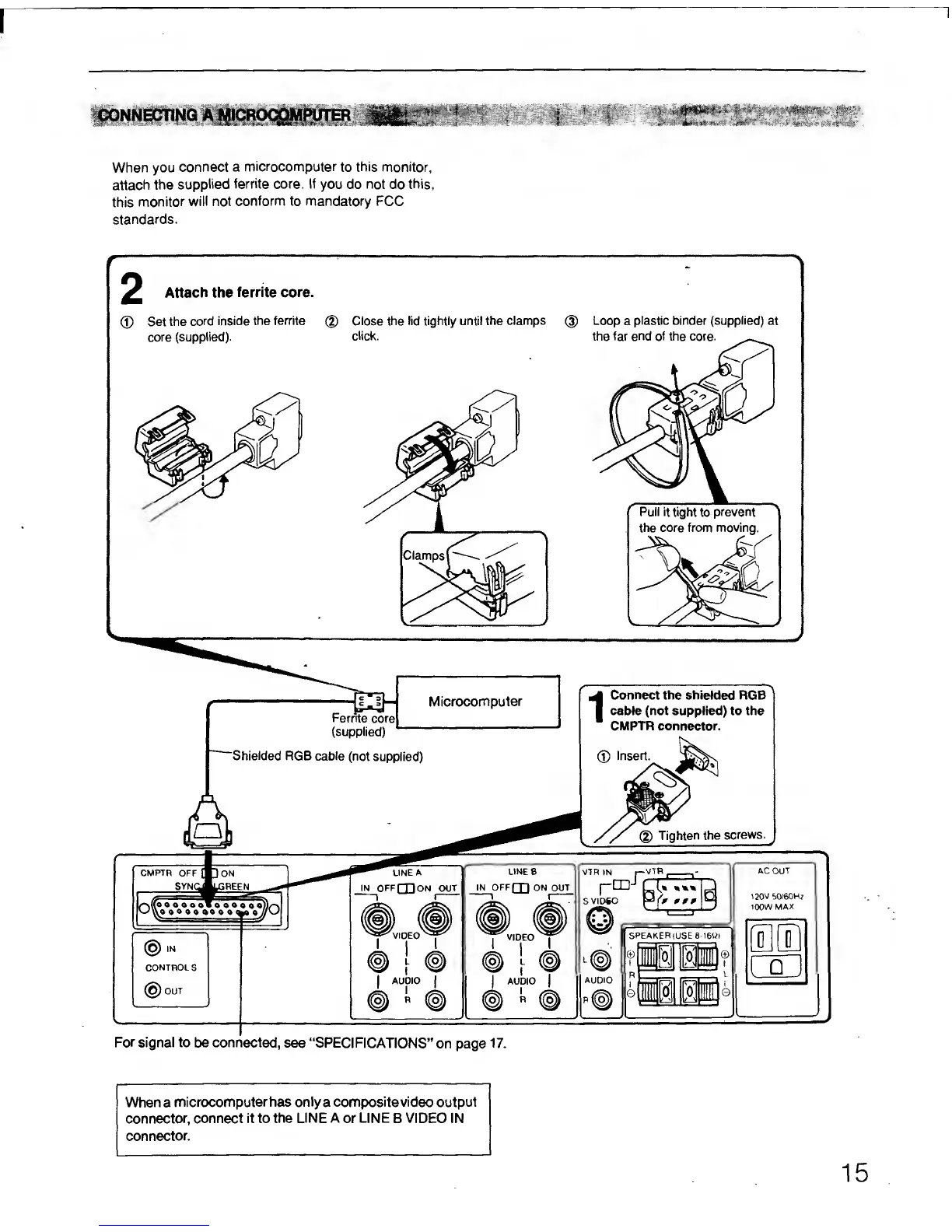
When you
connect
a microcomputer
to
this
monitor,
attach
the
supplied
ferrite core. If
you do not do
this,
this
monitor
will not
conform to mandatory FCC
standards.
^
Attach
the
ferrite core.
(J)
Set the
cord
inside
the ferrite
core
(supplied).
Close the lid tightly until
the clamps
click.
Loop
a
plastic binder
(supplied)
at
the far end of the core.
Pull
it
tight
to
prevent
the core
from moving.
Microcomputer
Ferrite
corel
(supplied)
"Shielded RGB cable
(not
supplied)
1
Connect
the shielded RGB
cable (not supplied) to the
CMPTR connector.
®
Insert.
For signal to be connected,
see “SPECIFICATIONS”
on
page
17.
Whena
microcomputerhas onlya composite video output
connector,
connect it to the
LINE A
or
LINE
B VIDEO IN
connector.
15