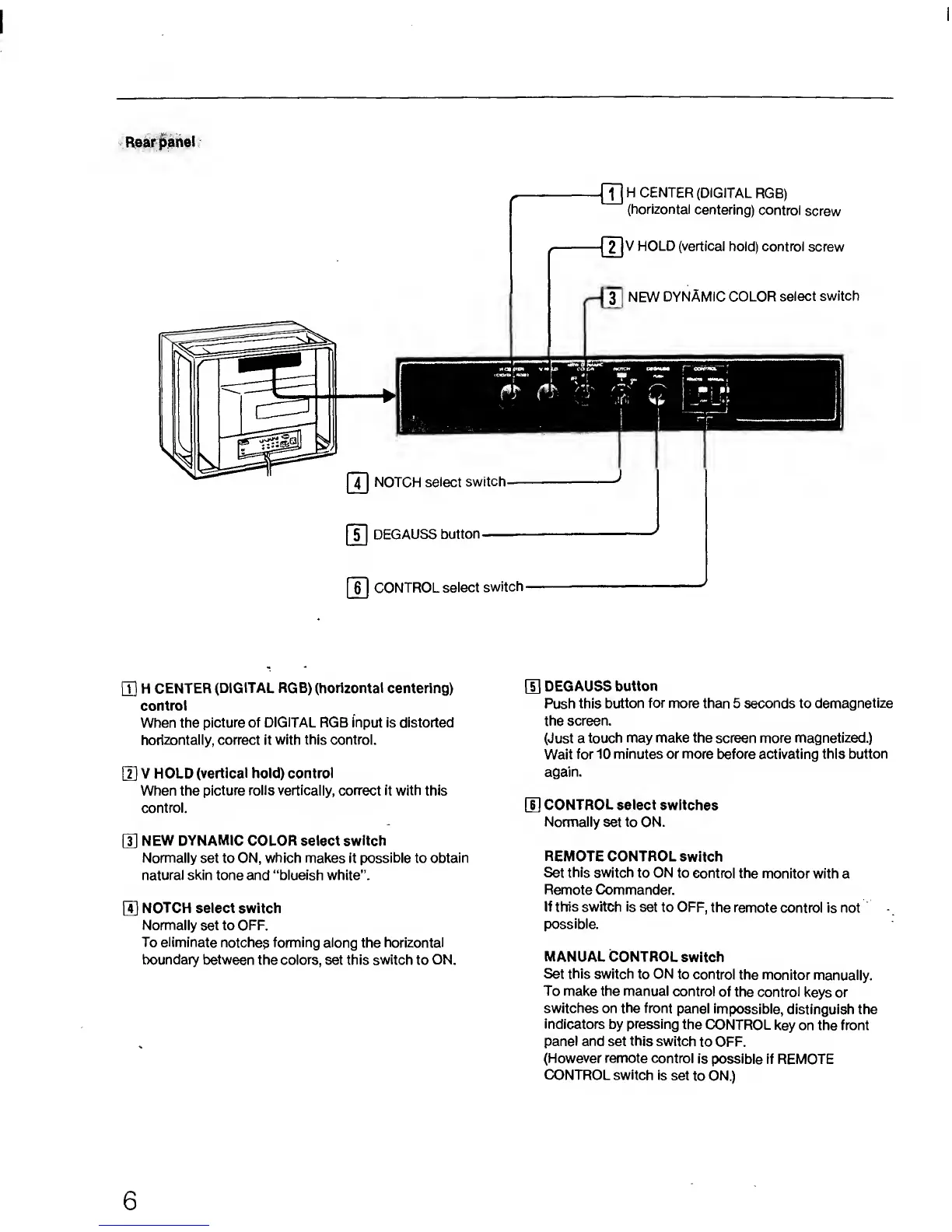
Rear panel
ITj
H
CENTER
(DIGITAL RGB) (horizontal
centering)
control
When the
picture of
DIGITAL
RGB input is distorted
horizontally, correct it
with this control.
[2]
V HOLD
(vertical hold) control
When the
picture rolls vertically, correct it with this
control.
HI
NEW DYNAMIC
COLOR select switch
Normally set to ON,
which
makes it possible to obtain
natural skin tone and “blueish white”.
H
NOTCH select switch
Normally
set to OFF.
To eliminate
notches
forming along
the
horizontal
boundary between
the
colors,
set
this switch
to
ON.
[5]
DEGAUSS
button
Push this
button
for
more than 5 seconds to demagnetize
the screen.
(Just a touch
may make the screen more magnetized.)
Wait
for 10
minutes
or
more
before activating
this button
again.
[U
CONTROL select
switches
Normally
set
to
ON.
REMOTE
CONTROL
switch
Set this switch
to ON to
control the
monitor with a
Remote Commander.
If tWs switch is set
to OFF,
the remote
control is not
possible.
MANUAL
CONTROL
switch
Set this switch to ON
to control
the monitor
manually.
To
make the manual
control
of the control
keys or
switches on the front
panel
impossible,
distinguish the
indicators by pressing
the
CONTROL
key on the front
panel and set
this
switch
to
OFF.
(However remote control
is possible
if REMOTE
CONTROL switch is
set
to ON.)
6




 To Next Page