EasyManua.ls Logo

Sony PVM-2030 - Page 8

Sony PVM-2030
18 pages
Print Icon
To Next Page IconTo Next Page
To Previous Page IconTo Previous Page
Loading...
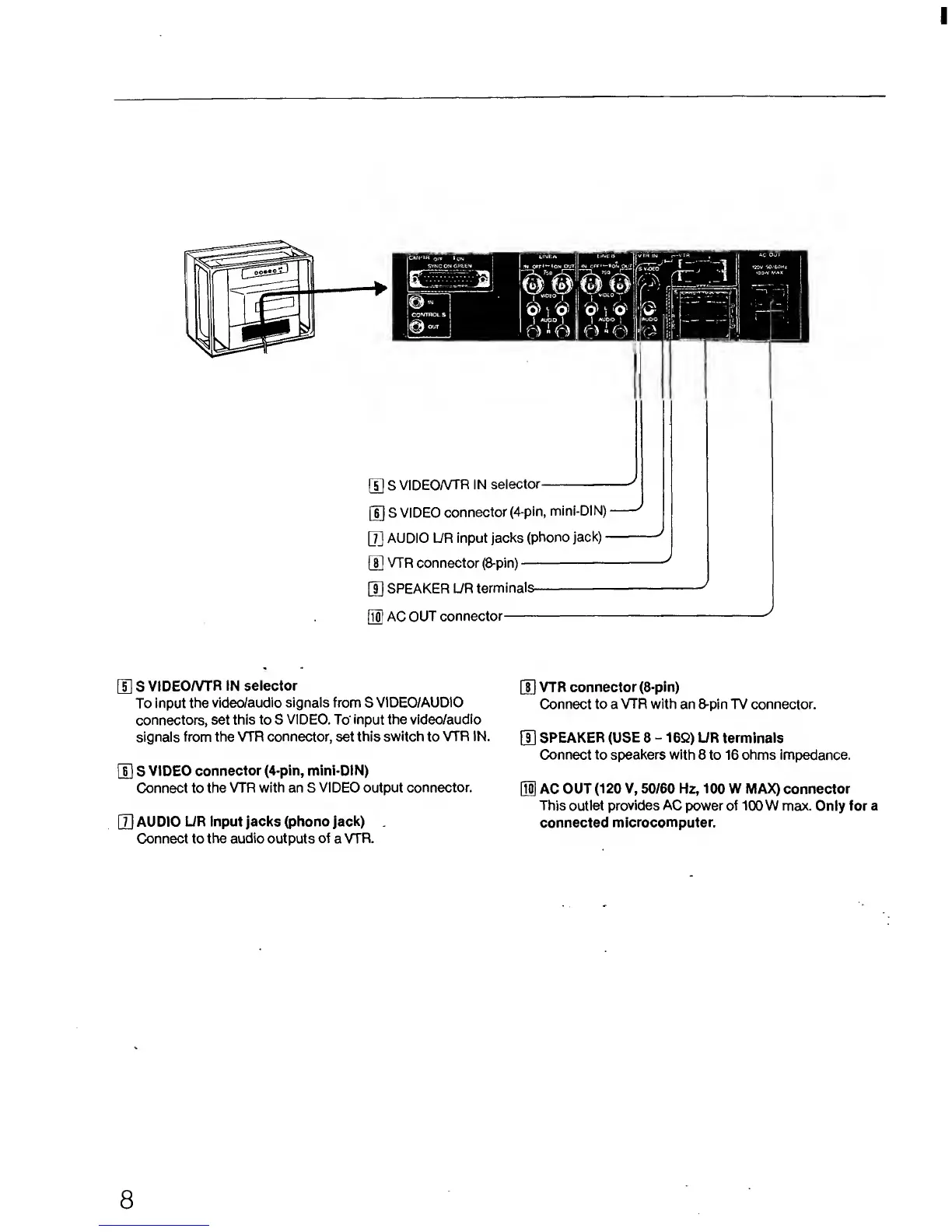
[5]
S
VIDEOAH'R
IN selector
[T) VTR
connector (8-pin)
To input
the
video/audio signals from
S
VIDEO/AUDIO
Connect to a
VTR
with
an
8-pin TV
connector,
connectors, set
this to S
VIDEO.
To input the
video/audio
signals
from the
VTR
connector, set this
switch
to
VTR IN.
]j]
SPEAKER
(USE
8
-
1
6Q)
UR terminals
Connect to speakers with
8 to 16 ohms impedance.
H]
S
VIDEO connector
(4-pin, mini-DIN)
Connect to the
VTR with an S
VIDEO
output
connector.
[
10
]
AC OUT (120
V,
50/60 Hz,
100
W MAX) connector
This outlet
provides AC
power of 100 W max.
Only for
a
[U
AUDIO
UR input jacks (phono jack)
connected
microcomputer.
Connect to the
audio outputs of
a
VTR.
8

Related product manuals