7 (E)
e IRIS control
When the AUTO button is not lit, you can adjust the
iris manually by turning the control.
When the AUTO button is lit, you can fine-adjust the
reference value for automatic iris adjustment in a range
of ±2f with this control.
The adjustment mode of this control is specified at the
factory as Absolute mode, which can also be changed
to Relative mode using the RM Configuration menu.
See “Settings on the RM Configuration Menu” on page 9 (E).
f Iris gauge
Turn the gauge to set the white line to the most
frequently used iris position, and it can be used as the
reference for manual iris adjustment.
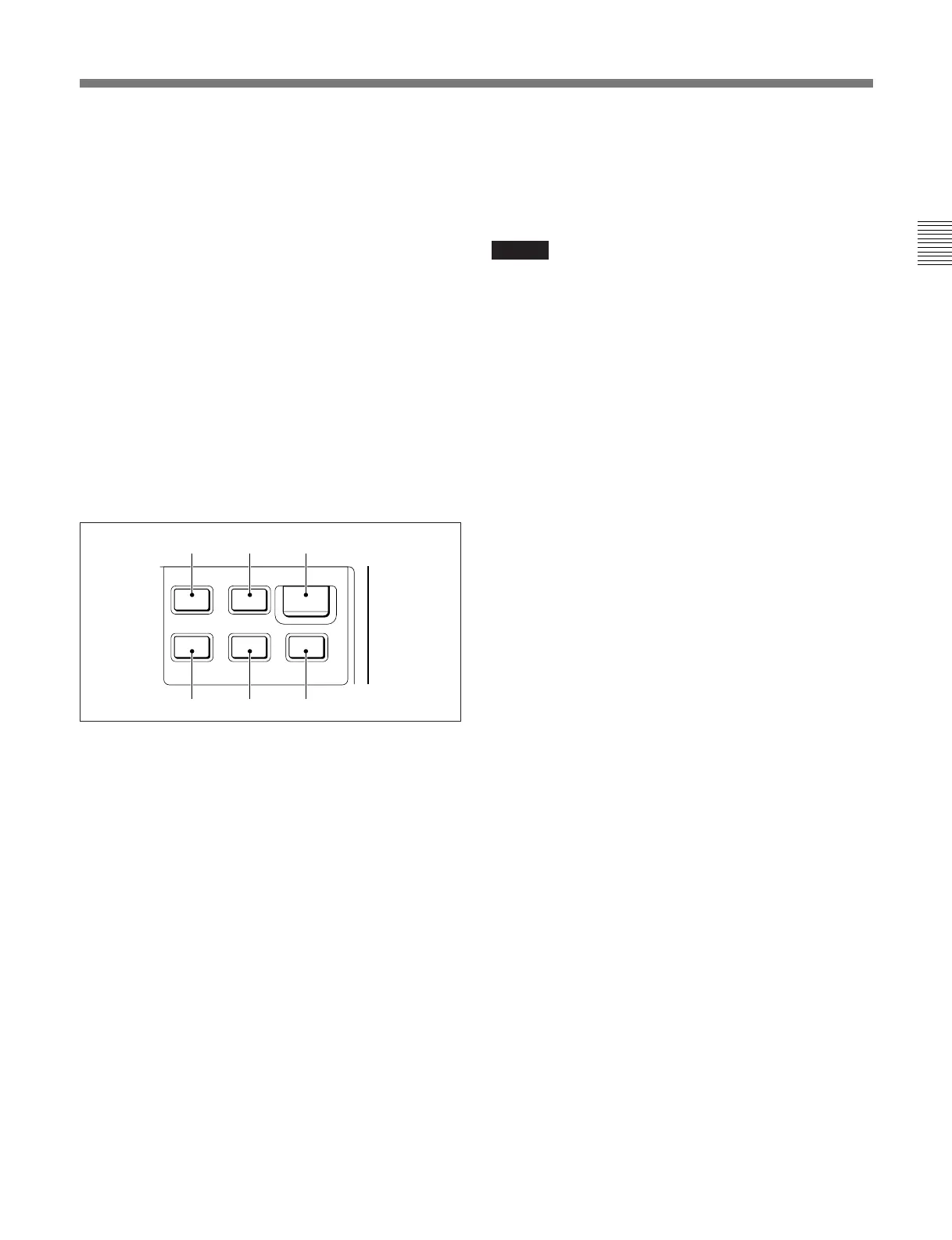
9 VTR control block
Controls VTR operations.
a 0REW (rewind) button (lights in amber)
Press and light up this button to start a rewind
operation.
b )F FWD (fast forward) button (lights in
amber)
Press and light up this button to start a fast-forward
operation.
c START/STOP button (lights in red)
Press and light up this button to start a recording
operation.
When you press the button when lit, it goes dark, and
recording stops.
d pSTOP button
Press to stop a rewind, fast-forward or playback
operation.
e (PLAY button (lights in amber)
Press and light up this button to start a playback
operation.
f ŒREC REVIEW (recording review) button
(lights in amber)
Press and light this button to execute a recording
review operation.
Notes
•When the START/STOP button is lit, the other
buttons in the VTR control block are deactivated. To
activate the other buttons, first press the START/
STOP button to cancel Recording mode.
•A part of the VTR control functions of this unit may
be disabled depending on the combination of camera
and VTR. For details, ask your Sony dealer.
!º OUTPUT selector
Selects the output signal from the connected camera.
CAM: Shooting signal
BARS: Color bar signal
TEST: Test signals for a video circuit check (the
signal can be selected using the RM Configuration
Menu).
See “Settings on the RM Configuration Menu” on page 9 (E).
!¡ GAIN (master gain) selector
Selects the video gain from three values (LOW, MID,
HIGH) according to the illumination of the subject to
be shot.
The factory setting specifies that the gain values to be
selected from among the three selector positions,
depending on the settings on the camera. The RM
Configuration menu permits the gain values to be
selected on this unit.
If the connected camera does not have an automatic
detection facility, the values set on this unit are used.
See “Settings on the RM Configuration Menu” on page 9 (E).
Œ
·
π
º‚
VTR
F FWDREW
PLAY
REC REVIEW
START/STOP
STOP
abc
def



 To Next Page