38
Operating the Camera’s Menu
• Use the supplied special remote control
cable for monitoring the signal from the
camera.
• If you wish to use a remote control cable
with a length that is different from the
length of the supplied cable, consult your
Sony dealer.
• The CCA-5 Remote Cable (optional)
does not support monitoring the signal
from the camera.
EXT I/O (external input/output)
connector (D-sub 9-pin)
If you remove the two screws and open the
lid, a connector is found inside for
expanded use.
For how to use the connector, consult your Sony
dealer.
Operating the
Camera’s Menu
The RM-B170 enables you to operate the
menu of the connected camera.
For the camera’s menu operations, use the
function/menu operation block of this unit.
Operating procedure
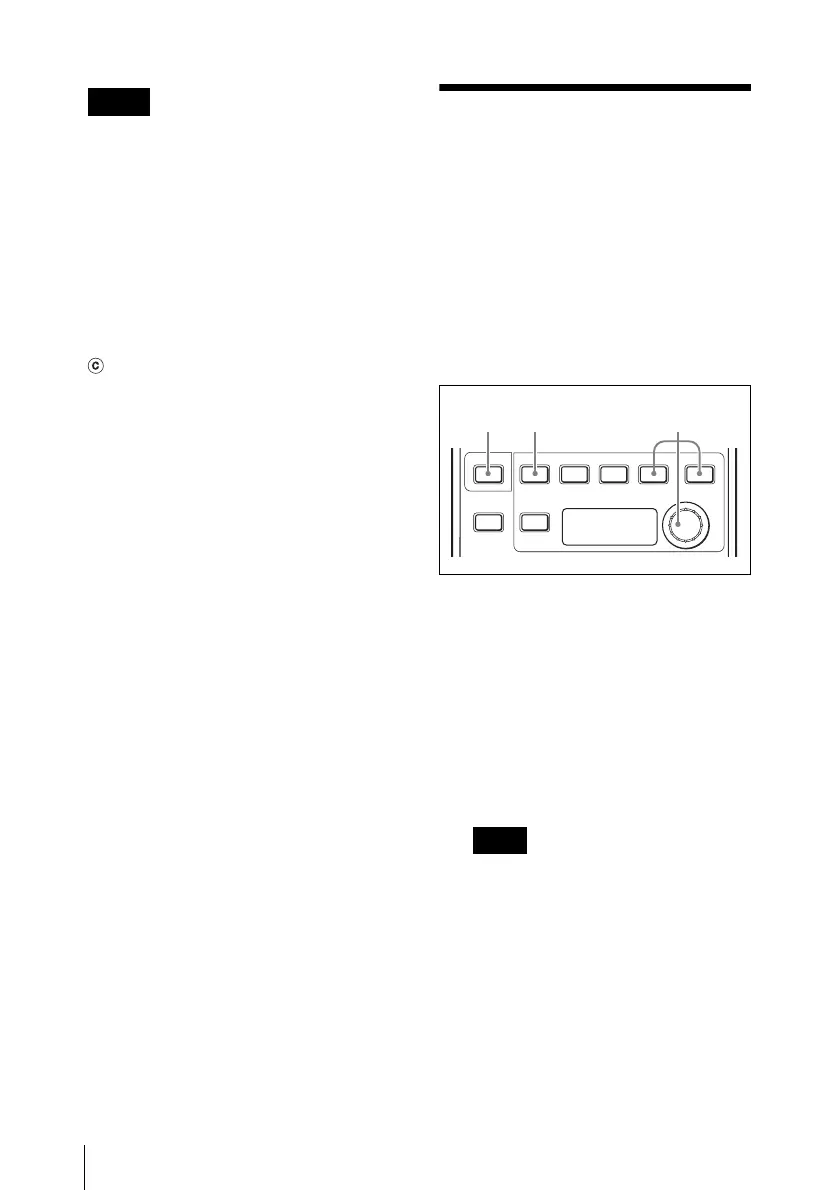
1 Press and light the CHARACTER
button.
The function/menu operation block of
this unit enters Camera Menu mode.
2 Press and light the MENU button.
The camera’s menu is displayed on the
image output from the MONITOR
connector.
To display the menu on the image
output from the MONITOR connector,
you may have to set the connected
camera. For details, refer to the
Operating Instructions of the
connected camera.
3 Operate the menu using the ENTER,
CANCEL and adjustment knob.
For the menu operation, refer to the Operating
Instructions of the connected camera.
Notes
Note
MENU
DETAIL
ONSHOT
MARK
ECS SLS
SHUTTER
DISPLAY CANCEL ENTER
CHARACTER
12 3











 To Next Page