40
Settings on the RM Configuration Menu
Basic Operation of the RM
Configuration Menu
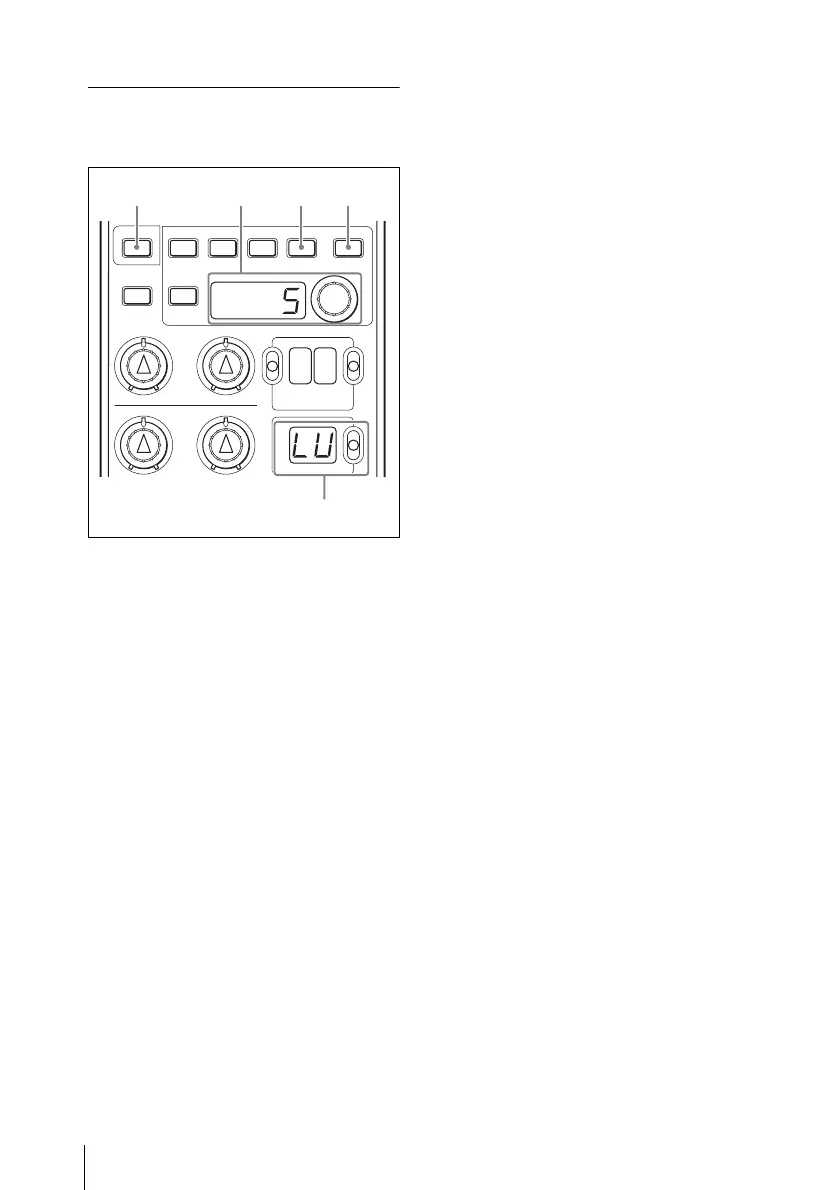
1 Press the menu item select switch
(MASTER GAIN switch) upward or
downward to display the desired item
on the MASTER GAIN indicator.
2 Turn the adjustment knob (rotary
encoder) to change the setting value on
the adjustment value indicator.
When the setting value is a digit
(digits), turn the adjustment knob
clockwise for a higher value and
counterclockwise for a lower value.
Turn the knob fast to change the value
rapidly and slowly for fine adjustment.
3 Press the ENTER button to register the
setting value.
If you press the CANCEL button
before pressing the ENTER button, the
setting value returns to the value
before changing.
If you operate the menu item select
switch before pressing the ENTER
button, the setting value returns to the
value before changing and another
menu item is selected.
To continue setting of another item
Repeat steps 1 to 3.
To exit the menu mode
Press the flashing CHARACTER button.
To return the setting value to the
factory setting
Select the item whose setting you wish to
return to the factory setting with the menu
item select switch. Then press and hold the
CANCEL button for two seconds or more
to reset the setting value to the factory
setting. Press the ENTER button to register
the setting value.
WHITE
BLACK
MENU
DETAIL
ON
ND CC
FILTER
MASTER GAIN
SHOT
MARK
ECS SLS
SHUTTER
DISPLAY CANCEL ENTER
CHARACTER
1
23
CANCELCHARACTER











 To Next Page