EasyManua.ls Logo

Sony RM-E100V - Page 16

Sony RM-E100V
23 pages
Print Icon
To Next Page IconTo Next Page
To Previous Page IconTo Previous Page
Loading...
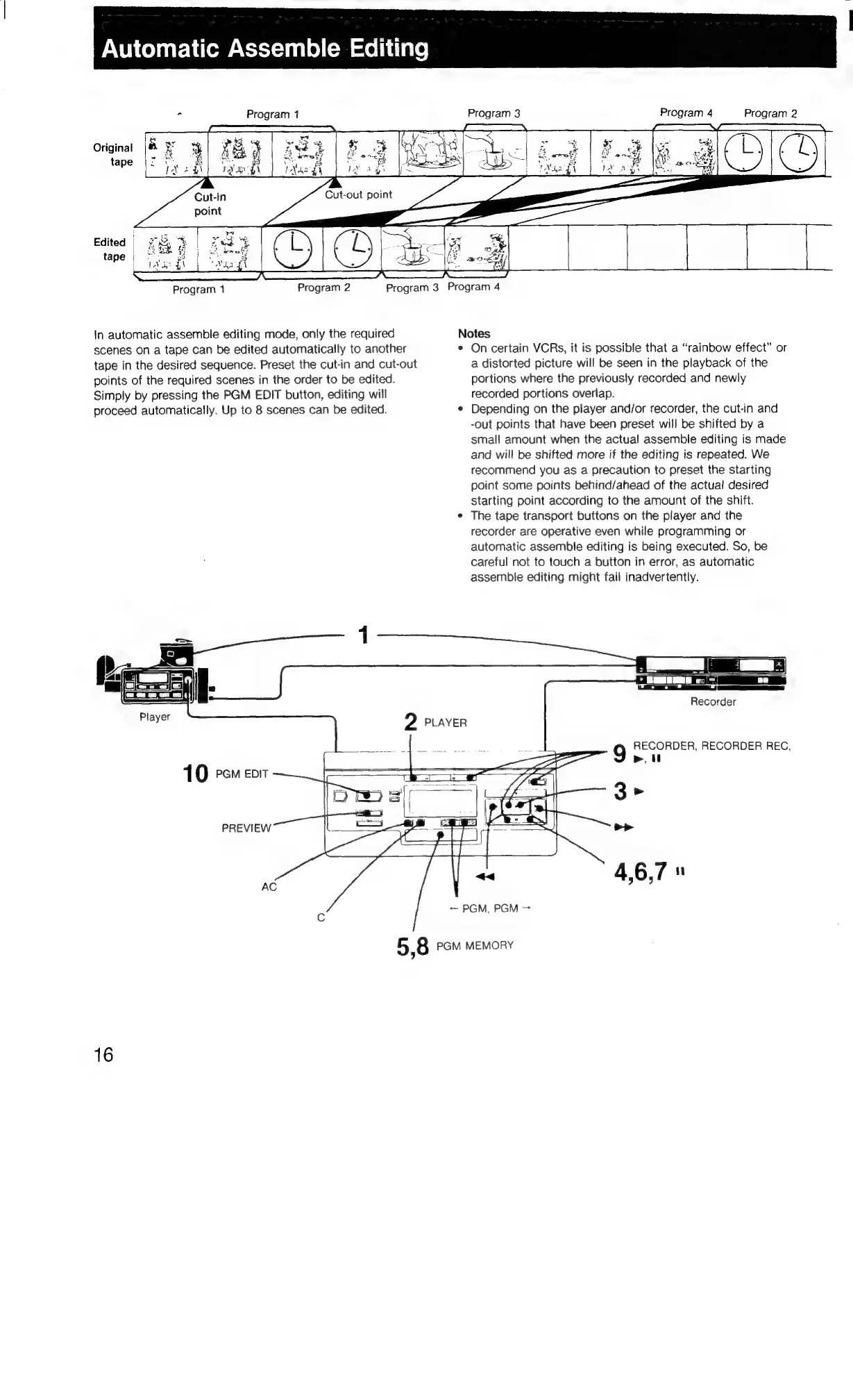
Automatic
Assemble
Editing
i
Program
1
Program
3
Program
4
Program
2
Original
Program
1
Program
2
Program
3
Program
4
in
automatic
assemble
editing
mode,
only
the
required
Notes
scenes
on
a
tape
can
be
edited
automatically
to
another
¢
Oncertain
VCRs,
it
is
possible
that
a
“rainbow
effect”
or
tape
in
the
desired
sequence.
Preset
the
cut-in
and
cut-out
a
distorted
picture
will
be
seen
in
the
playback
of
the
points
of
the
required
scenes
in
the
order
to
be
edited.
portions
where
the
previously
recorded
and
newly
Simply
by
pressing
the
PGM
EDIT
button,
editing
will
recorded
portions
overlap.
proceed
automatically.
Up
to
8
scenes
can
be
edited.
¢
Depending
on
the
player
and/or
recorder,
the
cut-in
and
-out
points
that
have
been
preset
will
be
shifted
by
a
small
amount
when
the
actual
assemble
editing
is
made
and
will
be
shifted
more
if
the
editing
is
repeated.
We
recommend
you
as
a
precaution
to
preset
the
starting
paint
some
points
behind/ahead
of
the
actual
desired
starting
point
according
to
the
amount
of
the
shift.
*
The
tape
transport
buttons
on
the
player
and
the
recorder
are
operative
even
while
programming
or
automatic
assemble
editing
is
being
executed.
So,
be
careful
not
to
touch
a
button
in
error,
as
automatic
assemble
editing
might
fail
inadvertently.
Recorder
2
PLAYER
RECORDER,
RECORDER
REC,
>,
10
ecm
coir
PREVIEW
«<
4,6,7"
~~
PGM,
PGM
AC
5,8
PGM
MEMORY
16

Related product manuals