EasyManua.ls Logo

Sony RM-E100V - Page 17

Sony RM-E100V
23 pages
Print Icon
To Next Page IconTo Next Page
To Previous Page IconTo Previous Page
Loading...
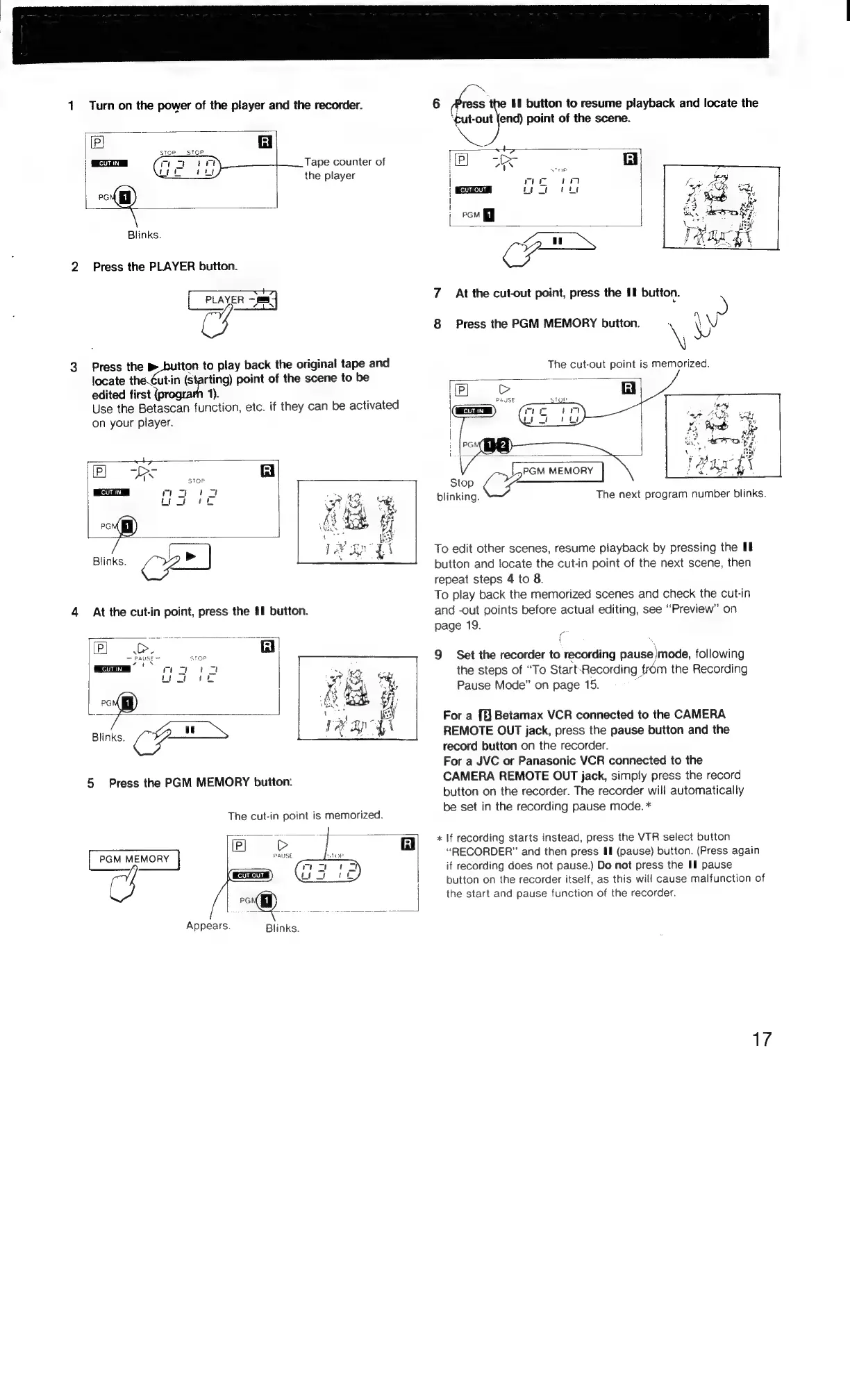
1
Turn
on
the
power
of
the
player
and
the
recorder.
6
Press
the
If
button
to
resume
playback
and
locate
the
‘gut-out
(end)
point
of
the
scene.
(eB
Gl
Ze,
stop.
STOP.
|
z
Tape
counter
of
P)
Te
|
the
player
|
days
Man
sy
sa
howe
en
l
pom
J
Blinks.
va
WN
2
Press
the
PLAYER
button.
CH
|
PLAYER
==]
7
At
the
cut-out
point,
press
the
II
button.
CS
8
Press
the
PGM
MEMORY
button.
\y
3
Press
the
>
varcmipon
to
play
back
the
original
tape
and
The
cut-out
point
is
memorized.
edited
first
locate
the.¢ut-in
sahil
point
of
the
scene
to
be
Use
the
Betascan
function,
etc.
if
they
can
be
activated
on
your
player.
r
ty
iP
ee
fi
i
age
Blinks.
4
At
the
cut-in
point,
press
the
§1
button.
2
oo
RI]
Blinks.
au
Ss
CF
5
Press
the
PGM
MEMORY
button:
~
P}
6UCD
|
|
PRISE
CUT
IN
{
!
Let
PGM
MEMORY
oe
Fen
blinking.
To
edit
other
scenes,
resume
playback
by
pressing
the
Ul
button
and
locate
the
cut-in
point
of
the
next
scene,
then
repeat
steps
4
to
8.
To
play
back
the
memorized
scenes
and
check
the
cut-in
and
-out
points
before
actual
editing,
see
“Preview”
on
page
19.
f
9
Set
the
recorder
to
recording
pause
mode,
following
the
steps
of
“To
Start:
Recording
|
from
the
Recording
Pause
Mode”
on
page
15.
For
a
[f]
Betamax
VCR
connected
to
the
CAMERA
REMOTE
OUT
jack,
press
the
pause
button
and
the
record
button
on
the
recorder.
For
a
JVC
or
Panasonic
VCR
connected
to
the
CAMERA
REMOTE
OUT
jack,
simply
press
the
record
button
on
the
recorder.
The
recorder
will
automatically
be
set
in
the
recording
pause
mode.
*
The
cut-in
point
is
memorized.
oD
:
|
rR]
*
If
recording
starts
instead,
press
the
VTR
select
button
“RECORDER”
and
then
press
&ll
(pause)
button.
(Press
again
The
next
program
number
blinks.
button
on
the
recorder
itself,
as
this
will
cause
malfunction
of
PGM
MEMORY
brass
&
|
CH
GER,
if
recording
does
not
pause.)
Do
not
press
the
I
pause
/
the
start
and
pause
function
of
the
recorder.
Appears.
Blinks.
17

Related product manuals