EasyManua.ls Logo

Sony RM-E100V - Page 18

Sony RM-E100V
23 pages
Print Icon
To Next Page IconTo Next Page
To Previous Page IconTo Previous Page
Loading...
Automatic
Assemble
Editing
Ss
10
Press
the
PGM
EDIT
button.
Automatic
assemble
editing
will
begin.
Seu
eant
The
procedure
is
as
follows:
CH
Player:
Playback
of
program
Ell—
Fast
forward
or
rewind
>
Playback
of
program
J
Fast
forward
or
rewind
—......etc.
Recorder:
Recording
of
program
H—
Recording
pause
>
Recording
of
program
Ed
>
Recording
pause
...
>
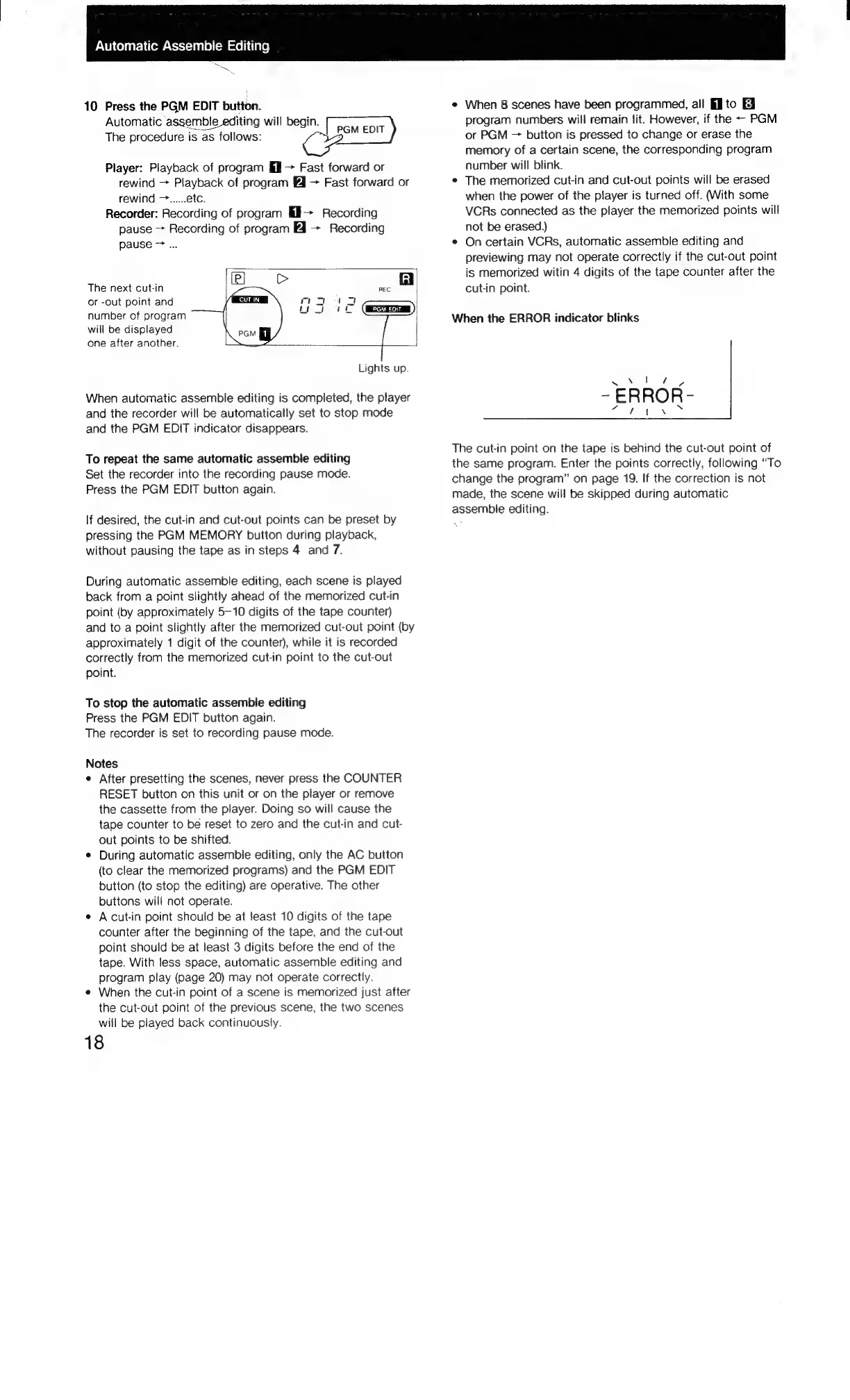
The
next
cut-in
(el
REC
Gil
or
-out
point
and
CUTIN
Py
ee
ee
number
of
program
oat
re
will
be
displayed
1
one
after
another.
Lights
up.
When
automatic
assemble
editing
is
completed,
the
player
and
the
recorder
will
be
automatically
set
to
stop
mode
and
the
PGM
EDIT
indicator
disappears.
To
repeat
the
same
automatic
assemble
editing
Set
the
recorder
into
the
recording
pause mode.
Press
the
PGM
EDIT
button
again.
If
desired,
the
cut-in
and
cut-out
points
can
be
preset
by
pressing
the
PGM
MEMORY
button
during
playback,
without
pausing
the
tape
as
in
steps
4
and
7.
During
automatic
assemble
editing,
each
scene
is
played
back
from
a
point
slightly
ahead
of
the
memorized
cut-in
point
(by
approximately
5-10
digits
of
the
tape
counter)
and
to
a
point
slightly
after
the
memorized
cut-out
point
(by
approximately
1
digit
of
the
counter),
while
it
is
recorded
correctly
from
the
memorized
cut-in
point
to
the
cut-out
point.
To
stop
the
automatic
assemble
editing
Press
the
PGM
EDIT
button
again.
The
recorder
is
set
to
recording
pause mode.
Notes
¢
After
presetting
the
scenes,
never
press
the
COUNTER
RESET
button
on
this
unit
or
on
the
player
or
remove
the
cassette
from
the
player.
Doing
so
will
cause
the
tape
counter
to
be
reset
to
zero
and
the
cut-in
and
cut-
out
points
to
be
shifted.
¢
During
automatic
assemble
editing,
only
the
AC
button
(to
clear
the
memorized
programs)
and
the
PGM
EDIT
button
(to
stop
the
editing)
are
operative.
The
other
buttons
will
not
operate.
¢
A
cut-in
point
should
be
at
feast
10
digits
of
the
tape
counter
after
the
beginning
of
the
tape,
and
the
cut-out
point
should
be
at
least
3
digits
before
the
end
of
the
tape.
With
less
space,
automatic
assemble
editing
and
program
play
(page
20)
may
not
operate
correctly.
¢
When
the
cut-in
point
of
a
scene
is
memorized
just
after
the
cut-out
point
of
the
previous
scene,
the
two
scenes
will
be
played
back
continuously.
18
«
When
8
scenes
have
been
programmed,
ail
to
8
program
numbers
will
remain
lit.
However,
if
the
-
PGM
or
PGM
~—
button
is
pressed
to
change
or
erase
the
memory
of
a
certain
scene,
the
corresponding
program
number
will
blink.
¢
The
memorized
cut-in
and
cut-out
points
will
be
erased
when
the
power
of
the
player
is
turned
off.
(With
some
VCRs
connected
as
the
player
the
memorized
points
will
not
be
erased.)
¢
Oncertain
VCRs,
automatic
assemble
editing
and
previewing
may
not
operate
correctly
if
the
cut-out
point
is
memorized
witin
4
digits
of
the
tape
counter
after
the
cut-in
point.
When
the
ERROR
indicator
blinks
The
cut-in
point
on
the
tape
is
behind
the
cut-out
point
of
the
same
program.
Enter
the
points
correctly,
following
“To
change
the
program”
on
page
19.
If
the
correction
is
not
made,
the
scene
will
be
skipped
during
automatic
assemble
editing.

Related product manuals