EasyManua.ls Logo

Sony RM-E100V - Page 19

Sony RM-E100V
23 pages
Print Icon
To Next Page IconTo Next Page
To Previous Page IconTo Previous Page
Loading...
P
review
-—
To
check
the
programs
before
actual
editing
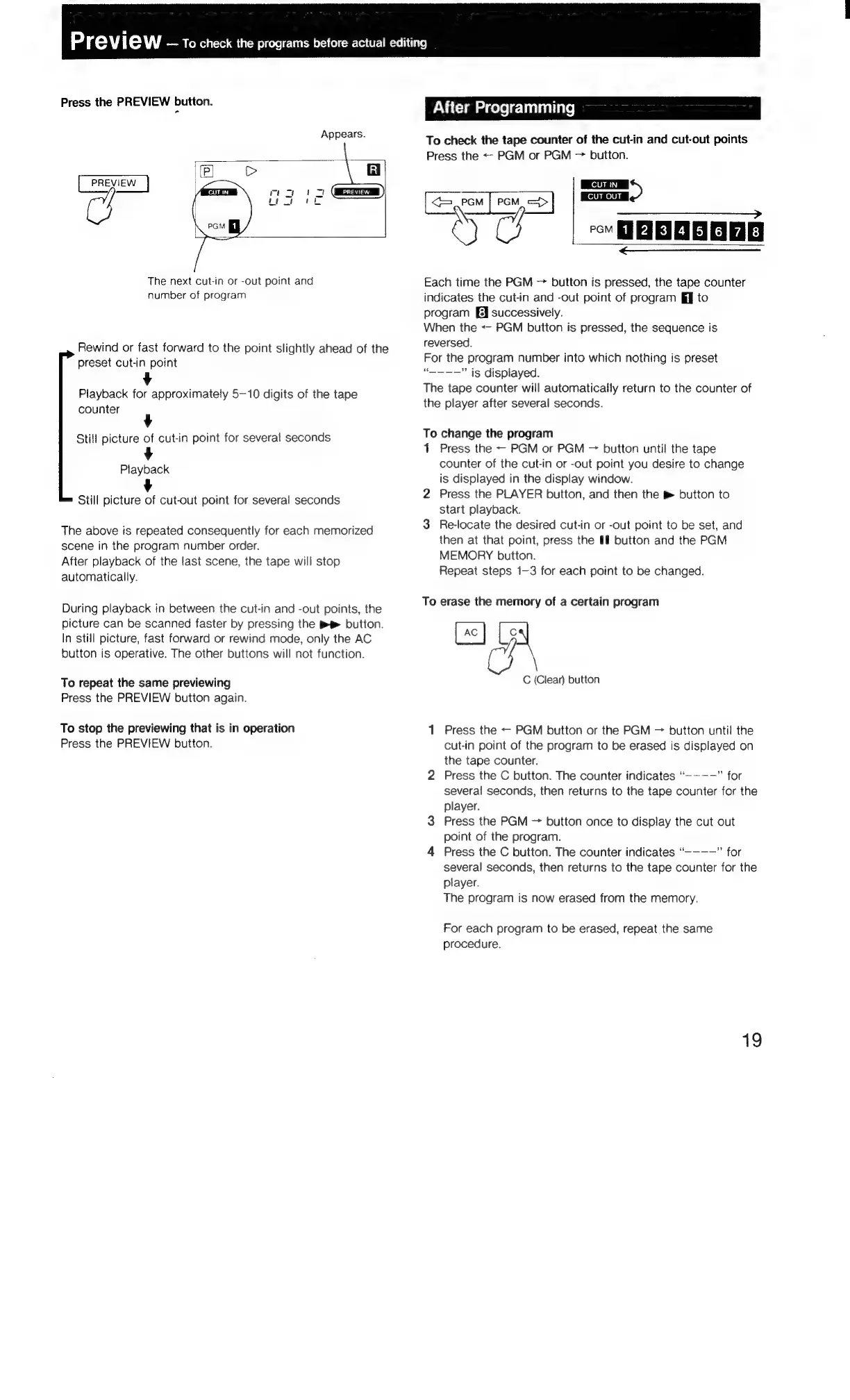
Press
the
PREVIEW
button.
Appears.
(P]
>
|
PREVIEW
H]
The
next
cut-in
or
-out
point
and
number
of
program
Rewind
or
fast
forward
to
the
point
slightly
ahead
of
the
preset
cut-in
point
Playback
for
approximately
5-10
digits
of
the
tape
counter
Still
picture
of
cut-in
point
for
several
seconds
Playback
Still
picture
of
cut-out
point
for
several
seconds
The
above
is
repeated
consequently
for
each
memorized
scene
in
the
program
number
order.
After
playback
of
the
last
scene,
the
tape
will
stop
automatically.
During
playback
in
between
the
cut-in
and
-out
points,
the
picture
can
be
scanned
faster
by
pressing
the
button.
In
still
picture,
fast
forward
or
rewind
mode,
only
the
AC
button
is
operative.
The
other
buttons
will
not
function.
To
repeat
the
same
previewing
Press
the
PREVIEW
button
again.
To
stop
the
previewing
that
is
in
operation
Press
the
PREVIEW
button.
PNG
Cia
i
celele
liane)
To
check
the
tape
counter
of
the
cut-‘in
and
cut-out
points
Press
the
<-
PGM
or
PGM
>
button.
ST
—__________»
an
'
12121415}
617]
8
—_——_———_—_—__—_—X—XVM"='sS>""-"
Each
time
the
PGM
button
is
pressed,
the
tape
counter
indicates
the
cut-in
and
-out
point
of
program
ij
to
program
Eq
successively.
When
the
<-
PGM
button
is
pressed,
the
sequence
is
reversed.
For
the
program
number
into
which
nothing
is
preset
“-———"
ig
displayed.
The
tape
counter
will
automatically
return
to
the
counter
of
the
player
after
several
seconds.
To
change
the
program
1
Press
the
-—
PGM
or
PGM
button
until
the
tape
counter
of
the
cut-in
or
-out
point
you
desire
to
change
is
displayed
in
the
display
window.
2
Press
the
PLAYER
button,
and
then
the
&
button
to
start
playback.
3
Re-locate
the
desired
cut-in
or
-out
point
to
be
set,
and
then
at
that
point,
press
the
I
button
and
the
PGM
MEMORY
button.
Repeat
steps
1-3
for
each
point
to
be
changed.
To
erase
the
memory
of
a
certain
program
=A
C
(Clear)
button
1
Press
the
PGM
button
or
the
PGM
button
until
the
cut-in
point
of
the
program
to
be
erased
is
displayed
on
the
tape
counter.
2
Press
the
C
button.
The
counter
indicates
“~~-—”
for
several
seconds,
then
returns
to
the
tape
counter
for
the
player.
3
Press
the
PGM
button
once
to
display
the
cut
out
point
of
the
program.
4
Press
the
C
button.
The
counter
indicates
“--——”
for
several
seconds,
then
returns
to
the
tape
counter
for
the
player.
The
program
is
now
erased
from
the
memory.
For
each
program
to
be
erased,
repeat
the
same
procedure.
19

Related product manuals