EasyManua.ls Logo

Sony RM-E700 - Page 16

Sony RM-E700
58 pages
Print Icon
To Next Page IconTo Next Page
To Previous Page IconTo Previous Page
Loading...
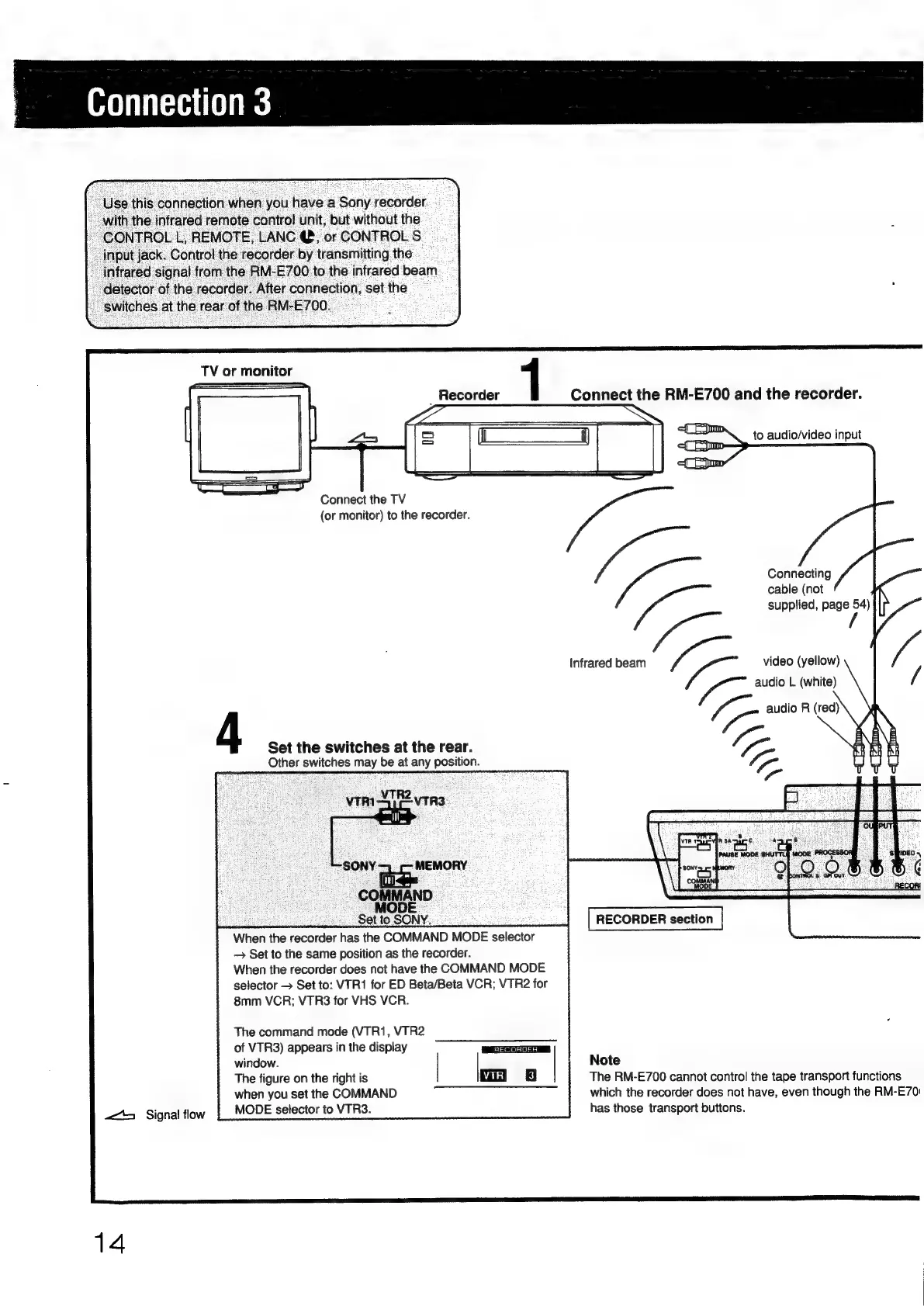
Connection
3
"Use
this
connection
when
you
have
a
Sony
recorder
__with
the
infrared
remote
control
unit,
but
without
the
ee
OL
L,
REMOTE,
LANC
@,
or
CONTROL
S
__
input
jack.
Control
the
recorder
by
transmitting
the
-_
infrared
signal
from
the
RM-E700
to
the
infrared
beam
_
detector
of
the
recorder.
After
connection,
set
the
"switches
at
the
rear
of
the
RM-E700.
TV
or
monitor
1
_
Recorder
Connect
the
RM-E700
and
the
recorder.
to
audio/video
input
Connect
the
TV
(or
monitor)
to
the
recorder.
Connecting
Yo
cable
(not
supplied,
page
54)
/
Infrared
beam
ee
video
(yellow)
Y=
audio
L
(white)
4
ee
audio
R
(red)
Set
the
switches
at
the
rear.
fs
Other
switches
may
be
at
any
position.
vm
2
VTR3°.
Ugony—.
MEMORY
COMMAND
:
MODE
es
oe
;
Set
to
SONY.
:
When
the
recorder
has
the
COMMAND
MODE
selector
Set
to
the
same
position
as
the
recorder.
When
the
recorder
does
not
have
the
COMMAND
MODE
selector
>
Set
to:
VTR1
for
ED
Beta/Beta
VCR;
VTR2
for
8mm
VCR;
VTR3
for
VHS
VCR.
RECORDER
section
The
command
mode
(VTR1,
VTR2
of
VTR3)
appears
in
the
display
window.
Note
The
figure
on
the
right
is
The
RM-E700
cannot
control
the
tape
transport
functions
when
you
set
the
COMMAND
which
the
recorder
does
not
have,
even
though
the
RM-E70:
244
Signal
flow
MODE
selector
to
VTR3.
14
has
those
transport
buttons.

Other manuals for Sony RM-E700

Related product manuals