EasyManua.ls Logo

Sony RM-E700 - Page 17

Sony RM-E700
58 pages
Print Icon
To Next Page IconTo Next Page
To Previous Page IconTo Previous Page
Loading...
Caution
:
When
the
player
is
a
video
camera
recorder
or
a
video
When
the
player
has
the
infrared
beam
detector:
cassette
recorder
controlled
by
an
infrared
remote
e
Set
the
command
mode
selector
on
the
player
to
OFF,
control
unit,
the
player
may
detect
the
control
signal
or
to
a
different
position
from
that
of
the
recorder.
from
the
RM-E700
to
the
recorder,
resulting
in
faulty
Or,
operation.
(At
worst,
the
recorded
contents
in
the
tape
e
When
the
player
does
not
have
the
command
mode
may
be
erased.*)
selector,
cover
its
infrared
beam
detector
with
thick
black
paper.
*
To
protect
the
recorded
contents,
set
the
safety
tab
to
prevent
recording
or
break
off
the
tab.
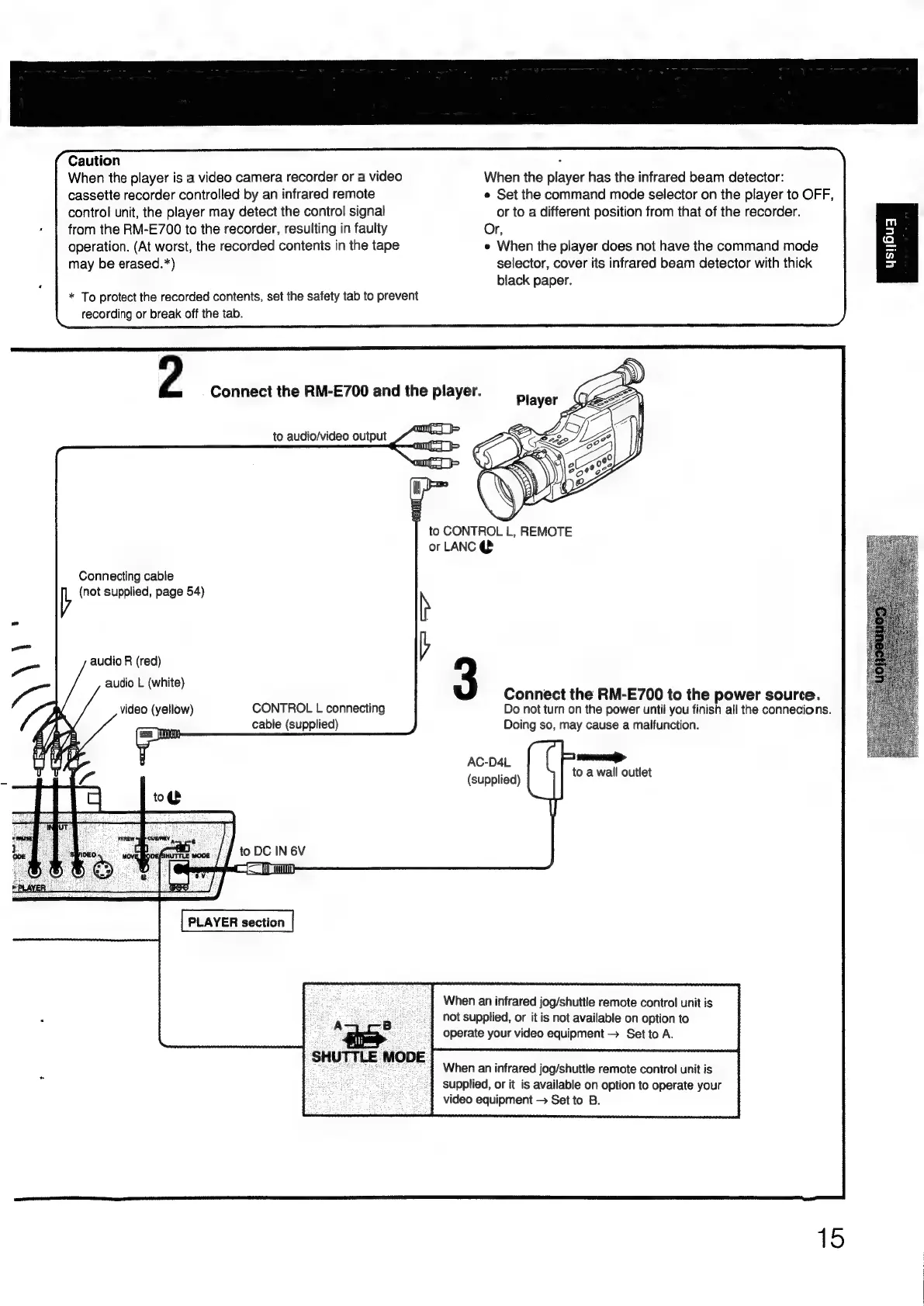
2
.
Connect
the
RM-E700
and
the
player.
to
audio/video
output
om
am]
jp
to
CONTROL
L,
REMOTE
or
LANC
@
Connecting
cable
V
(not
supplied,
page
54)
h
)
—_—_
audio
R
(red)
a“
: :
audio
L
(white)
a
Connect
the
RM-E700
to
the
power
source.
p:
video
(yellow)
CONTROL
L
connecting
Do
not
turn
on
the
power
until
you
finish
all
the
connecions.
()
cable
(supplied)
Doing
so,
may
cause
a
malfunction.
AC-D4L
iz
(supplied)
to
a
wall
outlet
to
DC
IN
6V
=
a
PLAYER
section
When
an
infrared
jog/shuttle
remote
control
unit
is
oS
y
es
5.
not
supplied,
or
it
is
not
available
on
option
to
4
operate
your
video
equipment
>
Set
to
A.
When
an
infrared
jog/shuttle
remote
control
unit
is
supplied,
or
it
is
available
on
option
to
operate
your
video
equipment
Set
to
B.
SHUTTLE
MODE
15

Other manuals for Sony RM-E700

Related product manuals