EasyManua.ls Logo

Sony RM-E700 - Page 20

Sony RM-E700
58 pages
Print Icon
To Next Page IconTo Next Page
To Previous Page IconTo Previous Page
Loading...
Connection
4
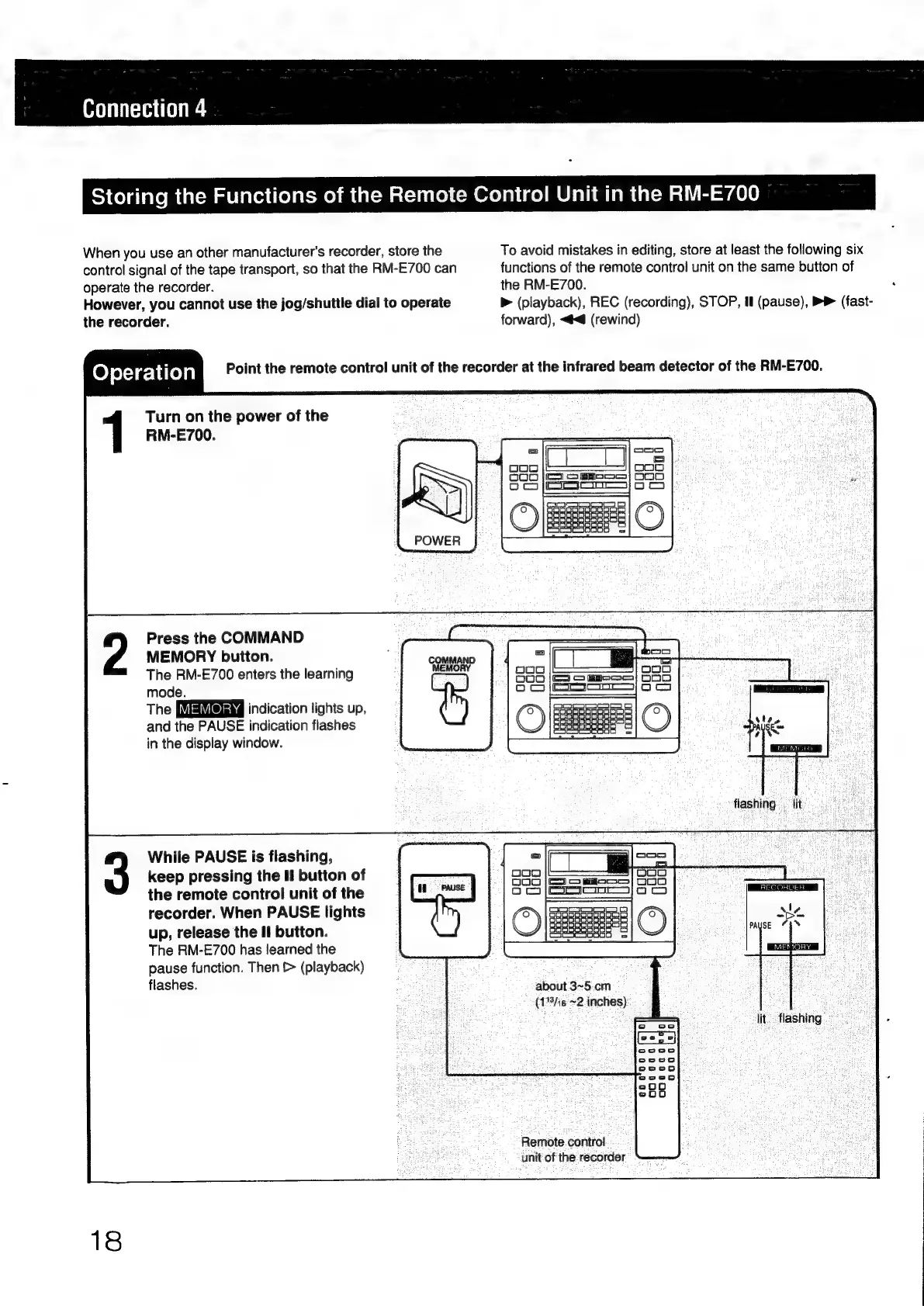
When
you
use
an
other
manufacturer's
recorder,
store
the
control
signal
of
the
tape
transport,
so
that
the
RM-E700
can
operate
the
recorder.
However,
you
cannot
use
the
jog/shuttle
dial
to
operate
the
recorder.
Storing
the
Functions
of
the
Remote
Control
Unit
in
the
RM-E700
To
avoid
mistakes
in
editing,
store
at
least
the
following
six
functions
of
the
remote
control
unit
on
the
same
button
of
the
RM-E700.
>
(playback),
REC
(recording),
STOP,
il
(pause),
PP
(fast-
forward),
<@<@
(rewind)
Ope
ec
hate)
al
Point
the
remote
control
unit
of
the
recorder
at
the
infrared
beam
detector
of
the
RM-E700.
Turn
on
the
power
of
the
RM-E700.
POWER
Press
the
COMMAND
MEMORY
button.
The
RM-E700
enters
the
learning
mode.
The
indication
lights
up,
and
the
PAUSE
indication
flashes
in
the
display
window.
While
PAUSE
is
flashing,
keep
pressing
the
I!
button
of
the
remote
control
unit
of
the
recorder.
When
PAUSE
lights
up,
release
the
Il
button.
The
RM-E700
has
learned
the
pause
function.
Then
>
(playback)
flashes.
18
(=)
ooo
noo
Ooo
|ma
S
Bom}
OOO
CO
Saco
jo
cm
ORs
|O|
-
about
3~5.cm
(19/16
~2
inches)
Ait:
flashing.
Remote.
control
unit'of
the
recorder

Other manuals for Sony RM-E700

Related product manuals