[40] Using the TV with Other Devices | Blu-ray and DVD players
Connecting a Blu-ray or DVD player
Connect a Blu-ray/DVD player to the TV.
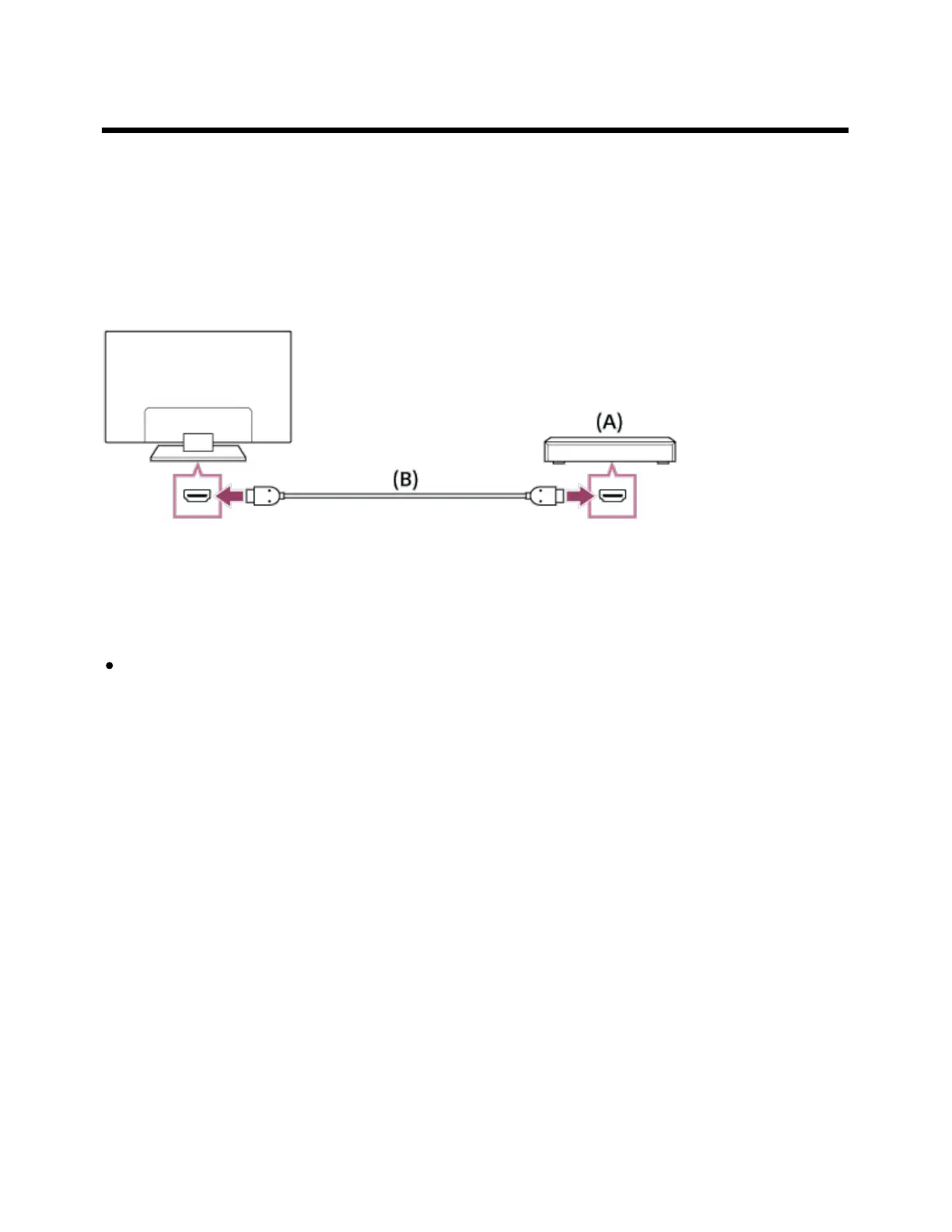
HDMI connection
For optimum picture quality, we recommend connecting your player to the TV using an HDMI cable. If
your Blu-ray/DVD player has an HDMI jack (socket), connect it using an HDMI cable.
(A) Blu-ray/DVD player
(B) HDMI cable (not supplied)
Be sure to use an authorized HIGH SPEED HDMI cable bearing the HDMI logo.
If the device has a DVI jack (socket), connect it to the HDMI (with AUDIO IN) port through a DVI -
HDMI adaptor interface (not supplied), and connect the device’s audio out jacks (sockets) to HDMI
3 AUDIO IN / HDMI 1 AUDIO IN.
Availability depends on your model/region/country. Refer to the Reference Guide to check if your TV
supports HDMI 3 AUDIO IN / HDMI 1 AUDIO IN.
Component video connection
Availability depends on your model/region/country.
If your Blu-ray/DVD player has component video jacks (sockets), connect them to the TV using a
component video cable and an audio cable.
*
*









 To Next Page