1-3
12
Setting up the remote commander
Step 2 : Setting up the remote commander
Inserting the batteries
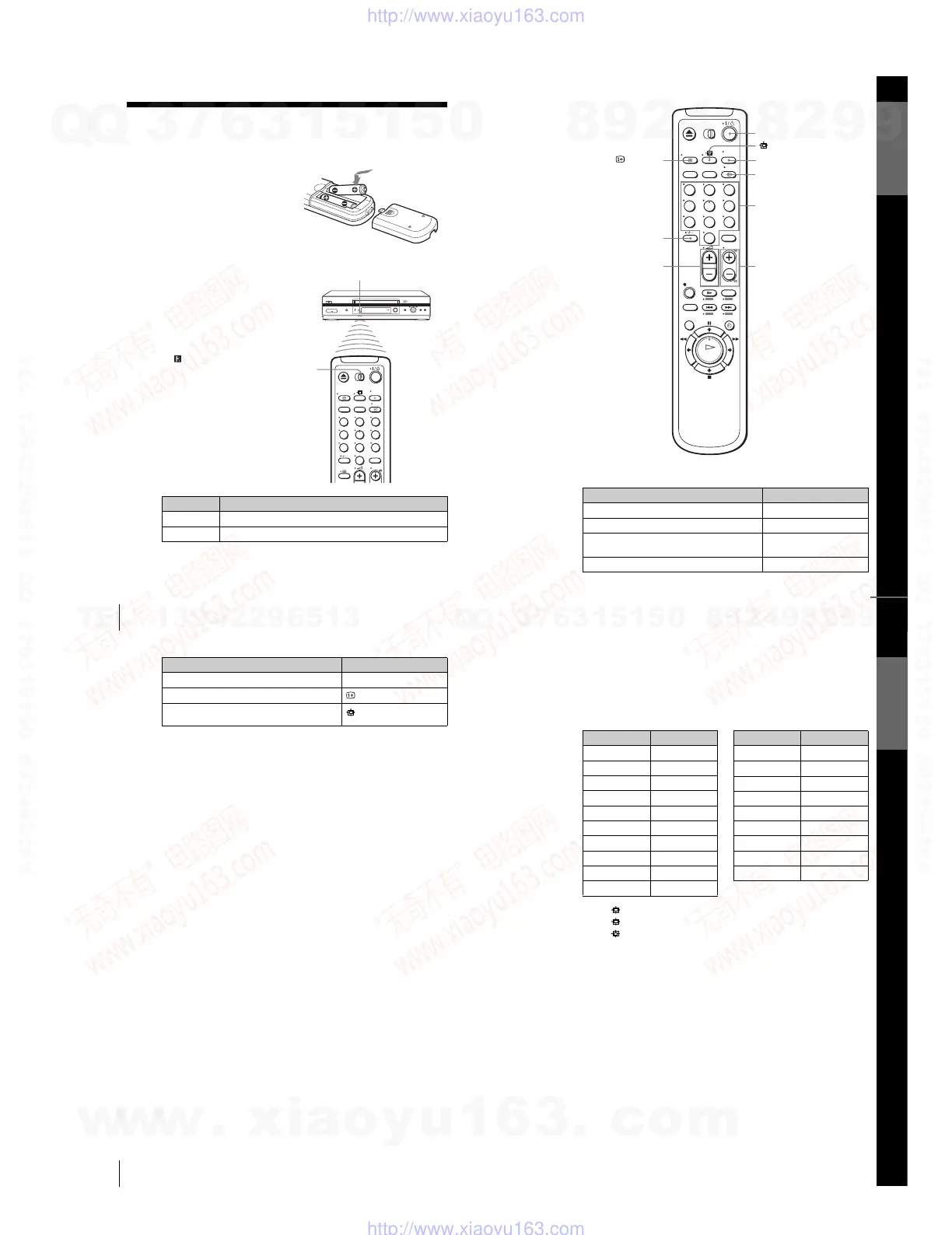
Insert two R6 (size AA) batteries
by matching the + and – on the
batteries to the diagram inside the
battery compartment.
Insert the negative (–) end first,
then push in and down until the
positive (+) end clicks into the
position.
Using the remote
commander
Yo u can use this remote
commander to operate this VCR
and a Sony TV. Buttons on the
remote commander marked with a
dot (•) can be used to operate your
Sony TV. If the TV does not have
the symbol near the remote
sensor, this remote commander
will not operate the TV.
To o perate Set [TV] / [VIDEO] to
the VCR [VIDEO] and point at the remote sensor at the VCR
a Sony TV [TV] and point at the remote sensor at the TV
123
456
789
0
Remote sensor
[TV] /
[VIDEO]
13
Setting up the remote commander
Getting Started
TV control buttons
To Press
Set the TV to standby mode ?/1
Select an input source: aerial in or line in t TV/VIDEO
Select the TV’s programme position Programme number buttons,
-, PROG +/–
Adjust the volume of the TV 2 +/–
PROG +/–/
c
/
C
2
+/–
123
456
789
0
Programme
number
buttons
DISPLAY
?
/
1
t
TV/VIDEO
-
AUDIO MONITOR
s
continued
14
Setting up the remote commander
Notes
•With normal use, the batteries should last about three to six months.
• If you do not use the remote commander for an extended period of time, remove
the batteries to avoid possible damage from battery leakage.
•Do not use a new battery together with an old one.
•Do not use different types of batteries together.
•Do not leave the remote commander in an extremely hot or humid place.
•Do not drop any foreign object into the remote casing, particularly when replacing
the batteries.
•Do not expose the remote sensor to direct light from the sun or lighting apparatus.
Doing so may cause a malfunction.
•Some buttons may not work with certain Sony TVs.
*
2
not available on SLV-SE240G/I
Select the sound*
2
AUDIO MONITOR
Call up the on-screen display
DISPLAY
Switch to/from wide mode of a Sony wide TV (For
other manufactures’ wide TVs.
(wide)
To Press
15
Setting up the remote commander
Getting Started
Code numbers of controllable TVs
If more than one code number is listed, try entering them one at a time until
you find the one that works with your TV.
To switch to wide mode, see the footnotes below this table for the applicable
code numbers.
*
1
Press (wide) to switch the wide picture mode on or off.
*
2
Press (wide), then press 2 +/– to select the wide picture mode you want.
*
3
Press (wide). The menu appears on the TV screen. Then, press M/m/</, to
select the wide picture you want and press OK.
Tip
•When you set your TV’s code number correctly while the TV is turned on, the TV
turns off automatically.
Notes
• If you enter a new code number, the code number previously entered will be
erased.
• If the TV uses a different remote control system from the one programmed to work
with the VCR, you cannot control your TV with the remote commander.
•When you replace the batteries of the remote commander, the code number may
change. Set the appropriate code number every time you replace the batteries.
Manufacturer Code number
Sony
01*
1
, 02
Akai 68
Ferguson 52
Grundig
10*
1
, 11*
1
Hitachi 24
JVC 33
Loewe 45
Mivar 09, 70
NEC 66
Nokia
15, 16, 69*
3
Panasonic
17*
1
, 49
Philips
06*
1
, 07*
1
, 08*
1
Saba 12, 13
Samsung22, 23
Sanyo 25
Sharp 29
Telefunken 36
Thomson
43*
2
Tos hiba 38
Manufacturer Code number
w
w
w
.
x
i
a
o
y
u
1
6
3
.
c
o
m
Q
Q
3
7
6
3
1
5
1
5
0
9
9
2
8
9
4
2
9
8
T
E
L
1
3
9
4
2
2
9
6
5
1
3
9
9
2
8
9
4
2
9
8
0
5
1
5
1
3
6
7
3
Q
Q
TEL 13942296513 QQ 376315150 892498299
TEL 13942296513 QQ 376315150 892498299
http://www.xiaoyu163.com
http://www.xiaoyu163.com


 To Next Page