HT-CT290/CT291
13
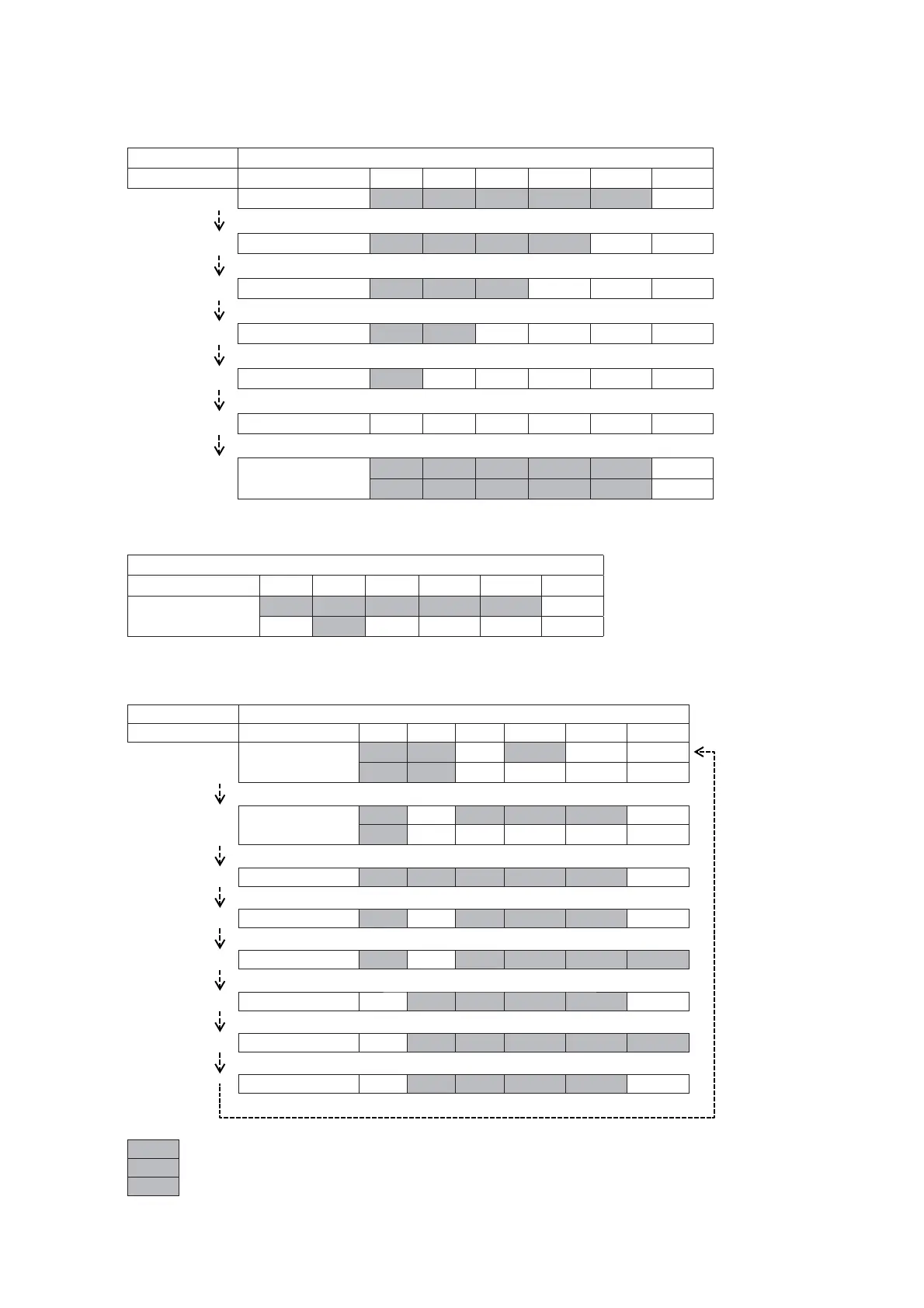
5. Each time touch of any touch key in the set, the LED will display as below. The touch key which are already counted once are not
counted again.
Operation LED REACTION SPEC
Transition Action USB TV BT MOVIE MUSIC BT LED
Key-link Check Mode O O O O O
Press Key 1 OK O O O O
Press Key 2 OK O O O
Press Key 3 OK O O
Press Key 4 OK O
Press Key 5 OK
AUTO
KEY-LINE CHECK
OK
. . . . . . . . . . . . . . . . . . . . . . . . .
*** *** *** *** ***
6. In the state of step 5, press the [2 +] button on the remote commander to check the destination and version. LED lights will display as
below table:
LED REACTION SPEC
Action USB TV BT MOVIE MUSIC BT LED
PROFILE CHECK
O . . . . . OO O
*3*
7. Each time the [2 ‒] button is pressed, the display changes from model name destination MTK version BT MAIN S/W version
BT MAIN H/W version BT WOOFER S/W version BT WOOFER H/W version SYSTEM version in this order, and returns
to the model name display. LED lights will display as below:
Operation LED REACTION SPEC
Transition Action USB TV BT MOVIE MUSIC BT LED
MODEL
. . . . . . . . . . O
*** ***
Press VOL+
DESTINATION
. . . . . Y Y Y
***
Press VOL+
MTK O O A B C
Press VOL+
BT MAIN S/W O A B C
Press VOL+
BT MAIN H/W O A B C O
Press VOL+
BT WOOFER S/W O A B C
Press VOL+
BT WOOFER H/W O A B C O
Press VOL+
SYSTEM AB C D
Press VOL+
A : MAJOR VERSION
B/C/D : MINOR VERSION
Y : DESTINATION
Note: Refer Destination
Indication Spec table
Note: Refer Version
Indication Spec table



 To Next Page