HT-CT290/CT291
12
SECTION 3
TEST MODE
RESET
The reset clears certain data in this system without initialize Personal Information and some operation data.
Execute this mode when returning the unit to the customers.
Procedure:
1. Touch the [
1
] touch key on the main unit to turn the power on.
2. Touch the [–] touch key and [
1
] touch key on the main unit simultaneously for fi ve seconds.
3. All LED will lights on and blink 3 times, after that, the main unit will restart.
PANEL TEST
Procedure:
1. Touch the [
1
] touch key on the main unit to turn the power on.
2. Press button in order of the [NX] [PLAY MODE] [ m ] [ M ] on the remote commander.
(Make the interval when each button is pressed within two seconds).
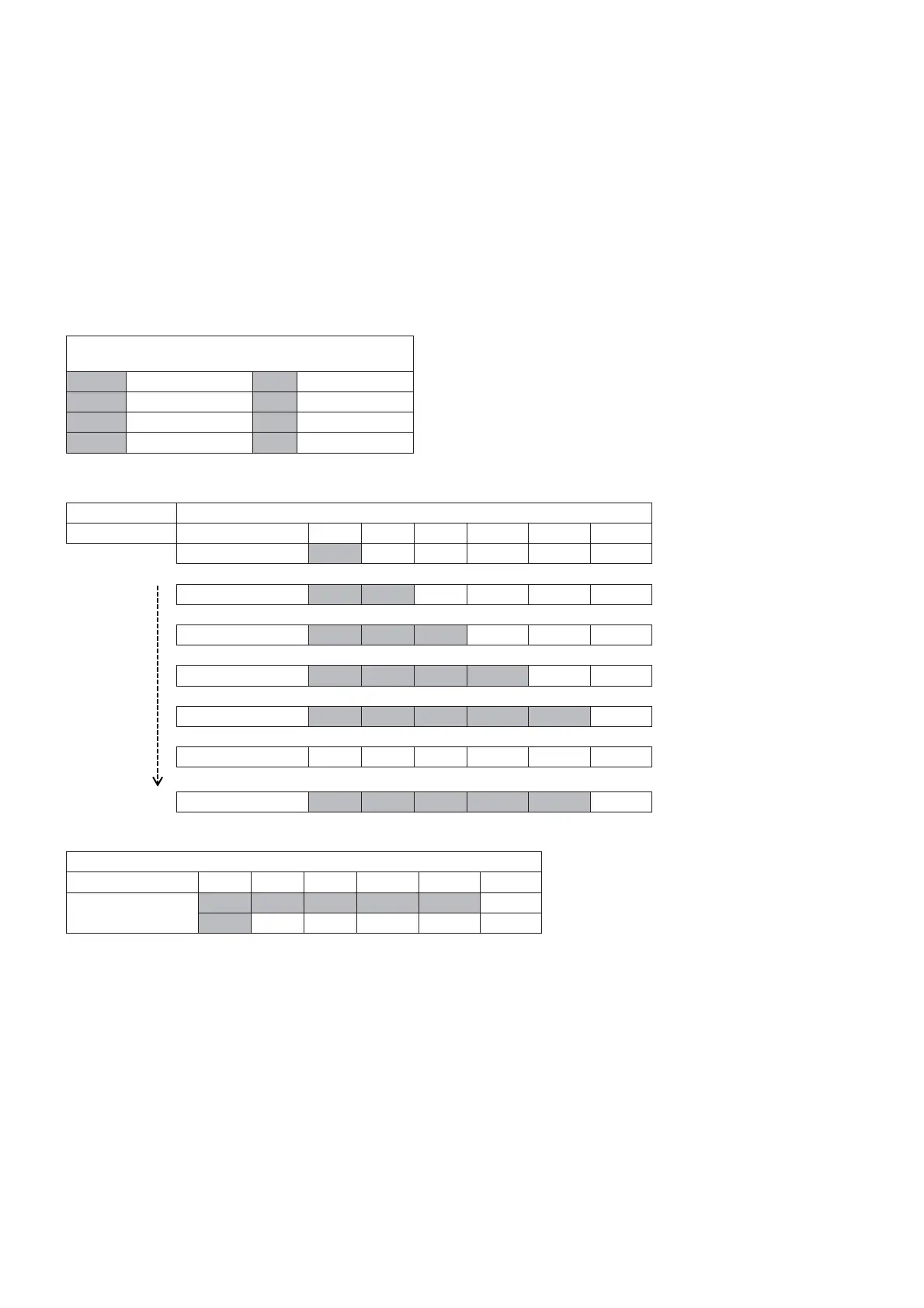
LED DISPLAY SPEC
O Light On Constantly *3* Blink 3 times
………. Flash Fast *2* Blink 2 times
. . . . . Flash Slow *1* Blink 1 times
Flash Repeat
***
Blink continously
Note: Blue BT LED will light up only for ARC mode.
Operation LED REACTION SPEC
Transition Action USB TV BT MOVIE MUSIC BT LED
MODE IN SEQ1 O
AUTO MODE IN SEQ2 O O
MODE IN SEQ3 O O O
MODE IN SEQ4 O O O O
MODE IN SEQ5 O O O O O
MODE IN SEQ6
HOLD PANEL TEST O O O O O
3. In the state of step 2, press the [INPUT] button on the remote commander, the LED lights will display as below table:
LED REACTION SPEC
Action USB TV BT MOVIE MUSIC BT LED
KEY-LINK CHECK
. . . . . O O O O
*3*
4. The LED lights on from USB, TV, BT, MOVIE and MUSIC, after that, all LED will lights on and blink once.



 To Next Page