HT-CT290/CT291
16
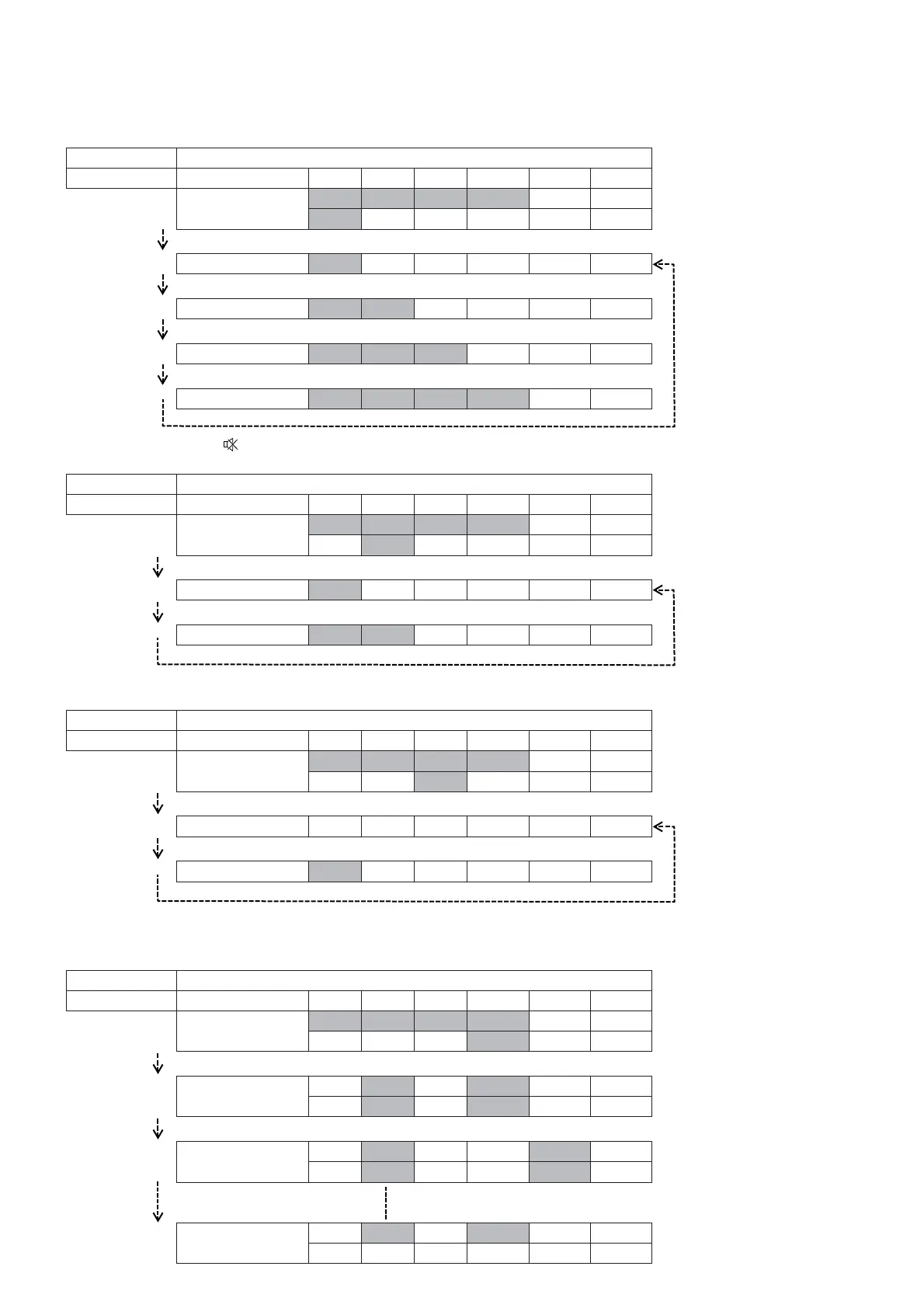
3. In the state of step 2, press [PLAY MODE] button on the remote commander to swap speaker output.
The LED will lights on as below table:
Operation LED REACTION SPEC
Transition Action USB TV BT MOVIE MUSIC BT LED
SWAP
. . . . . O O O
*3*
AUTO
THRU O
F2S O O
F2CW O O O
FULL O O O O
4. In the state of step 3, press [ ] button on the remote commander to change volume level.
The LED light will display as below table:
Operation LED REACTION SPEC
Transition Action USB TV BT MOVIE MUSIC BT LED
VOLUME
O . . . . . O O
*3*
AUTO
VOL. NORMAL O
VOL. MSM O O
5. In the state of step 4, press [CLEARAUDIO+] button on the remote commander to toggle VACS ON/OFF.
The LED light will display as below table:
Operation LED REACTION SPEC
Transition Action USB TV BT MOVIE MUSIC BT LED
VACS ON/OFF
O O . . . . . O
*3*
AUTO
VACS OFF
Press CA+
VACS ON O
Press CA+
6. In the state of step 5, press [VOICE] button on the remote commander to adjust the volume gain.
It can be adjusted between -1.0 to +1.0 (increase everytime 0.1 step).
Eg: Refer to Gain Table as below:
Operation LED REACTION SPEC
Transition Action USB TV BT MOVIE MUSIC BT LED
Gain adjust
O O O . . . . .
*3*
AUTO
GAIN -1.0
………. ……….
*** ***
Press VOICE
GAIN -0.9
………. ……….
*** ***
Press VOICE
GAIN +1.0
OO



 To Next Page