8
GB
Guide to Parts and Controls
Front
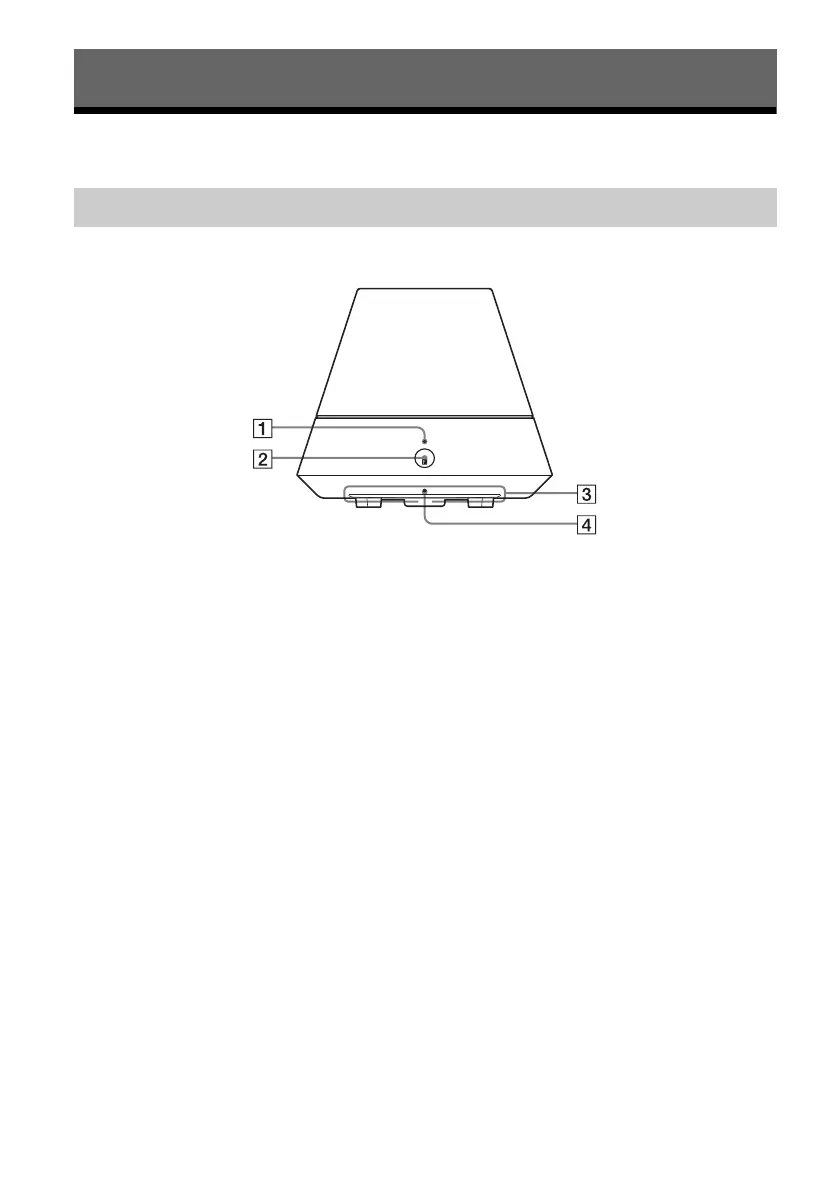
A PARTY STREAMING indicator
Indicates the PARTY STREAMING status
(page 25).
Green: The unit is having a PARTY as
PARTY host.
Amber: The unit has joined a PARTY as
PARTY guest.
Red: An error has occurred.
B PARTY button
Press to use the PARTY STREAMING
function (page 25).
Tip
This button also receives signals from a remote
control.
Operate the remote control aiming at this point.
The remote signal reception of this unit may not
work correctly when the surface of this button is
dirty.
C Illumination indicator
Indicates the playback status of audio
content.
White: The unit is in playback mode.
Blue: The unit has stopped playing back
audio content.
Note
This indicator normally lights up in white even
if the unit stops playing when audio input is
selected.
D Network standby indicator
Lights up in amber when the unit is in the
network standby mode (page 13).
Getting Started
Main unit



 To Next Page