SA-WCT180
9
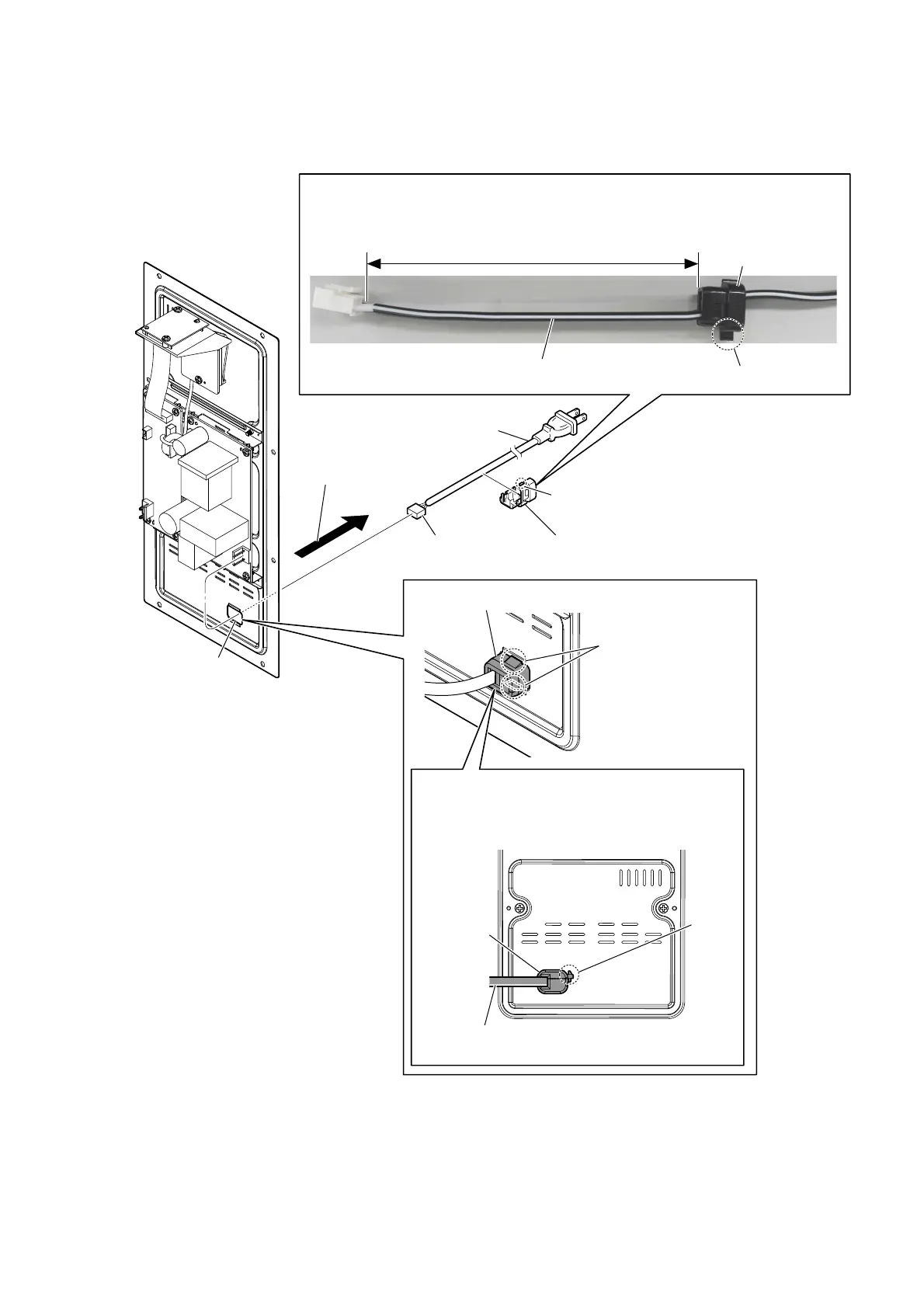
2-5. AC CORD (AC1)
Note 2:
Check the directions of the claw of the cord bush,
and install correctly.
+RZWRLQVWDOOWKHFRUGEXVK
claw
AC cord (AC1)
[white line]
cord bush
125 ± 5 mm
–5HDUYLHZ–
2 two claws
5 cord bush
3 Draw the AC cord block out
of the hole in AMP block.
6 AC cord (AC1)
4 claw
1 connector
(CN501)
–$03EORFNIURQWYLHZ–
cord bush
hole
,QVWDOODWLRQGLUHFWLRQIRUWKH$&FRUGEORFN
claw
cord bush
Note 1:
When installing the cord bush to the AC cord (AC1), check the directions of the white line
of the AC cord (AC1) and the claw of the cord bush, and install correctly.
Note 3:
Make sure that the white line
is at the bottom.



 To Next Page