EasyManua.ls Logo

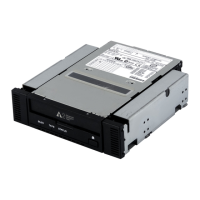
Sony SDX-500 Series - User Manual

Sony SDX-500 Series
28 pages
Print Icon
To Next Page IconTo Next Page
Loading...
3-866-003-03(2)
1996 Sony Corporation
AIT Drive
SDX-500 Series
SDX-510 Series
User’s Guide

Other manuals for Sony SDX-500 Series

Question and Answer IconNeed help?

Do you have a question about the Sony SDX-500 Series and is the answer not in the manual?

Summary

Introduction

Product Features

Details the features of the SDX-500 series tape drive, including capacity, transfer rates, and supported formats.

Precautions

Installation Precautions

Advises on environmental conditions to avoid when installing the drive, such as humidity and temperature.

Operation Precautions

Provides warnings and guidelines for safe and proper operation, including moving the drive and temperature changes.

Transportation Precautions

Offers advice on how to pack and transport the drive safely, including using original materials.

SCSI Termination

Microsoft PC97 SCSI Requirements

Details the SCSI termination specifications required by the Microsoft PC97 standard for the SDX-500C.

Installation

SCSI Connection and ID Setting

Guides users on setting the SCSI ID using jumpers and connecting the SCSI 68-pin connector.

Parity Disable Jumper

Describes how to disable the parity check function using a jumper on the drive.

Option Switches (DIP Switch)

DIP Switch Positions

Details the function of each position on the DIP switch, including reserved settings and control options.

Data Compression Control

Explains how DIP switches control data compression and host control settings for the drive.

Mounting Holes

3.5 Standard Height (SDX-500 C)

Provides detailed mechanical drawings and dimensions for mounting the 3.5" standard height SDX-500C drive.

3.5 Standard Height (SDX-510 C)

Provides mechanical drawings and dimensions for mounting the 3.5" standard height SDX-510C drive.

5.25 Half Height (SDX-500 C;R)

Presents mechanical drawings and dimensions for mounting the 5.25" half height SDX-500C/R drive.

Remodeling 5.25 to 3.5 Model

Drive Orientation

Operation Overview

Front Panel LEDs and EJECT Button

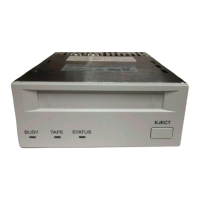
Locates and describes the BUSY, TAPE, and STATUS LEDs and the EJECT button on the front panel.

LED Drive Status Indication

Drive Operations

Loading a Tape

Provides instructions on how to insert and load a cassette into the drive.

Unloading a Tape

Describes the procedure for removing a cassette from the drive using the Eject button or SCSI command.

Write-Protecting a Tape

Details how to use the tab on the cassette to protect data from writing or accidental erasure.

Using a Cleaning Cassette

Advises on the use of a cleaning cartridge for the drive, especially when errors occur.

Emergency Tape Removal

Interface Implementation

Supported SCSI Messages

Lists the various SCSI messages that the drive supports for communication.

Supported SCSI Commands

Lists the specific SCSI commands that the drive recognizes and can execute.

Specifications

Product Specifications

Details the physical, environmental, and performance specifications of the SDX-500/510 series drives.

Temperature and Humidity

Power Requirements

Environmental Factors

Suspended Particulate

Defines acceptable levels of suspended particulate matter for drive operation.

ESD

Outlines Electrostatic Discharge (ESD) voltage limits to prevent drive damage.

Air-cooling Requirement

Recommends clean air flow and specifies maximum surrounding temperature for proper cooling.
Third Party Support Contacts

Sony Contacts

Summary

Introduction

Product Features

Details the features of the SDX-500 series tape drive, including capacity, transfer rates, and supported formats.

Precautions

Installation Precautions

Advises on environmental conditions to avoid when installing the drive, such as humidity and temperature.

Operation Precautions

Provides warnings and guidelines for safe and proper operation, including moving the drive and temperature changes.

Transportation Precautions

Offers advice on how to pack and transport the drive safely, including using original materials.

SCSI Termination

Microsoft PC97 SCSI Requirements

Details the SCSI termination specifications required by the Microsoft PC97 standard for the SDX-500C.

Installation

SCSI Connection and ID Setting

Guides users on setting the SCSI ID using jumpers and connecting the SCSI 68-pin connector.

Parity Disable Jumper

Describes how to disable the parity check function using a jumper on the drive.

Option Switches (DIP Switch)

DIP Switch Positions

Details the function of each position on the DIP switch, including reserved settings and control options.

Data Compression Control

Explains how DIP switches control data compression and host control settings for the drive.

Mounting Holes

3.5 Standard Height (SDX-500 C)

Provides detailed mechanical drawings and dimensions for mounting the 3.5" standard height SDX-500C drive.

3.5 Standard Height (SDX-510 C)

Provides mechanical drawings and dimensions for mounting the 3.5" standard height SDX-510C drive.

5.25 Half Height (SDX-500 C;R)

Presents mechanical drawings and dimensions for mounting the 5.25" half height SDX-500C/R drive.

Remodeling 5.25 to 3.5 Model

Drive Orientation

Operation Overview

Front Panel LEDs and EJECT Button

Locates and describes the BUSY, TAPE, and STATUS LEDs and the EJECT button on the front panel.

LED Drive Status Indication

Drive Operations

Loading a Tape

Provides instructions on how to insert and load a cassette into the drive.

Unloading a Tape

Describes the procedure for removing a cassette from the drive using the Eject button or SCSI command.

Write-Protecting a Tape

Details how to use the tab on the cassette to protect data from writing or accidental erasure.

Using a Cleaning Cassette

Advises on the use of a cleaning cartridge for the drive, especially when errors occur.

Emergency Tape Removal

Interface Implementation

Supported SCSI Messages

Lists the various SCSI messages that the drive supports for communication.

Supported SCSI Commands

Lists the specific SCSI commands that the drive recognizes and can execute.

Specifications

Product Specifications

Details the physical, environmental, and performance specifications of the SDX-500/510 series drives.

Temperature and Humidity

Power Requirements

Environmental Factors

Suspended Particulate

Defines acceptable levels of suspended particulate matter for drive operation.

ESD

Outlines Electrostatic Discharge (ESD) voltage limits to prevent drive damage.

Air-cooling Requirement

Recommends clean air flow and specifies maximum surrounding temperature for proper cooling.
Third Party Support Contacts

Sony Contacts

Sony SDX-500 Series Specifications

General IconGeneral
BrandSony
ModelSDX-500 Series
CategoryStorage
LanguageEnglish

Related product manuals