35
GB
USB Transfer
3 Press / repeatedly to select the
bit rate you want, then press .
• 128 KBPS: encoded MP3 tracks have
smaller file size and lower audio
quality.
• 256 KBPS: encoded MP3 tracks have
bigger file size but higher audio
quality.
To exit OPTIONS menu, hold down
SHIFT, then press OPTIONS.
You can easily transfer all the music on a
disc or USB A to USB B (Synchronized
Transfer). You can also transfer a single
track or audio file during playback
(REC1 Transfer).
Use the buttons on the unit to perform this
operation.
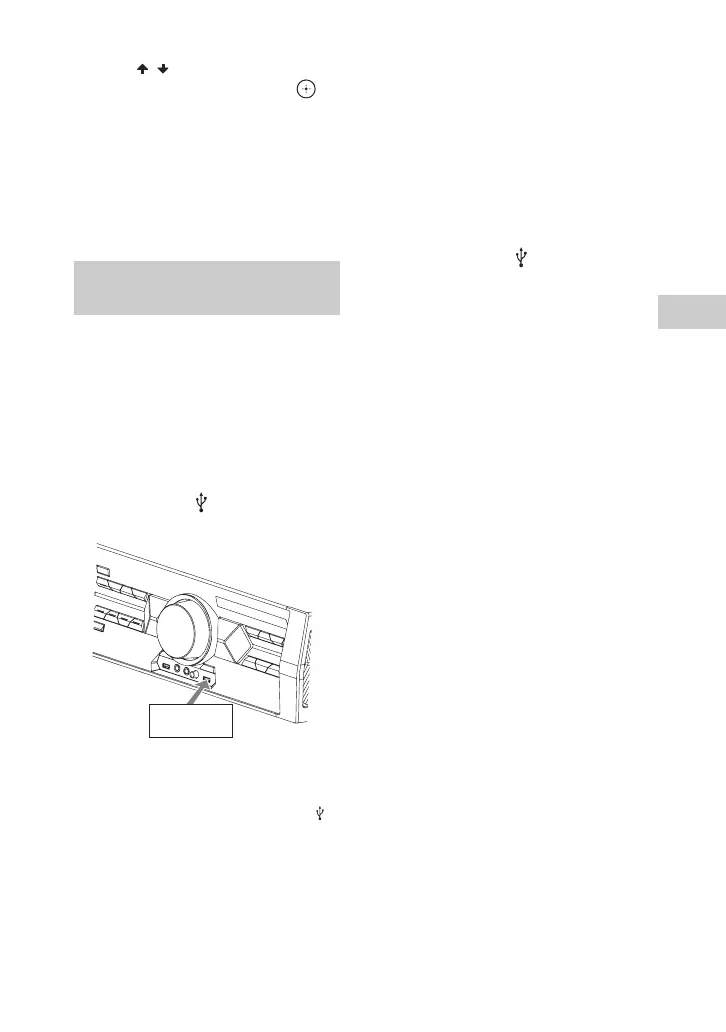
1 Connect a transferable USB
device to the B port as shown
below.
Note
You can use a USB adaptor (not supplied) to
connect the USB device to the unit if the
USB device cannot be plugged into the
port.
2 For disc:
Press DVD/CD, then load the disc. If
the system starts playback
automatically, press x twice to stop
the playback fully.
For USB:
Press USB/USB SELECT repeatedly
until “USB A” lights up in the display
panel, then connect a USB device you
want to transfer to A port.
3 For Synchronized Transfer:
When playback is stopped, hold down
SHIFT, then press PLAY MODE on
the remote control repeatedly to select
the play mode you want.
Notes
• If you start transferring in [FOLDER
(SHUFFLE)], the selected play mode
changes to [FOLDER] automatically.
• If you start transferring in Shuffle Play
(except [FOLDER (SHUFFLE)]), Repeat
Play or Program Play with no steps, the
selected play mode changes to Normal
Play automatically.
For REC1 Transfer:
Select the track or audio file you want
to transfer, then start playback.
4 Press REC TO USB B.
“PUSH ENTER” appears in the
display panel.
5 Press ENTER.
The transfer starts when “DON’T
REMOVE” appears in the display
panel.
For Synchronized Transfer:
When the transfer is completed, the
transfer source and the USB device
stop automatically.
For REC1 Transfer:
When the transfer is completed, the
disc or the USB device continues to
play.
Transferring music from a disc
or USB device
USB device



 To Next Page