EasyManua.ls Logo

Sony SL-2710 - Setting the Ciock

Sony SL-2710
144 pages
Print Icon
To Next Page IconTo Next Page
To Previous Page IconTo Previous Page
Loading...
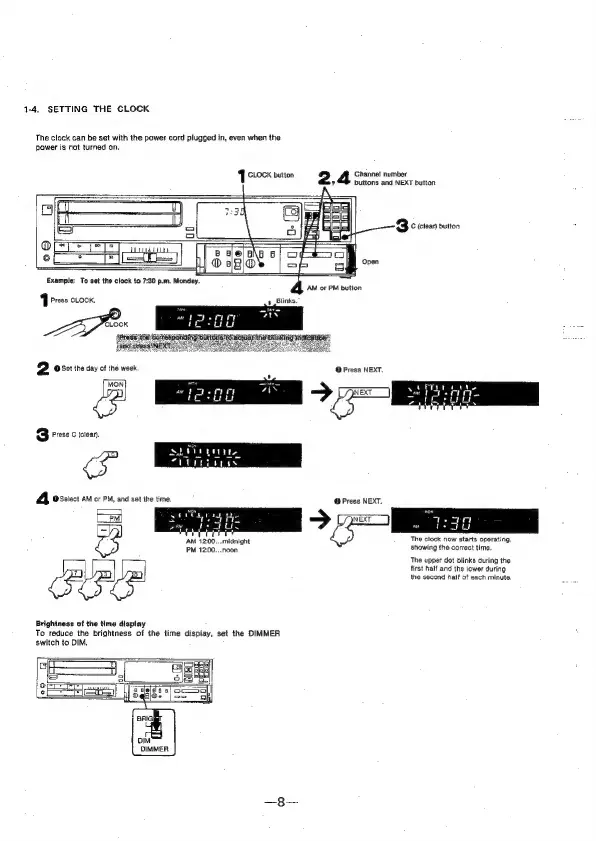
1-4.
SETTING
THE
CLOCK
The
clock
can
be
set
with
the
power
cord
plugged
in,
even
when
the
power
is
not
turned
on.
,
buttons
and
NEXT
button
1
CLOCK
button
2
Ghannet
number
aN
im
3
C
(clear)
button
OFT
TP)
aan
®
{y=
Example:
To
set
the
clock
to
7:30
p.m.
Monday.
J
Press
Look,
Ze
D
os0t
tne
day
of
the
week
@
Press
NEXT.
va
3
Press
C
(clear).
cs
A
@Select
AM
or
PM,
and
set
the
time,
@
Press
NEXT.
5
E>
The
clock
now
starts
operating,
showing
the
correct
time,
AM
12:00...
midnight
The
upper
dot
blinks
during
the
first
half
and
the
lower
during
the
second
half
of
each
minute.
Brightness
of
the
time
display
To
reduce
the
brightness
of
the
time
display,
set
the
DIMMER
switch
to
DIM.
DIMMER