EasyManua.ls Logo

Sony SL-2710 - How to Select TV Channels

Sony SL-2710
144 pages
Print Icon
To Next Page IconTo Next Page
To Previous Page IconTo Previous Page
Loading...
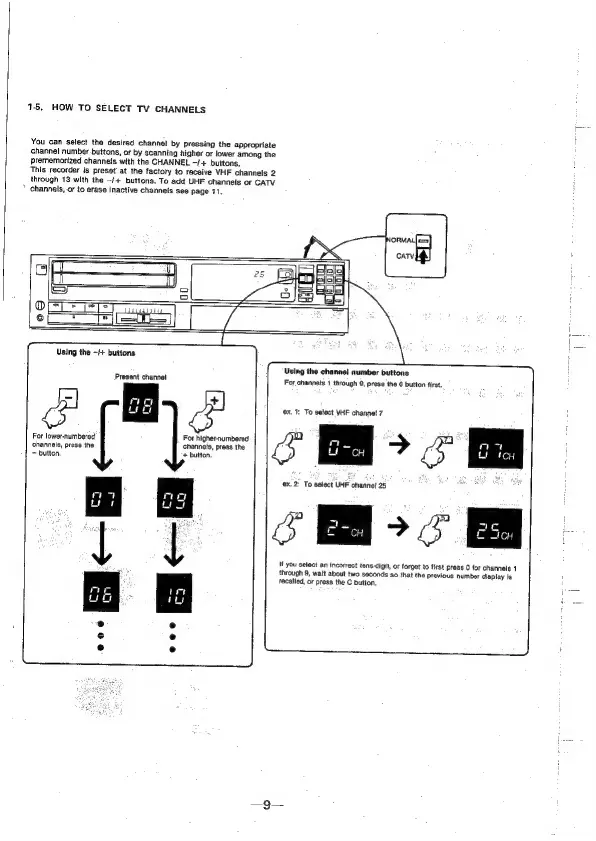
15,
HOW
TO
SELECT
TV
CHANNELS
You
can
select
the
desired
channel
by
Pressing
the
appropriate
channel
number.buttons,
or
by
scanning
higher
or
lower
among
the
prememorized
channels
with
the
CHANNEL
—/+
buttons,
This
recorder
is
preset
at
the
factory
to
receive
VHF
channels
2
through
13
with
the
-/+
buttons.
To
add
UHF
channels
or
CATV
*
channels,
or
to
erase
inactive
channels
see
page
71.
WPnVeSTTIN
es
Using
the
-++
buttons
Present
channel
For
higher-numbered
channels,
press
the
+
button.
For
lower-numbered
channels,
press
the
button,
Using
the
channel
number
buttons
For
channels
1
through
9,
press
the
0
button
first.
ex.
1:
To
select
VHF
channe!
7
ex.2)
To
select
UHF
channel
25
os
Mf
you
select
an
incorrect
tens-digit,
or
forget
to
first
press
0
for
channels
1
through
8,
wait
about
two
seconds
so
that
the
previous
number
display
Is
recalled,
or
press
the
C
button.
om