D:\WINNT\Profiles\Y3_ichikawa-w\Desktop\nakui sagyo\1016\3065679111 SLV-SE310
QSG\GB1EX.fm
masterpage:Right
SLV-SE310 QSG
3-065-679-11 (1) GB
5 Tuning your TV to the VCR
If your TV does not have a Scart (EURO-AV) connector.
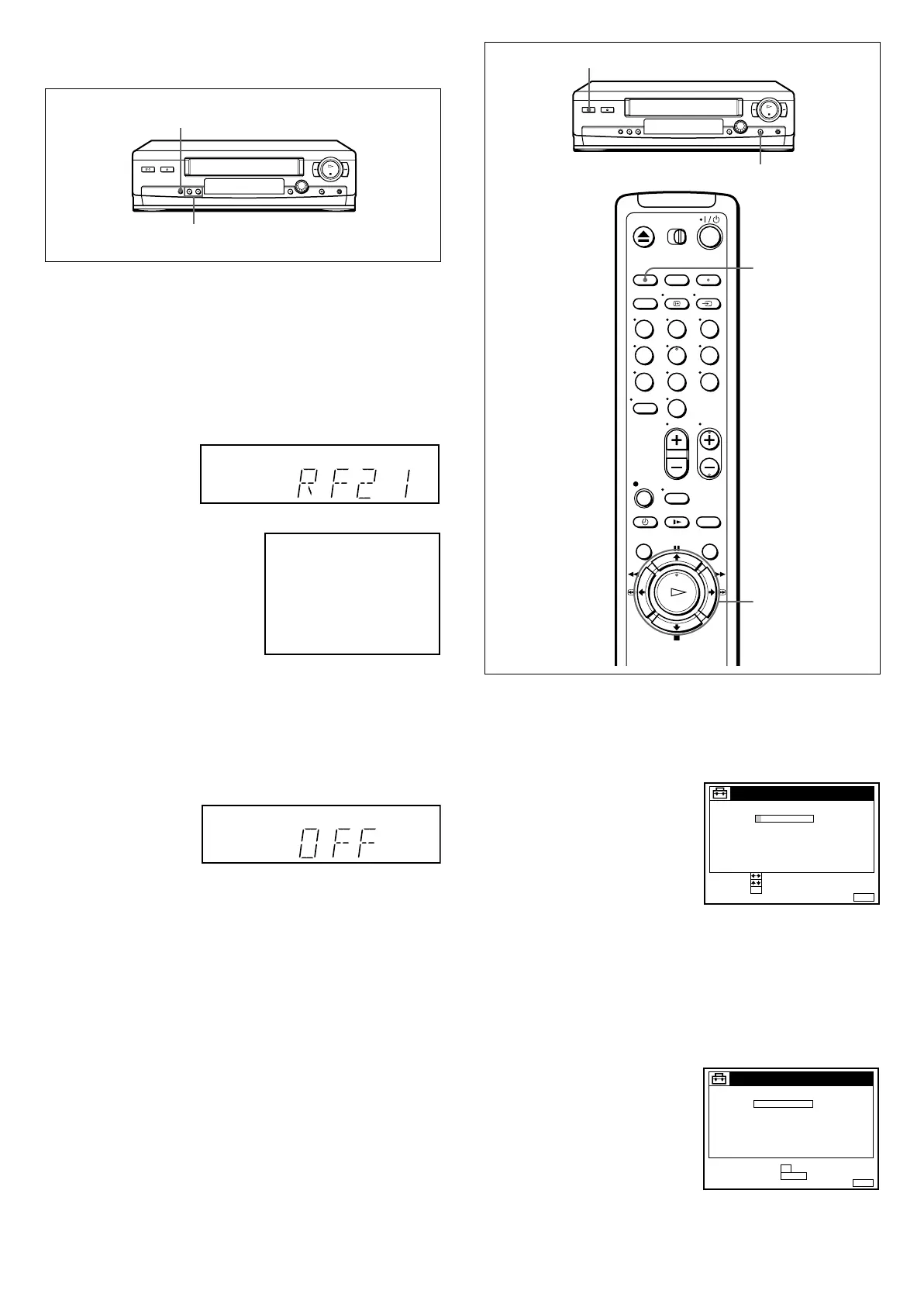
1 Press RF CHANNEL on the VCR lightly.
2 Turn on your TV and select a vacant programme position.
3 Tune the TV to the display window’s RF channel to show the
message below. Refer to your TV’s instruction manual for
tuning instructions.
4 Press RF CHANNEL.
If your TV has a Scart (EURO-AV) connector.
1 Press RF CHANNEL on the VCR lightly.
2 Press PROGRAM +/– to set the RF channel to off.
3 Press RF CHANNEL.
Now you can operate your VCR.
For details on how to use your VCR, refer to the Operating
Instructions.
You can enter your personal code to mark your new VCR for
identification. See “Setting your personal code.”
Setting your personal code
For security, you can enter a personal code (up to eleven
characters), such as your post code. If your VCR is stolen and then
recovered, you can identify your VCR using your personal code.
Once you enter the code, you can never change it. Please make a
note of the code to quote to the police if your VCR is stolen.
Before you start...
• Turn on your TV and set the TV to the video channel.
• IfthereisatapeintheVCR,removeit.
•TurnofftheVCR.
RF CHANNEL
PROGRAM +/–
SONY VIDEO CASSETTE RECORDER
1 Hold down X (pause) and
I/1 (on/standby) on the
VCR simultaneously for
three seconds.
2 Enter your personal code.
1 Press M/m to select a character.
A
t
B
t
...
t
Z
t
0
t
1
t
...
t
9
t
(blank space)
t
– (hyphen)
t
A
2 Press , to set the next character.
3 Repeat steps 1 and 2 until you have entered the entire
personal code.
3 Press OK.
4 If the displayed personal code is correct, press OK.
If not, press CLEAR and repeat from step 2.
123
456
789
0
I/1
X
CLEAR
M/m/</,
OK
MENUEXIT :
SECURITY FUNCTION
–
PERSONAL CODE
––––––– –
CONFIRM :
SET :
OK
SELECT :
––
MENUEXIT :
SECURITY FUNCTION
–
PERSONAL CODE
WB–1578 – ––
CANCEL :
CLEAR
FINAL CONFIRM
OK:


 To Previous Page