EasyManua.ls Logo

Sony SQA-2030 - Page 10

Sony SQA-2030
14 pages
Print Icon
To Next Page IconTo Next Page
To Previous Page IconTo Previous Page
Loading...
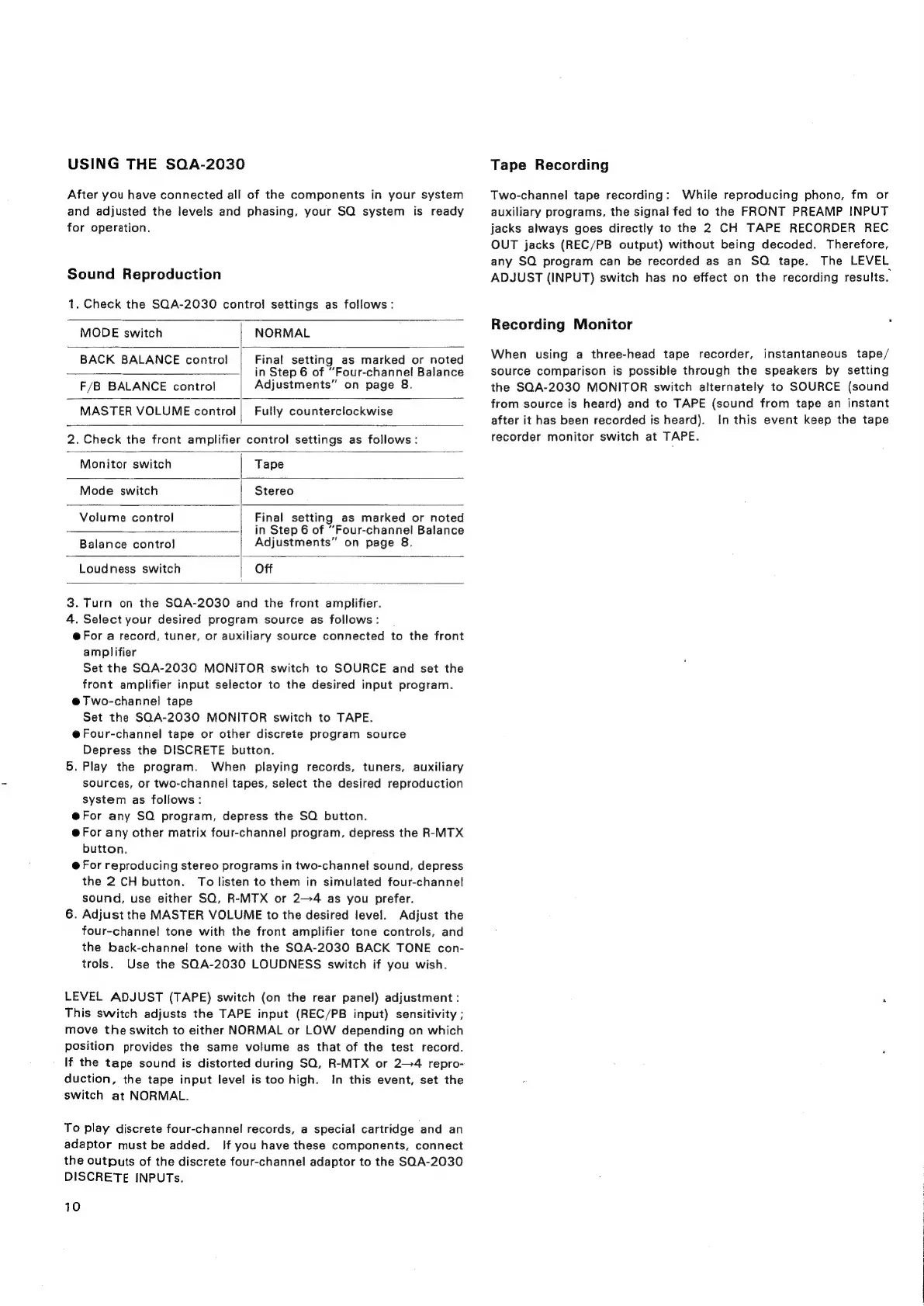
USING
THE
SOA-2030
After
you
have
connected
all
of
the
components
in
your
system
and
adjusted
the
levels
and
phasing,
your
SQ
system
is
ready
for
operation.
Sound
Reproduction
1.
Check
the
SQA-2030
control
settings
as
follows:
MODE
switch
NORMAL
BACK
BALANCE
control
Final
setting
as
marked
or
noted
in
Step
6
of
“Four-channel
Balance
Adjustments”
on
page
8.
F/B
BALANCE
control
MASTER
VOLUME
control
Fully
counterclockwise
2.
Check
the
front
amplifier
control
settings
as
follows:
Monitor
switch
Tape
Mode
switch
Stereo
Final
setting
as
marked
or
noted
in
Step
6
of
“Four-channel
Balance
Adjustments”
on
page
8.
Volume
control
Balance
contro}
Loudness
switch
Off
3.
Turn
on
the
SQA-2030
and
the
front
amplifier.
4.
Select
your
desired
program
source
as
follows:
@For
a
record,
tuner,
or
auxiliary
source
connected
to
the
front
amplifier
Set
the
SQA-2030
MONITOR
switch
to
SOURCE
and
set
the
front
amplifier
input
selector
to
the
desired
input
program.
@Two-channel
tape
Set
the
SQA-2030
MONITOR
switch
to
TAPE.
@Four-channel
tape
or
other
discrete
program
source
Depress
the
DISCRETE
button.
5,
Play
the
program.
When
playing
records,
tuners,
auxiliary
sources,
or
two-channel
tapes,
select
the
desired
reproduction
system
as
follows:
@For
any
SQ
program,
depress
the
SQ
button.
@
For
any
other
matrix
four-channel
program,
depress
the
R-MTX
button.
@
For
reproducing
stereo
programs
in
two-channel
sound,
depress
the
2
CH
button.
To
listen
to
them
in
simulated
four-channel
sound,
use
either
SQ,
R-MTX
or
2—4
as
you
prefer.
6.
Adjust
the
MASTER
VOLUME
to
the
desired
level.
Adjust
the
four-channel
tone
with
the
front
amplifier
tone
controls,
and
the
back-channel
tone
with
the
SQA-2030
BACK
TONE
con-
trols.
Use
the
SQA-2030
LOUDNESS
switch
if
you
wish.
LEVEL
ADJUST
(TAPE)
switch
(on
the
rear
panel)
adjustment
:
This
switch
adjusts
the
TAPE
input
(REC/PB
input)
sensitivity
;
move
the
switch
to
either
NORMAL
or
LOW
depending
on
which
position
provides
the
same
volume
as
that
of
the
test
record.
If
the
tape
sound
is
distorted
during
SQ,
R-MTX
or
2-4
repro-
duction,
the
tape
input
level
is
too
high.
In
this
event,
set
the
switch
at
NORMAL.
To
play
discrete
four-channel
records,
a
special
cartridge
and
an
adaptor
must
be
added.
If
you
have
these
components,
connect
the
outputs
of
the
discrete
four-channe!
adaptor
to
the
SQA-2030
DISCRETE
INPUTs.
10
Tape
Recording
Two-channel
tape
recording:
While
reproducing
phono,
fm
or
auxiliary
programs,
the
signal
fed
to
the
FRONT
PREAMP
INPUT
jacks
always
goes
directly
to
the
2
CH
TAPE
RECORDER
REC
OUT
jacks
(REC/PB
output)
without
being
decoded.
Therefore,
any
SQ
program
can
be
recorded
as
an
SOQ
tape.
The
LEVEL
ADJUST
(INPUT)
switch
has
no
effect
on
the
recording
results.
Recording
Monitor
When
using
a
three-head
tape
recorder,
instantaneous
tape/
source
comparison
is
possible
through
the
speakers
by
setting
the
SQA-2030
MONITOR
switch
alternately
to
SOURCE
(sound
from
source
is
heard)
and
to
TAPE
(sound
from
tape
an
instant
after
it
has
been
recorded
is
heard).
In
this
event
keep
the
tape
recorder
monitor
switch
at
TAPE.

Related product manuals