EasyManua.ls Logo

Sony SQA-2030 - Preparing for Use; Do and Dont

Sony SQA-2030
14 pages
Print Icon
To Next Page IconTo Next Page
To Previous Page IconTo Previous Page
Loading...
TABLE
OF
CONTENTS
PREPARING
FOR
USE
Wh
packing’
220.
4
cee
lak
et
or
Bh
we
Be
Gk
es
x
3
DO“
arid’DON
Te.
oss
So
ese)
Bk
ee
eas
a
ty
a
seats
3
System
Connections
..............280200.
4
Signal
Diagram
of
SQ
System
Connection
Notes
Speaker
Location
Front
Amplifier
Record
Player,
Tuner
and
Auxiliary
Sound
Sources
Two-channel
Tape
Recorder
Discrete
Four-channel
Tape
Recorder
Power
Connections
OPERATING
INSTRUCTIONS
Function
and
Location
of
Parts
and
Controls.
......
7
Four-channel
Sound
Adjustments.
............
8
Using
the
SQA-2030.
.............2.2.208,
10
CARE
OF
YOUR
SQA-2030
CIEANING
serait
uk
ead,
vate
4
oes
oe
a.
chee
fe
AS
ea
eee
be
11
Trouble:
‘Checks:
2
a
{ac
oe
Se
Se
ee
ae
1
TECHNICAL
DATA
What
is
the
SQ
System
...........-2.0088
12
Specifications
2...
6.
ee
ee
13
Block:
Diagram
sg
6
le
eee
ae
ee
a
eS
Ee
14
PREPARING
FOR
USE
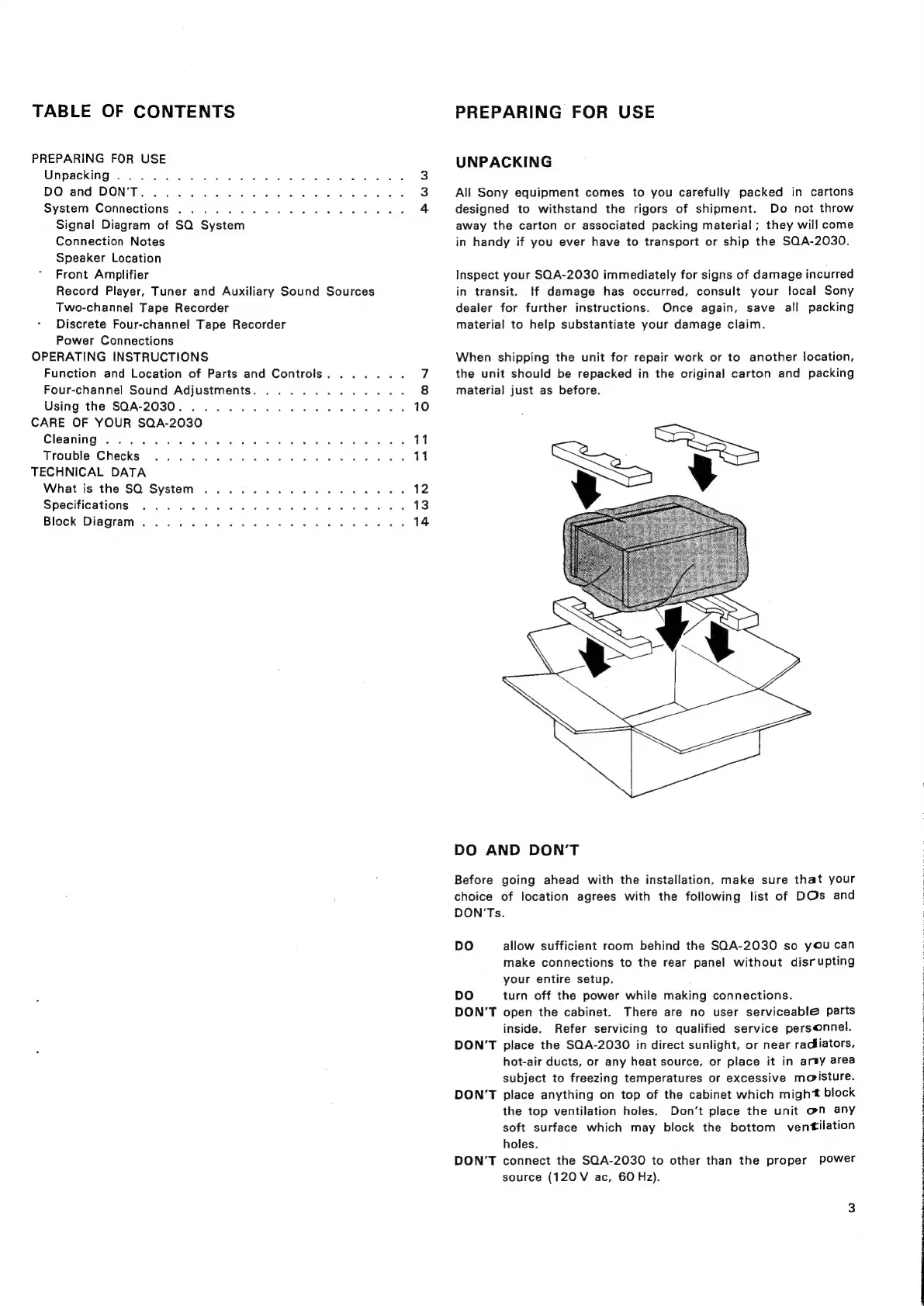
UNPACKING
All
Sony
equipment
comes
to
you
carefully
packed
in
cartons
designed
to
withstand
the
rigors
of
shipment.
Do
not
throw
away
the
carton
or
associated
packing
material;
they
will
come
in
handy
if
you
ever
have
to
transport
or
ship
the
SQA-2030.
Inspect
your
SQA-2030
immediately
for
signs
of
damage
incurred
in
transit.
!f
damage
has
occurred,
consult
your
local
Sony
dealer
for
further
instructions.
Once
again,
save
all
packing
material
to
help
substantiate
your
damage
claim.
When
shipping
the
unit
for
repair
work
or
to
another
location,
the
unit
should
be
repacked
in
the
original
carton
and
packing
material
just
as
before.
DO
AND
DON’T
Before
going
ahead
with
the
installation,
make
sure
that
your
choice
of
location
agrees
with
the
following
list
of
DOs
and
DON'Ts.
DO
allow
sufficient
room
behind
the
SQA-2030
so
you
can
make
connections
to
the
rear
panel
without
disrupting
your
entire
setup.
DO
turn
off
the
power
while
making
connections.
DON’T
open
the
cabinet.
There
are
no
user
serviceable
parts
inside.
Refer
servicing
to
qualified
service
personnel.
DON’T
place
the
SQA-2030
in
direct
sunlight,
or
near
racfiators,
hot-air
ducts,
or
any
heat
source,
or
place
it
in
artsy
area
subject
to
freezing
temperatures
or
excessive
moisture.
DON’T
place
anything
on
top
of
the
cabinet
which
might
block
the
top
ventilation
holes.
Don't
place
the
unit
@n
any
soft
surface
which
may
block
the
bottom
ventilation
holes.
DON’T
connect
the
SQA-2030
to
other
than
the
proper
power
source
(120
V
ac,
60
Hz).
OE
Re
RET
OR
ENTERED
On,
EET
CR
RT
hE
CES
LET
Ie
Oo
Re
Ae
Pee
tr
EAS
Tae
SPP
Te

Related product manuals