EasyManua.ls Logo

Sony SQA-2030 - Page 5

Sony SQA-2030
14 pages
Print Icon
To Next Page IconTo Next Page
To Previous Page IconTo Previous Page
Loading...
Speaker
Location
In
many
home-entertainment
stereo
systems,
the
choice
of
speaker
location
is
often
limited
by
the
existing
furniture
arrange-
ment.
However,
if
rearrangement
is
possible,
or
if
you
want
to
furnish
the
area
specifically
for
stereo
listening,
here
are
a
few
suggestions
for
optimizing
your
listening
pleasure.
Set
up
your
speakers
in
a
large
room
having
carpeting
on
the
floor.
If
the
room
has
heavy
draperies,
so
much
the
better.
Carpets,
draperies,
and
upholstered
furniture
minimize
the
multiple
reflections
of
high-frequency
sound
that
occur
in
a
bare
room
and
which
reduce
the
stereo
effect.
Four-channel
speaker
placement
is
not
especially
critical.
But
for
optimum
acoustical
effect
we
recommend
you
place
the
four
speakers
in
a
square
or
rectangular
area
having
a
maximum
short-side
to
long-side
ratio
of
approximately
1:
1.5.
When
arranging
the
speakers
in
a
rectangle,
use
the
short-side
for
right
and
left
channels,
and
the
long-side
for
front
and
back
channels.
Position
the
left
and
right
speakers
in
similar
acoustic
environ-
ments.
If
you
set
up
the
left
and
right
speakers
in
an
un-
balanced
acoustic
condition,
i.e.
positioning
the
left
speaker
in
a
corner
and
the
right
speaker
in
the
middle
of
a
wall,
you
will
produce
unbalanced
bass—the
left
channel
sound
will
be
em-
phasized
in
this
case
since
corner
locations
emphasize
the
bass
tones.
If
you
must
position
the
speakers
off
the
floor,
do
not
place
them
higher
than
eye-level.
Because
of
psychological
condi-
tioning,
sound
coming
from
the
vicinity
of
the
ceiling
gives
an
unnatural
feeling.
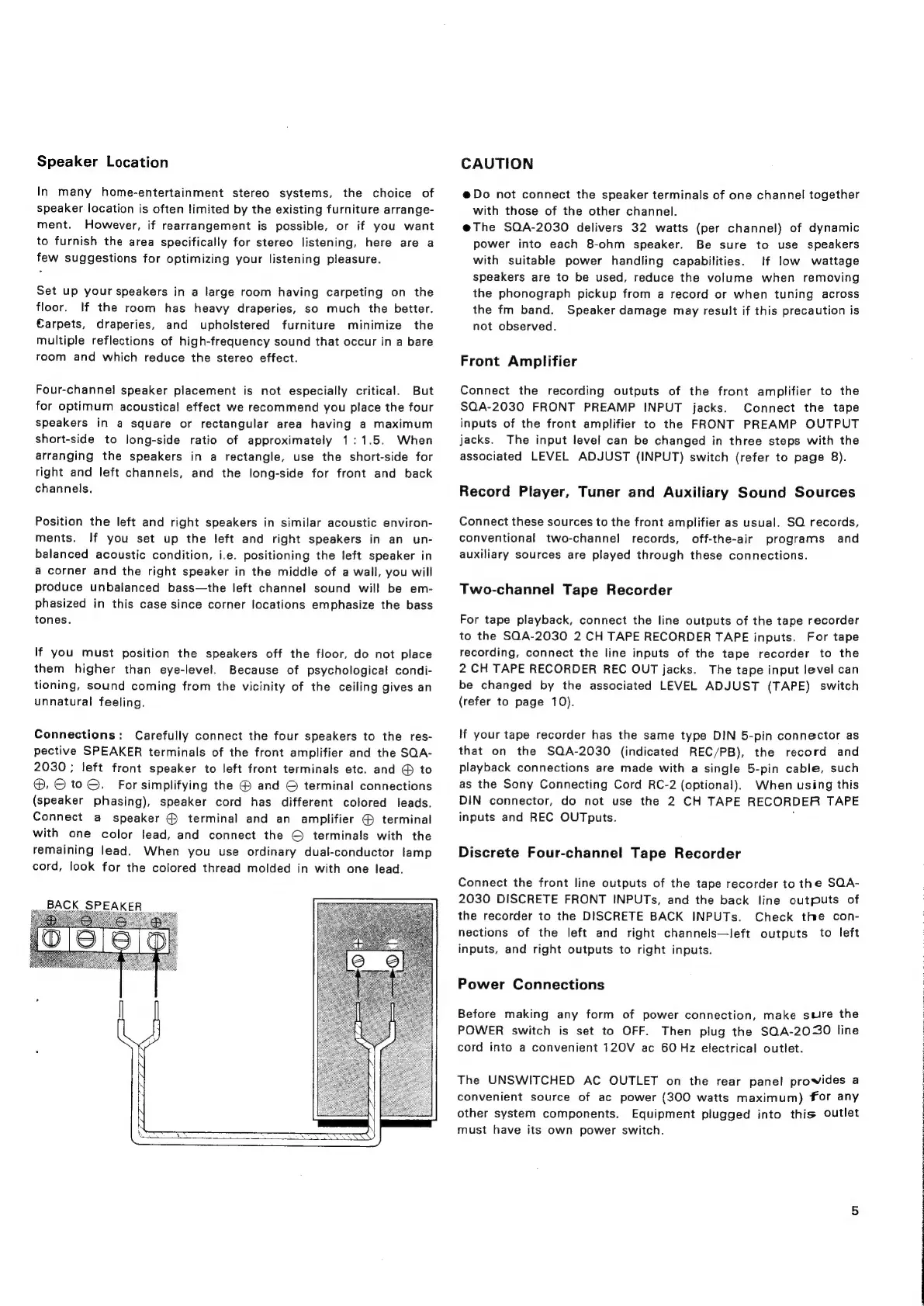
Connections:
Carefully
connect
the
four
speakers
to
the
res-
pective
SPEAKER
terminals
of
the
front
amplifier
and
the
SQA-
2030
;
left
front
speaker
to
left
front
terminals
etc.
and
@
to
®,
©
to
©.
For
simplifying
the
@
and
©
terminal
connections
(speaker
phasing),
speaker
cord
has
different
colored
leads.
Connect
a
speaker
©
terminal
and
an
amplifier
@
terminal
with
one
color
lead,
and
connect
the
©
terminals
with
the
remaining
lead.
When
you
use
ordinary
dual-conductor
lamp
cord,
look
for
the
colored
thread
molded
in
with
one
lead.
BACK
SPEAKER
CAUTION
@Do
not
connect
the
speaker
terminals
of
one
channel
together
with
those
of
the
other
channel.
e@The
SQA-2030
delivers
32
watts
(per
channel)
of
dynamic
power
into
each
8-ohm
speaker.
Be
sure
to
use
speakers
with
suitable
power
handling
capabilities.
tf
low
wattage
speakers
are
to
be
used,
reduce
the
volume
when
removing
the
phonograph
pickup
from
a
record
or
when
tuning
across
the
fm
band.
Speaker
damage
may
result
if
this
precaution
is
not
observed.
Front
Amplifier
Connect
the
recording
outputs
of
the
front
amplifier
to
the
SQA-2030
FRONT
PREAMP
INPUT
jacks.
Connect
the
tape
inputs
of
the
front
amplifier
to
the
FRONT
PREAMP
OUTPUT
jacks.
The
input
level
can
be
changed
in
three
steps
with
the
associated
LEVEL
ADJUST
(INPUT)
switch
(refer
to
page
8).
Record
Player,
Tuner
and
Auxiliary
Sound
Sources
Connect
these
sources
to
the
front
amplifier
as
usual.
SQ
records,
conventional
two-channel
records,
off-the-air
programs
and
auxiliary
sources
are
played
through
these
connections.
Two-channel
Tape
Recorder
For
tape
playback,
connect
the
line
outputs
of
the
tape
recorder
to
the
SQA-2030
2
CH
TAPE
RECORDER
TAPE
inputs.
For
tape
recording,
connect
the
line
inputs
of
the
tape
recorder
to
the
2
CH
TAPE
RECORDER
REC
OUT
jacks.
The
tape
input
level
can
be
changed
by
the
associated
LEVEL
ADJUST
(TAPE)
switch
(refer
to
page
10).
If
your
tape
recorder
has
the
same
type
DIN
5-pin
connector
as
that
on
the
SQA-2030
(indicated
REC/PB),
the
record
and
playback
connections
are
made
with
a
single
5-pin
cable,
such
as
the
Sony
Connecting
Cord
RC-2
(optional).
When
using
this
DIN
connector,
do
not
use
the
2
CH
TAPE
RECORDER
TAPE
inputs
and
REC
OUTputs.
:
Discrete
Four-channel
Tape
Recorder
Connect
the
front
line
outputs
of
the
tape
recorder
to
the
SQA-
2030
DISCRETE
FRONT
INPUTs,
and
the
back
line
outputs
of
the
recorder
to
the
DISCRETE
BACK
INPUTs.
Check
the
con-
nections
of
the
left
and
right
channels—left
outputs
to
left
inputs,
and
right
outputs
to
right
inputs.
Power
Connections
Before
making
any
form
of
power
connection,
make
sure
the
POWER
switch
is
set
to
OFF.
Then
plug
the
SQA-2030
line
cord
into
a
convenient
120V
ac
60
Hz
electrical
outlet.
The
UNSWITCHED
AC
OUTLET
on
the
rear
panel
prowides
a
convenient
source
of
ac
power
(300
watts
maximum)
for
any
other
system
components.
Equipment
plugged
into
this
outlet
must
have
its
own
power
switch.

Related product manuals