EasyManua.ls Logo

Sony SRF-M100 - Page 3

Sony SRF-M100
21 pages
Print Icon
To Next Page IconTo Next Page
To Previous Page IconTo Previous Page
Loading...
SECTION
1
GENERAL
Front
panel
Rear
panel
Display
window
(Ob.E
Reverv
eye)
meal
ie
cam
A
|
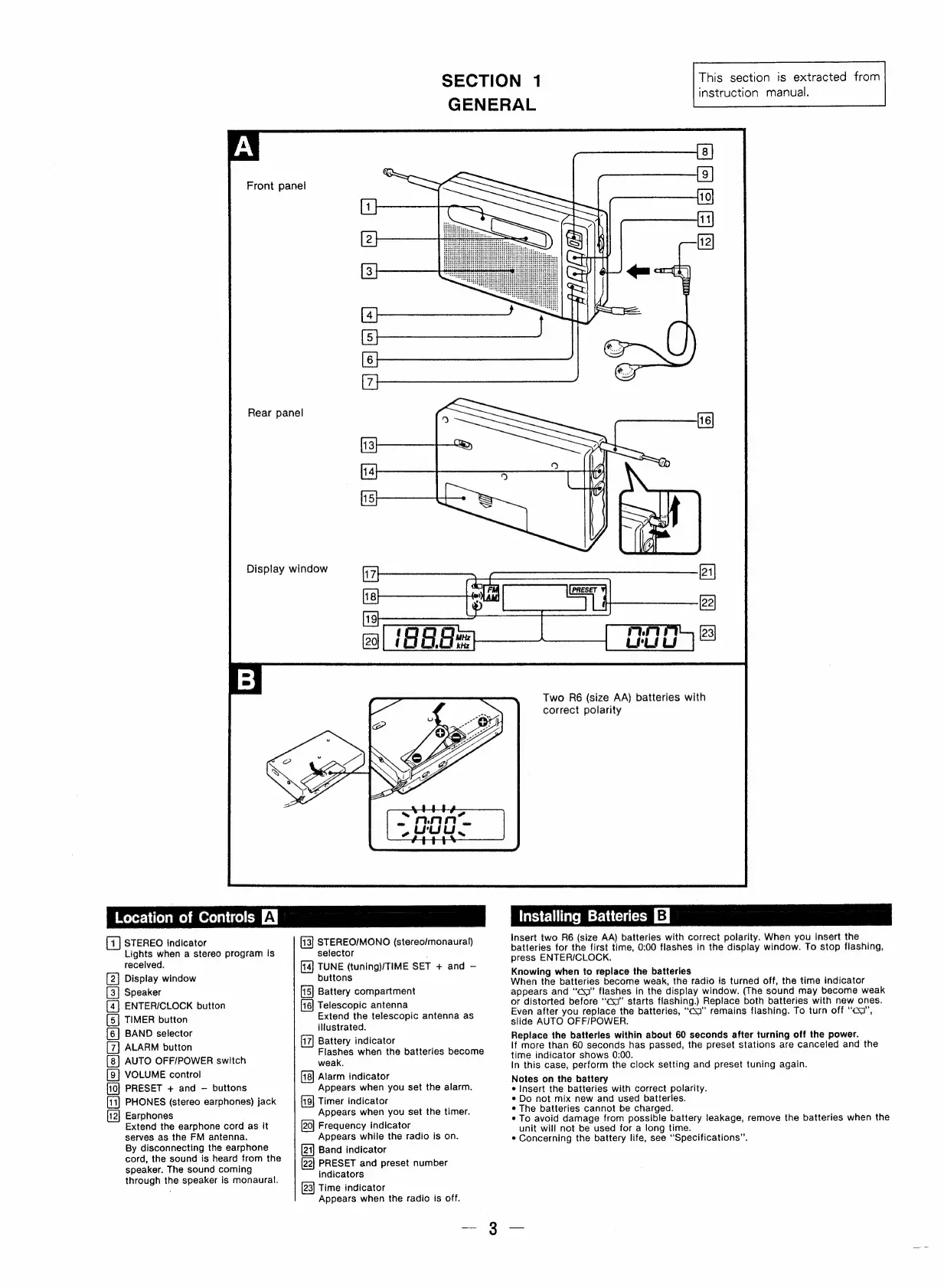
STEREO
indicator
Lights
when
a
stereo
program
is
received.
[2]
Display
window
Speaker
[4]
ENTER/CLOCK
button
[5]
TIMER
button
BAND
selector
ALARM
button
AUTO
OFF/POWER
switch
[9]
VOLUME
control
PRESET
+
and
buttons
PHONES
(stereo
earphones)
jack
2
Earphones
Extend
the
earphone
cord
as
it
serves
as
the
FM
antenna.
By
disconnecting
the
earphone
cord,
the
sound
is
heard
from
the
speaker.
The
sound
coming
through
the
speaker
is
monaural.
eIae)
STEREO/MONO
(stereo/monaural)
selector
.
TUNE
(tuning)/TIME
SET
+
and
buttons
Battery
compartment
Telescopic
antenna
Extend
the
telescopic
antenna
as
illustrated.
Battery
indicator
Flashes
when
the
batteries
become
weak,
Alarm
indicator
Appears
when
you
set
the
alarm.
Timer
indicator
Appears
when
you
set
the
timer.
Frequency
indicator
Appears
while
the
radio
is
on.
Band
indicator
[22]
PRESET
and
preset
number
indicators
Time
indicator
Appears
when
the
radio
is
off.
This
section
is
extracted
from
instruction
manual.
Two
R6
(size
AA)
batteries
with
correct
polarity
Installing
Batteries
EJ
insert
two
R6
(size
AA)
batteries
with
correct
polarity.
When
you
insert
the
batteries
for
the
first
time,
0:00
flashes
in
the
display
window.
To
stop
flashing,
press
ENTER/CLOCK.
Knowing
when
to
replace
the
batteries
When
the
batteries
become
weak,
the
radio
is
turned
off,
the
time
indicator
appears
and
“cq”
flashes
in
the
display
window.
(The
sound
may
become
weak
or
distorted
before
“‘csa”
starts
flashing.)
Replace
both
batteries
with
new
ones.
Even
after
you
replace
the
batteries,
“cosa”
remains
flashing.
To
turn
off
“cs”,
slide
AUTO
OFF/POWER.
Replace
the
batteries
within
about
60
seconds
after
turning
off
the
power.
If
more
than
60
seconds
has
passed,
the
preset
stations
are
canceled
and
the
time
indicator
shows
0:00.
In
this
case,
perform
the
clock
setting
and
preset
tuning
again.
Notes
on
the
battery
¢
Insert
the
batteries
with
correct
polarity.
*
Do
not
mix
new
and
used
batteries.
e
The
batteries
cannot
be
charged.
*
To
avoid
damage
from
possible
battery
leakage,
remove
the
batteries
when
the
unit
will
not
be
used
for
a
long
time.
*
Concerning
the
battery
life,
see
“Specifications”.
Se
ET

Related product manuals