EasyManua.ls Logo

Sony SRF-M100 - Section 4 Electrical Adjustments; Main Board (Component Side)

Sony SRF-M100
21 pages
Print Icon
To Next Page IconTo Next Page
To Previous Page IconTo Previous Page
Loading...
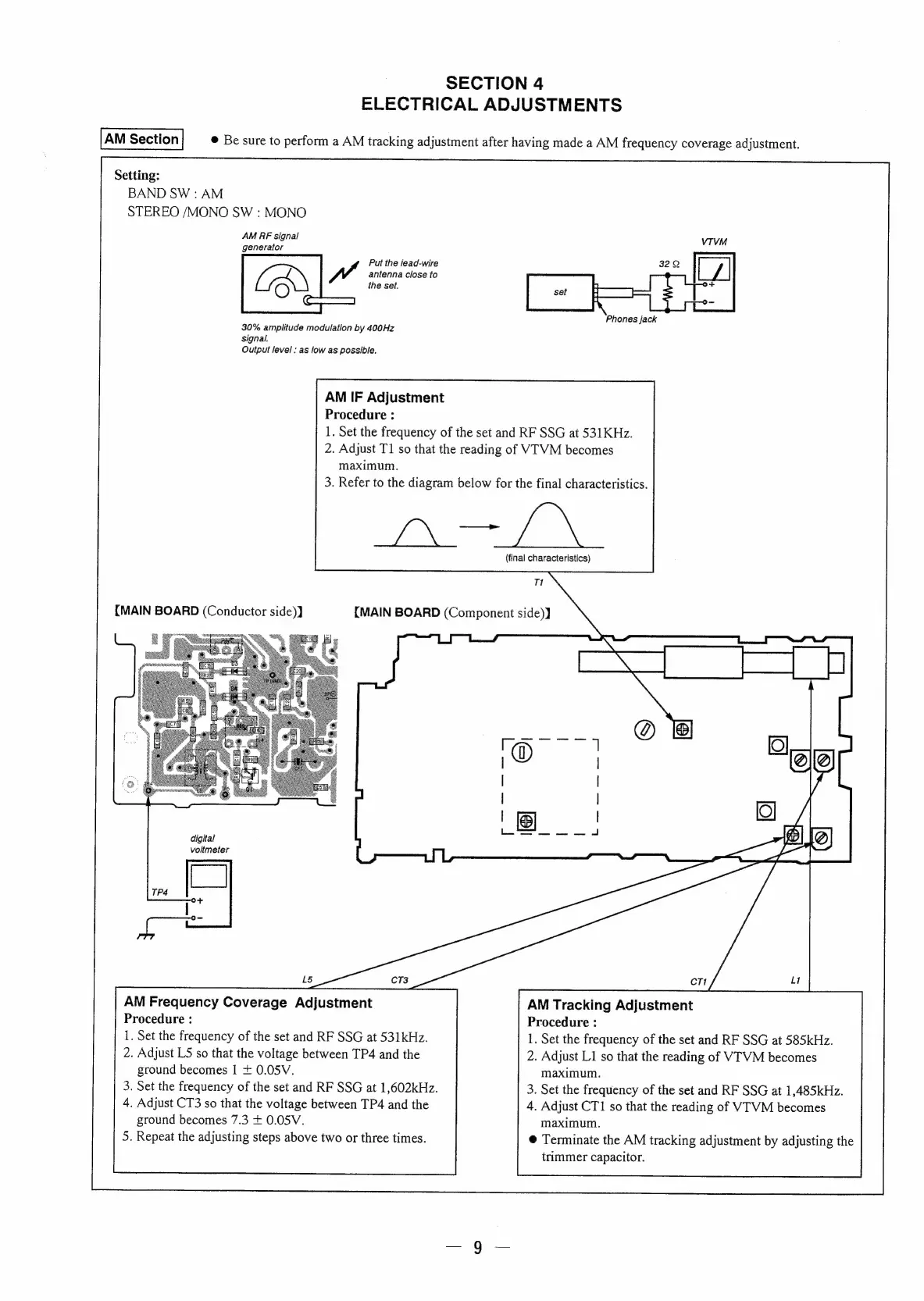
SECTION
4
ELECTRICAL
ADJUSTMENTS
©
Be
sure
to
perform
a
AM
tracking
adjustment
after
having
made
a
AM
frequency
coverage
adjustment.
Setting:
BAND
SW
:
AM
STEREO
/MONO
SW
:
MONO
AM
PF
signal
generator
Put
the
jead-wire
VA
antenna
close
to
the
set.
Cd
Phones
jack
30%
amplitude
modulation
by
400Hz
Signal.
Output
level
:
as
low
as
possible.
AM
IF
Adjustment
Procedure
:
1.
Set
the
frequency
of
the
set
and
RF
SSG
at
531
KHz.
2.
Adjust
T1
so
that
the
reading
of
VTVM
becomes
maximum.
3.
Refer
to
the
diagram
below
for
the
final
characteristics.
ae
(final
characteristics)
T1
{MAIN
BOARD
(Conductor
side)]
{MAIN
BOARD
(Component
side))
digital
voltmeter
AM
Frequency
Coverage
Adjustment
AM
Tracking
Adjustment
Procedure
:
Procedure
:
1.
Set
the
frequency
of
the
set
and
RF
SSG
at
531kHz.
1,
Set
the
frequency
of
the
set
and
RF
SSG
at
585kHz.
2.
Adjust
LS
so
that
the
voltage
between
TP4
and
the
2.
Adjust
L1
so
that
the
reading
of
VTVM
becomes
ground
becomes
|
+
0.05V.
maximum.
3.
Set
the
frequency
of
the
set
and
RF
SSG
at
1,602kHz.
3.
Set
the
frequency
of
the
set
and
RF
SSG
at
1,485kHz.
4,
Adjust
CT3
so
that
the
voltage
between
TP4
and
the
4.
Adjust
CT1
so
that
the
reading
of
VTVM
becomes
ground
becomes
7.3
+
0.05V.
maximum.
5.
Repeat
the
adjusting
steps
above
two
or
three
times.
@
Terminate
the
AM
tracking
adjustment
by
adjusting
the
trimmer
capacitor.

Related product manuals