EasyManua.ls Logo

Sony STR-AV500 - Recording Audio and Video

Sony STR-AV500
28 pages
Print Icon
To Next Page IconTo Next Page
To Previous Page IconTo Previous Page
Loading...
acre)
cellare
elim:
Wale
l
(om
ir-lel-
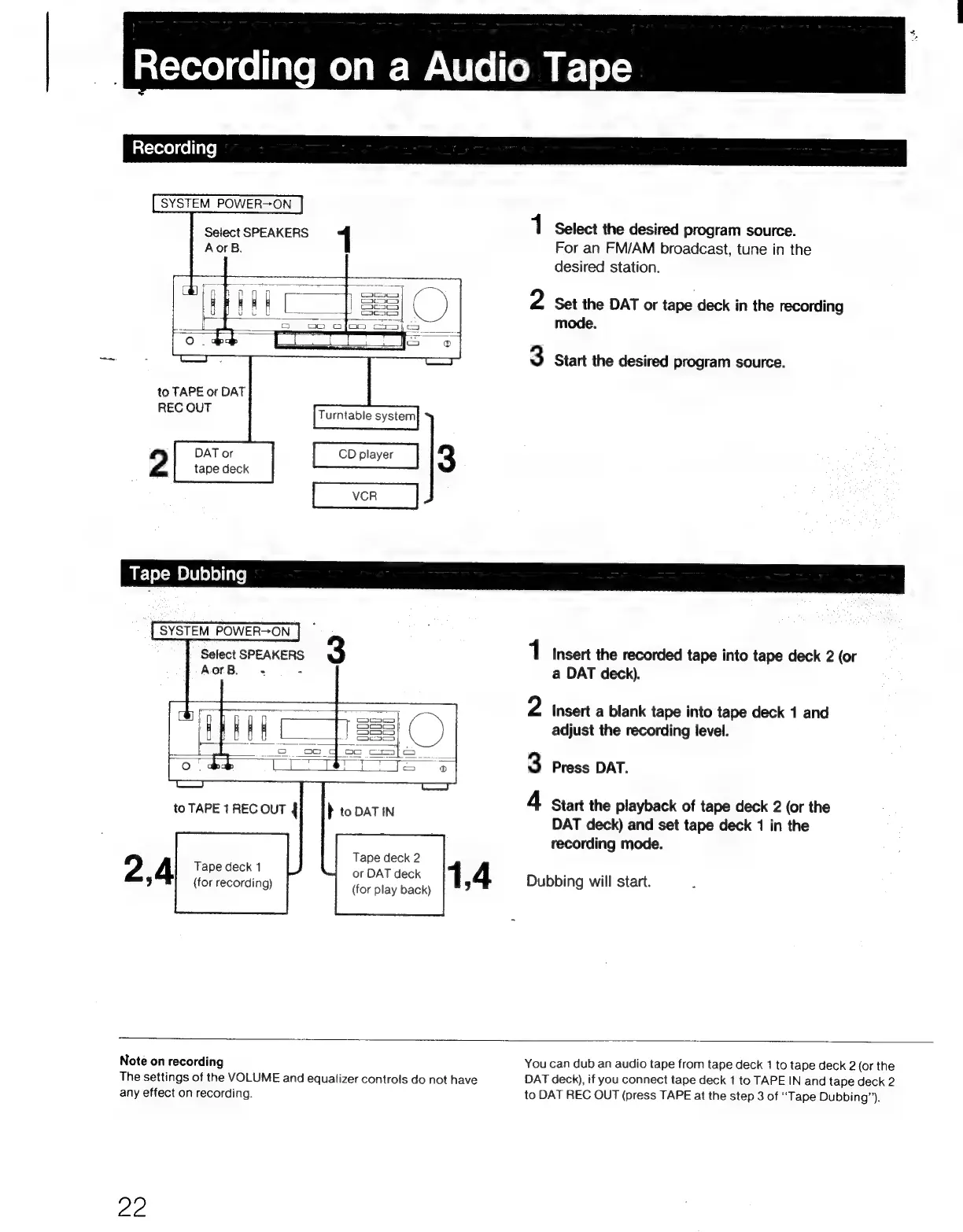
SYSTEM
POWER-ON
Select
SPEAKERS
1
Select
the
desired
program
source.
AorB.
1
For
an
FM/AM
broadcast,
tune
in
the
desired
station.
2
Set
the
DAT
or
tape
deck
in
the
recording
mode.
3
Start
the
desired
program
source.
to
TAPE
or
DAT
REC
OUT
2
Select
SPEAKERS
3
1
Insert
the
recorded
tape
into
tape
deck
2
(or
AorB.
-
-
a
DAT
deck).
2
Insert
a
blank
tape
into
tape
deck
1
and
adjust
the
recording
level.
3
Press
DAT.
4
Start
the
playback
of
tape
deck
2
(or
the
DAT
deck)
and
set
tape
deck
1
in
the
recording
mode.
Tape
deck
2
or
DAT
deck
(for
play
back)
Tape
deck
1
(for
recording)
1,4
Dubbing
will
start.
Note
on
recording
You
can
dub
an
audio
tape
from
tape
deck
1
to
tape
deck
2
(or
the
The
settings
of
the
VOLUME
and
equalizer
controls
do
not
have
DAT
deck),
if
you
connect
tape
deck
1
to
TAPE
IN
and
tape
deck
2
any
effect
on
recording.
to
DAT
REC
OUT
(press
TAPE
at
the
step
3
of
“Tape
Dubbing’).
22

Related product manuals