EasyManua.ls Logo

Sony STR-AV500 - Recording Tv Programs

Sony STR-AV500
28 pages
Print Icon
To Next Page IconTo Next Page
To Previous Page IconTo Previous Page
Loading...
aCclere)collare
on
re
VC
R
To
operate
the
VCR,
refer
to
its
instruction
manual.
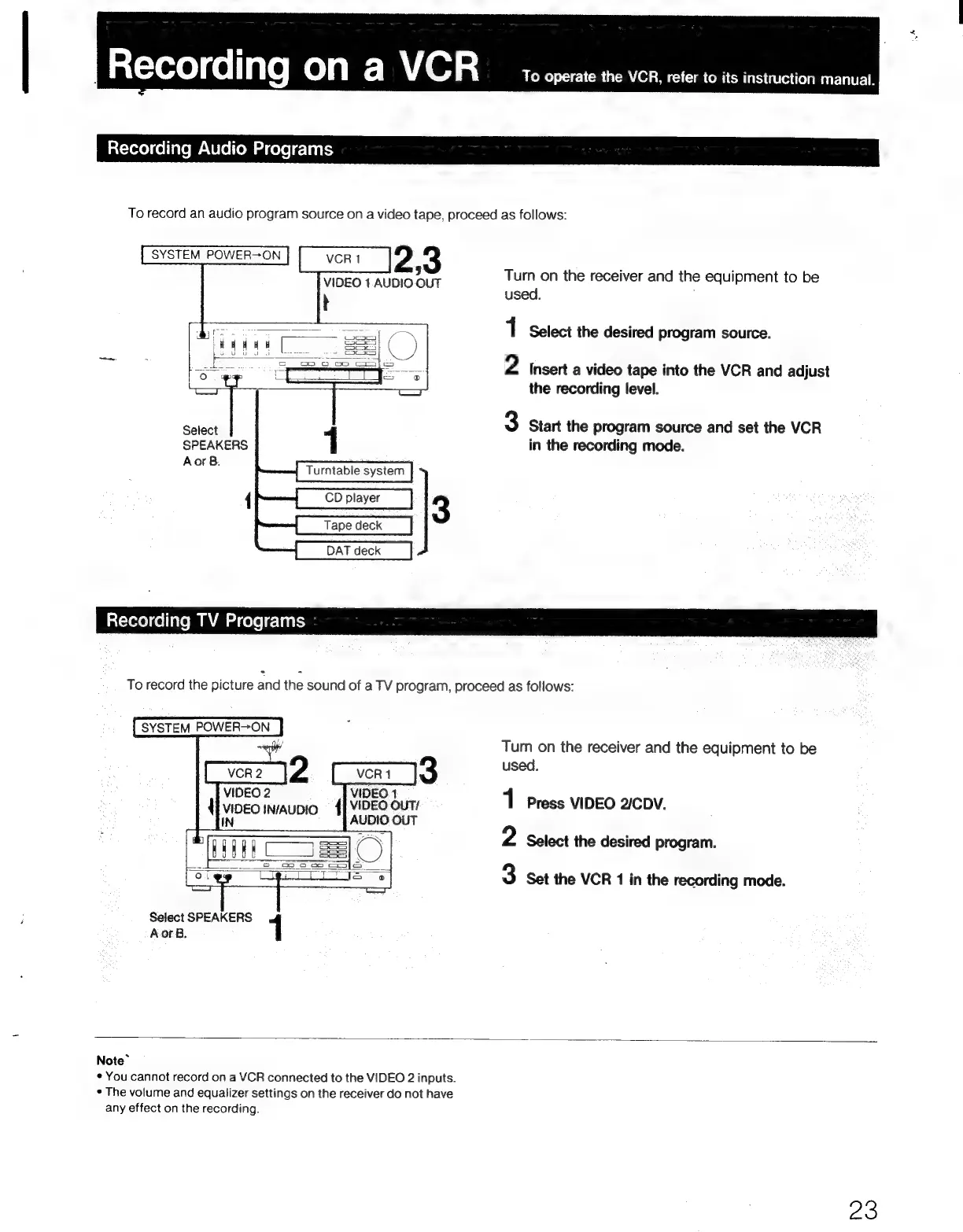
Recording
Audio
Programs
To
record
an
audio
program
source
on
a
video
tape,
proceed
as
follows:
Turn
on
the
receiver
and
the
equipment
to
be
used.
1
Select
the
desired
program
source.
2
Insert
a
video
tape
into
the
VCR
and
adjust
the
recording
level.
3
Start
the
program
source
and
set
the
VCR
in
the
recording
mode.
Select
SPEAKERS
AorB.
Tape
deck
DAT
deck
Recording
TV
Programs
|
To
record
the
picture
and
the
sound
of
a
TV
program,
proceed
as
follows:
SYSTEM
POWER>ON
Turn
on
the
receiver
and
the
equipment
to
be
3
used.
VIDEO
OUT/
1
Press
VIDEO
2ICDV.
{
VIDEO
INAUDIO
{
AUDIO
OUT
2
Select
the
desired
program.
3
Set
the
VCR
1
in
the
recording
mode.
Select
SPEAKERS
AorB.
1
Note~
*
You
cannot
record
on
a
VCR
connected
to
the
VIDEO
2
inputs.
¢
The
volume
and
equalizer
settings
on
the
receiver
do
not
have
any
effect
on
the
recording.
23

Related product manuals