EasyManua.ls Logo

Sony STR-AV500 - Video Tape Editing Functions

Sony STR-AV500
28 pages
Print Icon
To Next Page IconTo Next Page
To Previous Page IconTo Previous Page
Loading...
Video
Tape
Editing
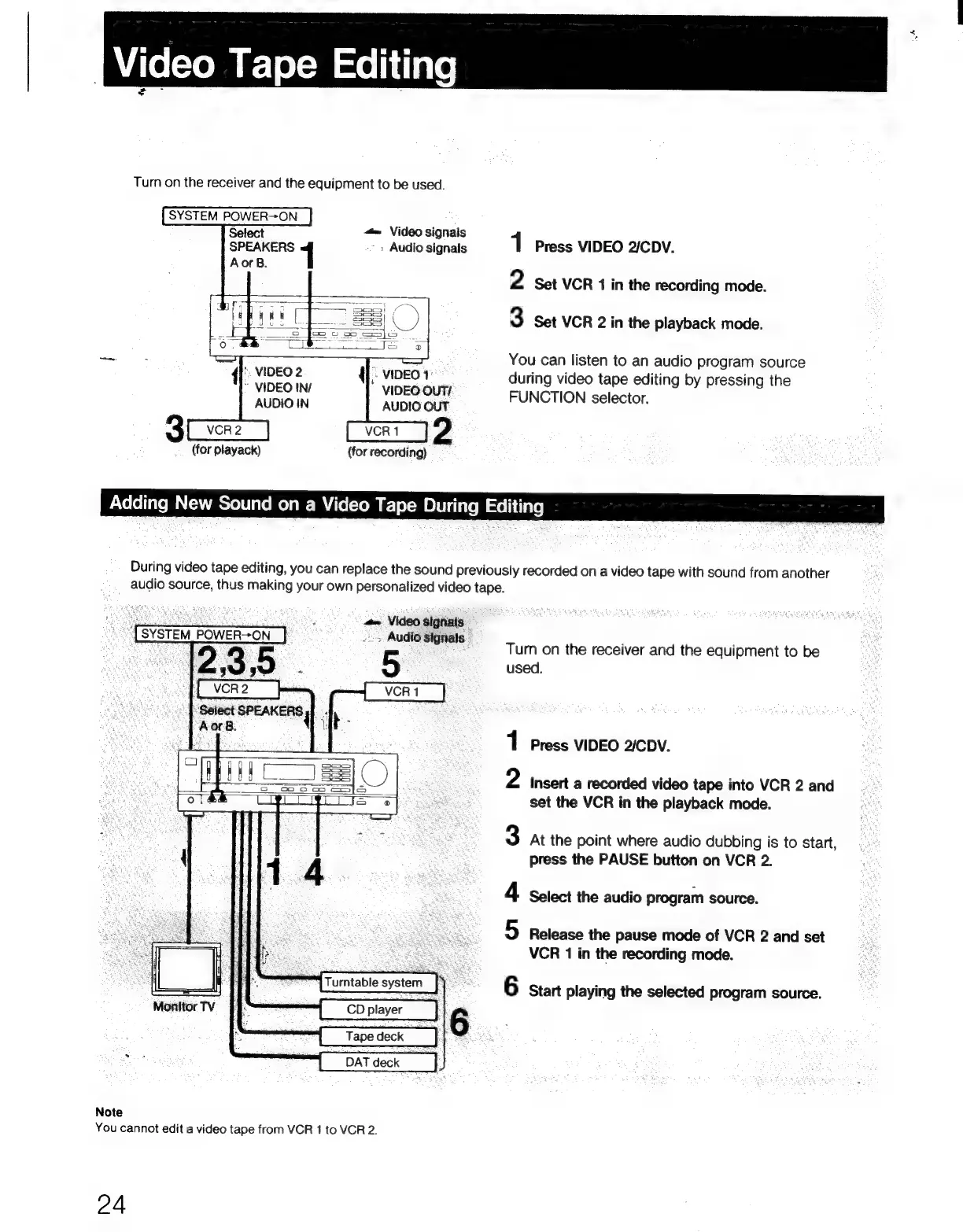
Turn
on
the
receiver
and
the
equipment
to
be
used.
SYSTEM
POWER>ON
<=
Video
signals
-;
Audio
signals
{'.
VIDEO
2
|
VIDEO
~
VIDEO
IN/
VIDEO
OUT/
AUDIO
IN
AUDIO
OUT
(for
playack)
(for
recording)
Adding
New
Sound
on
a
Video
Tape
During
Editing
1
Press
VIDEO
2/CDV.
2
Set
VCR
1
in
the
recording
mode.
3
Set
VCR
2
in
the
playback
mode.
You
can
listen
to
an
audio
program
source
during
video
tape
editing
by
pressing
the
FUNCTION
selector.
During
video
tape
editing,
you
can
replace
the
sound
previously
recorded
on
a
video
tape
with
sound
from
another
audio
source,
thus
making
your
own
personalized
video
tape.
#-
Video
signals
“|
SYSTEM
POWER—ON
3
Audio
signals
-
2,3;5
.
Be
‘Select
SPEAKERS,
a
|
Aors.
{Turntable
system
_]
6
Monitor
TV
Note
You
cannot
edit
a
video
tape
from
VCR
1
to
VCR
2.
24
Tum
on
the
receiver
and
the
equipment
to
be
used.
Press
VIDEO
2/CDV.
Insert
a
recorded
video
tape
into
VCR
2
and
set
the
VCR
in
the
playback
mode.
At
the
point
where
audio
dubbing
is
to
start,
press
the
PAUSE
button
on
VCR
2.
Select
the
audio
program
source.
Release
the
pause
mode
of
VCR
2
and
set
VCR
1
in
the
recording
mode.
Oo
art
©
ND
=
Start
playing
the
selected
program
source.

Related product manuals