EasyManua.ls Logo

Sony STR-D360Z - Page 10

Sony STR-D360Z
23 pages
Print Icon
To Next Page IconTo Next Page
To Previous Page IconTo Previous Page
Loading...
Receiver
Operations
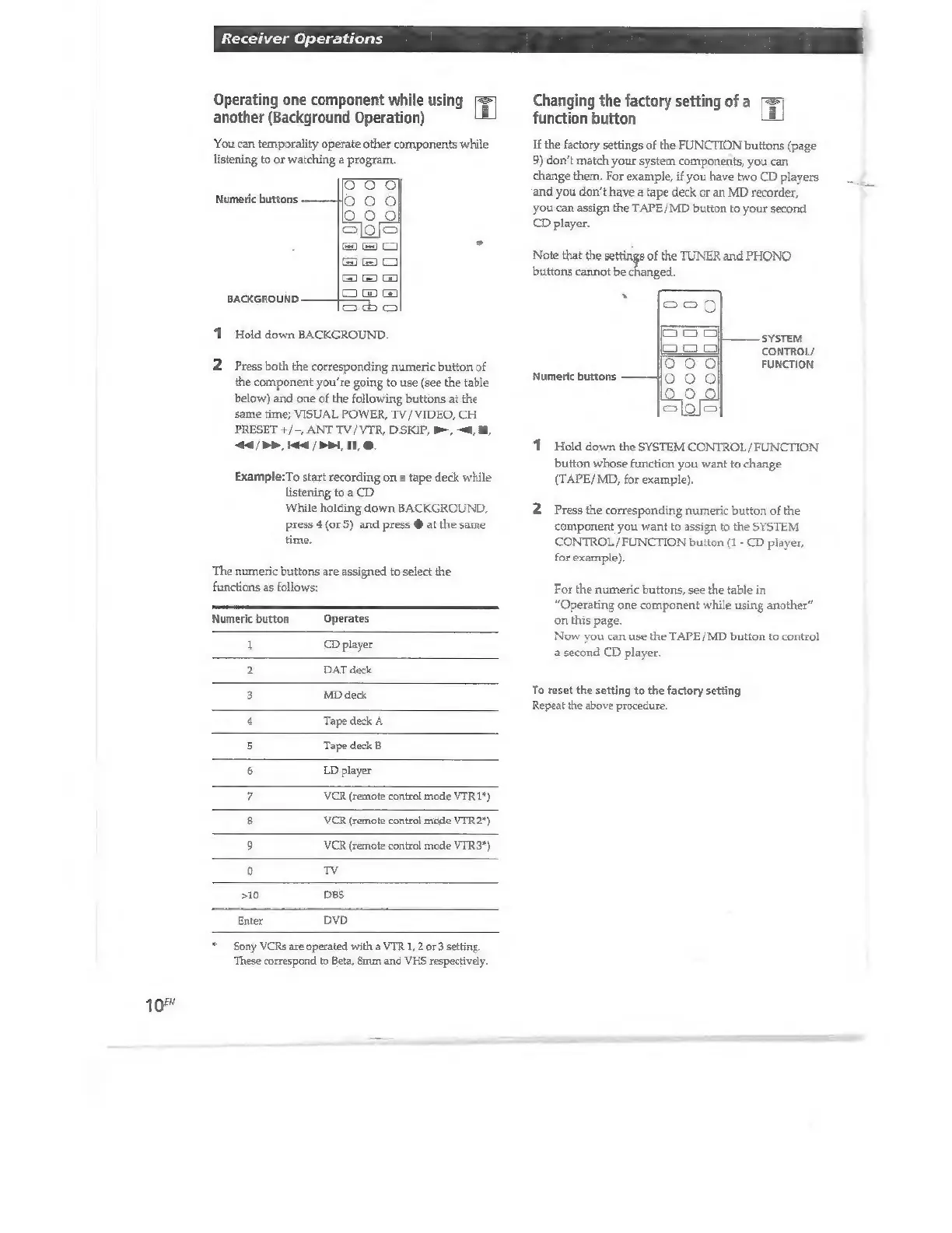
Operating
one
component
while
using
Changing
the
factory
setting
of
a
another
(Background
Operation)
function
button
You
can
temporality
operate
other
components
while
If
the
factory
settings
of
the
FUNCTION
buttons
(page
listening
to
or
watching
a
program.
9)
don’t
match
your
system
components,
you
can
ng
ga
progr
your
sy:
p
y
change
them.
For
example,
if
you
have
two
CD
players
E
000
and
you
don't
have
a
tape
deck
or
an
MD
recorder,
bs
E
"
you
can
assign
the
TAPE/MD
button
to
your
second
ble
CD
player.
©
©
.
xx
Note
that
the
settings
of
the
TUNER
and
PHONO
ea
buttons
cannot
be
changed
© © ©
`
i
c
BACKGROUND.
[cs
cog
1
Hold
down
BACKGROUND.
Peo
SYSTEM
Moe
CONTROL/
2
Press
both
the
corresponding
numeric
button
of
5
000
FUNCTION
the
component
you're
going
to
use
(see
the
table
Himeric
burton
200
below)
and
one
of
the
following
buttons
at
the
dal
clolo
same
time;
VISUAL
POWER,
TV
/
VIDEO,
CH
PRESET
+/-,
ANT
TV/
VTR,
D.SKIP,
B>,
<a,
E,
44
|
P,
i
|
>>,
IL
1
Hold
down
the
SYSTEM
CONTROL/FUNCTION
button
whose
function
you
want
to
change
Example:To
start
recording
on
a
tape
deck
while
(TAPE/MD,
for
example).
listening
to
a
CD
While
holding
down
BACKGROUND,
2
Press
the
corresponding
numeric
button
of
the
press
4
(or
5)
and
press
@
at
the
same
component
you
want
to
assign
to
the
SYSTEM
time.
CONTROL
/FUNCTION
button
(1
-
CD
player,
for
example).
The
numeric
buttons
are
assigned
to
select
the
functions
as
follows:
For
the
numeric
buttons,
see
the
table
in
“Operating
one
component
while
using
another”
Numeric
button
Operates
on
this
page.
Now
you
can use
the
TAPE/MD
button
to
control
i
FP
player
a
second
CD
player.
2
DAT
deck
B
MON
ee
nus,
4
Tape
deck
À
5
Tape
deck
B
6
LD
player
7
VCR
(remote
control
mode
VTR
17)
8
VCR
(remote
control
mode
VTR
2°)
9
VCR
(remote
control
mode
VTR
3*)
0
kia
»10
DBS
Enter
DVD
*
Sony
VCRs
are
operated
with
a
VTR
1,
2
or
3
setting
‘These
correspond
to
Beta,
mm
and
VHS
respectively.
10"

Other manuals for Sony STR-D360Z

Related product manuals